20
ENG
ENGLISH
ASSEMBLING AND PREPARING
Make sure to use screws and wall mount bracket that
meet the VESA standard. Standard dimensions for the
wall mount kits are described in the following table
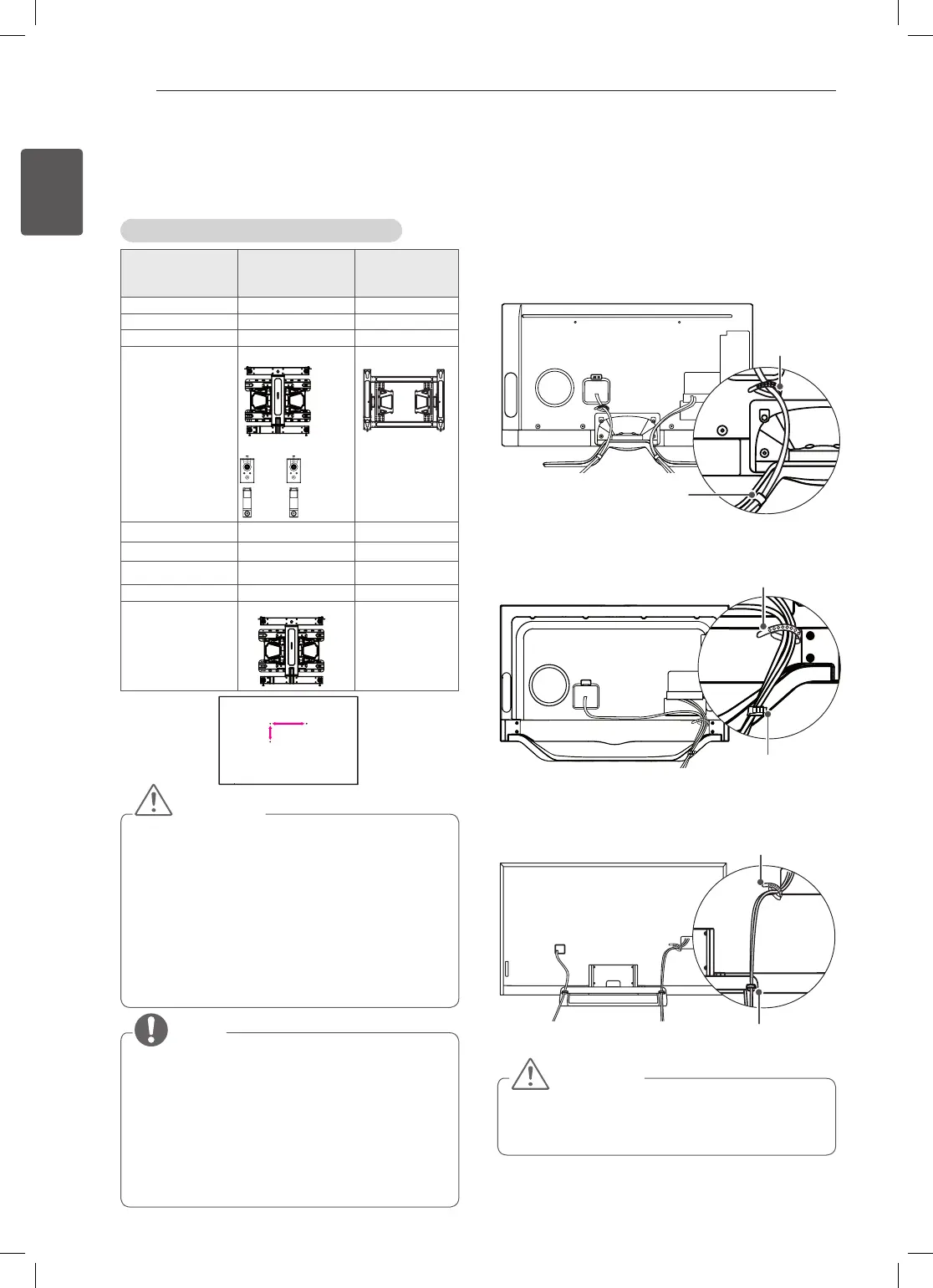
Separate purchase(Wall Mounting Bracket)
Model
47/55LA79**
42/47/55/LA86**
47/55LA96
70LA86**
84LA98**
VESA (A x B) 400 x 400 600 x 400
Standard screw M6 M8
Number of screws 4 4
Wall mount bracket
LSW430B
MSW240
LSW630B
Model 60LA86**
VESA (A x B) 400 x 400
Standard screw M6
Number of screws 4
Wall mount bracket LSW430B
A
B
CAUTION
Disconnect the power first, and then move or
install the TV. Otherwise electric shock may occur.
If you install the TV on a ceiling or slanted
wall, it may fall and result in severe injury.
Use an authorised LG wall mount and contact the
local dealer or qualified personnel.
Do not over tighten the screws as this may cause
damage to the TV and void your warranty.
Use the screws and wall mounts that meet the
VESA standard. Any damages or injuries by
misuse or using an improper accessory are not
covered by the manufacturer’s warranty.
NOTE
Use the screws that are listed on the VESA
standard screw specifications.
The wall mount kit includes an installation manual
and necessary parts.
The wall mount bracket is not provided. You can
obtain additional accessories from your local
dealer.
The length of screws may differ depending on the
wall mount. Make sure to use the proper length.
For more information, refer to the manual supplied
with the wall mount.
Tidying cables
1 Gather and bind the cables with the Cable Holder
and the Cable Management.
2 Fix the Cable Management rmly to the TV.
(Only LA79**)
Cable Management
Cable Holder
(Only LA86**, LA96**)
Cable Management
Cable Holder
(Only LA98**)
Cable Management
Cable Holder
CAUTION
Do not move the TV by holding the cable holders,
as the cable holders may break, and injuries and
damage to the TV may occur.



 To Next Page