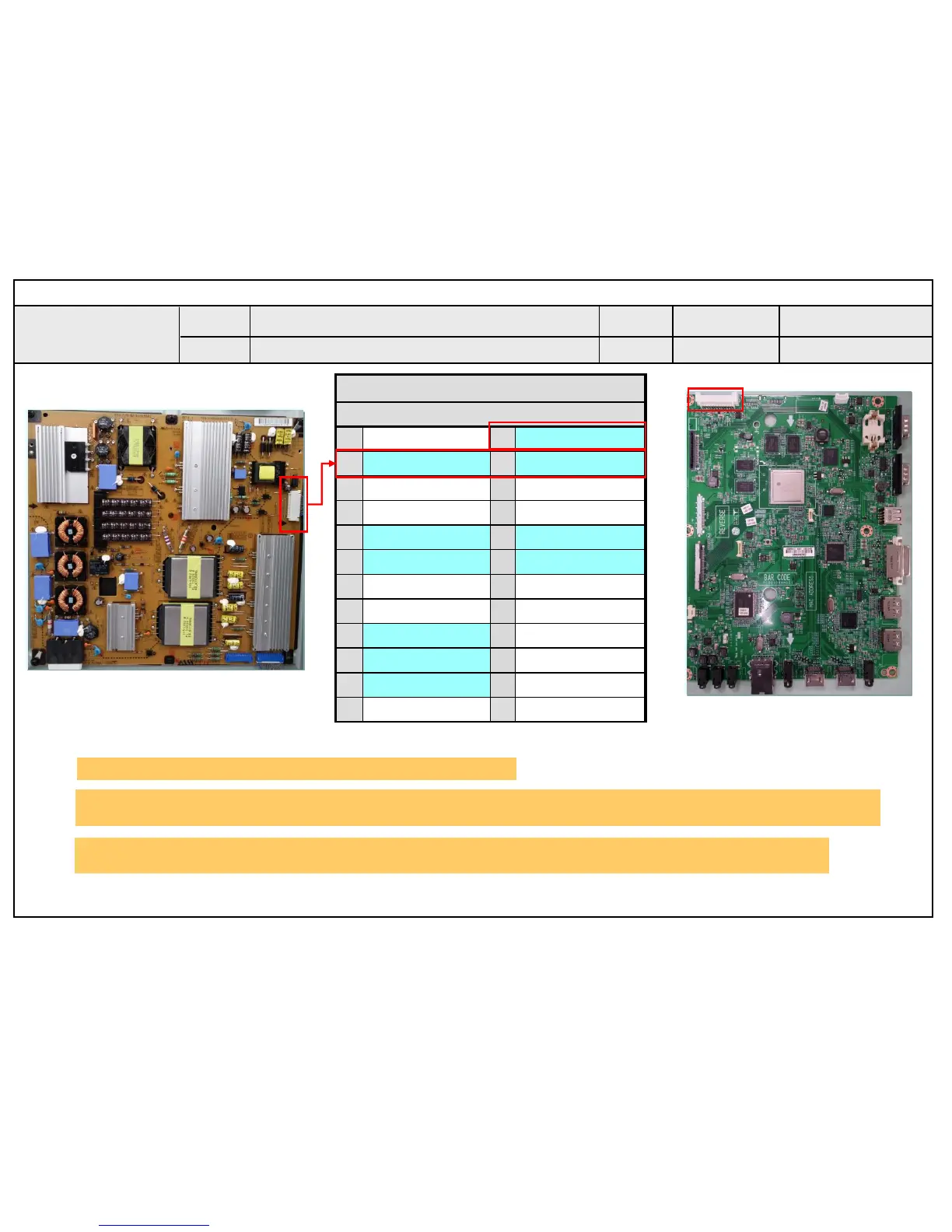
24 Pin (Power Board ↔ Main Board)
SMAW200-H24S2
1
Power on
2
24V
3
24V
4
24V
5
GND
6
GND
7
GND
8
GND
9
3.5V
10
3.5V
11
3.5V
12
3.5V
13
GND
14
GND
15
GND
16 N.C
17 12V 18
Inverter On
19 12V 20
PWM#1
21 12V 22
PWM#2
23 N.C 24
ERROR
Checking order when there is no audio
① Check the contact condition of or 24V connector of Main Board
② Measure the 24V input voltage supplied from Power Board
(If there is no input voltage, remove and check the connector)
③ Connect the tester RX1 to the speaker terminal and if you hear the Chik Chik sound when you touch the GND
and output terminal, the speaker is normal.
Standard Repair Process Detail Technical Manual
Voltage and speaker checking method
when there is no audio
C. Audio error_No audio/Normal video
A25
Established
date
Revised
date
Error
symptom
Content
A25
[MS75A]
< Main Ass’y>
①
②
Signage Monitor


 To Next Page
 Loading...