29
ENGLISH
2 Press the red ON button on the remote control
to assign the PICTURE ID.
3 Assign the Set ID to the selection of your
choice.
• A set with a different Set ID from the PICTURE
ID cannot be controlled by IR signals.
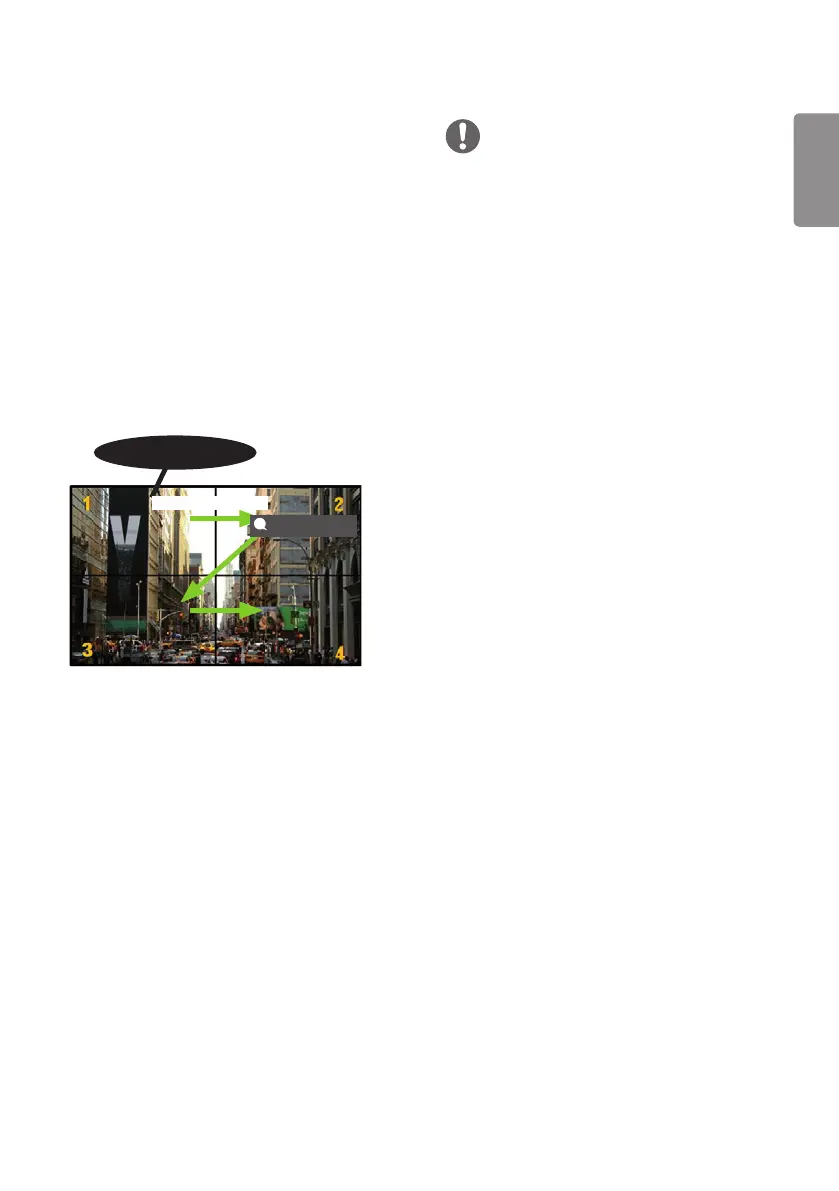
1 Assign the Set ID to the installed monitors as
shown below.
PICTURE ID Settings
• Only applies to certain models.
PICTURE ID is used to change the settings of a
specific set (display) using a single IR receiver for
multi-vision. Communication is possible between
a monitor with an IR receiver and other monitors
using RS-232C cables. Each monitor is identified
by a Set ID. If you assign the PICTURE ID using
the remote control, only displays with matching
PICTURE ID and Set ID can be controlled remotely.
AUDIO
(RGB/DVI)
REMOTE
CONTROL IN
RS-232C OUT
RS-232C IN
RS-232C OUT
RS-232C IN
RS-232C OUT
RS-232C IN
IR & Light Sensor
RS-232C cables
PICTURE ID
• If PICTURE ID is set to 2, only the upper
right monitor, which has a Set ID of 2, can be
controlled by IR signals.
• If you press the green OFF button for PICTURE
ID, the PICTURE IDs for all monitors are turned
off. If you then press any button on the remote
control, all monitors can be controlled by IR
signals regardless of Set ID.
NOTE


 To Next Page