EasyManua.ls Logo

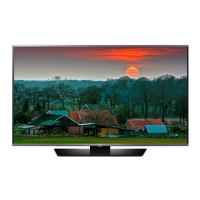
LG 65LB5200 - User Manual

LG 65LB5200
29 pages
Print Icon
To Next Page IconTo Next Page
Loading...
OWNER’S MANUAL
LED TV*
* LG LED TV applies LCD screen with LED backlights.
Please read this manual carefully before operating your TV
and retain it for future reference.
www.lg.com
32LB520B
60LB5200
65LB52
0773-CE360000-L202
00

Questions and Answers

Summary

Important Safety Instructions

Power Cord Safety

Details precautions related to the power cord, including hazards and proper handling.

Installation and Environmental Safety

Provides guidance on safe installation, moving, and ventilation for optimal performance and safety.

Screen Care and Image Retention

Addresses screen defects, normal operating sounds, and methods to prevent image burn-in.

Regulatory and Recycling Information

Includes FCC compliance information and details about LG's product recycling program.

Licenses

Assembling and Preparing Your TV

Unpacking Your TV

Lists the items included in the product box and advises on checking for missing accessories.

Parts and Buttons Overview

Identifies and illustrates the TV's components and the function of its physical buttons.

Using the Keyboard Buttons

Explains how to operate the TV using the physical buttons on the unit for basic functions and menu navigation.

Lifting and Moving the TV Safely

Provides instructions and cautions for safely lifting and moving the television to prevent damage.

Attaching the Stand

Details the process of attaching the TV stand to the unit, including model-specific instructions.

Mounting on a Table or Wall

Guides on how to safely place the TV on a table or mount it securely on a wall.

Making Connections

Connecting to Antenna or Cable

Explains how to connect an antenna or cable box to receive TV broadcast signals.

Connecting External Devices (Models 60 LB5200;65 LB5200)

Illustrates how to connect various external devices like Blu-Ray players and HD cable boxes using HDMI and component ports.

Connecting External Devices (Model 32 LB520 B)

Shows how to connect external devices to the TV using HDMI, DVI, and component ports for the 32LB520B model.

Remote Control

Settings

Channel and Energy Saving Setup

Guides on automatically tuning channels and adjusting the screen brightness for energy savings.

Picture Mode and Options

Explains how to select picture modes and adjust advanced picture settings for optimal viewing.

Audio and Time Settings

Covers audio adjustments like auto volume and sound modes, plus sleep timer and clock setup.

Lock, Caption, and Initial Settings

Details setting up passwords, viewing captions, and returning the TV to its factory default settings.

USB Storage Device Warnings and Usage

Provides warnings and instructions for connecting and using USB storage devices with the TV.

Supported Media Formats

Lists the supported file types, bit rates, and sample frequencies for photos and audio files.

Specifications

Power and Environmental Conditions

Details power requirements, television system, program coverage, and environmental operating conditions.

Model Dimensions and Weight

Provides physical dimensions and weight specifications for different TV models, with and without stands.

Supported Video Modes

Lists supported resolutions, horizontal, and vertical frequencies for PC, DTV, and component video inputs.

Component Port Information

Explains the connectivity information for component ports on the TV and video output ports on DVD players.

Maintenance

Cleaning Your TV

Offers instructions on how to clean the TV screen, frame, cabinet, and stand safely.

Power Cord Maintenance

Advises on regularly removing dust and dirt from the power cord.

Child Safety: Proper Television Placement Matters

Consumer Electronics Industry Commitment

Highlights the industry's commitment to making home entertainment safe and enjoyable for users.

Safe Placement and Usage Guidelines

Provides essential safety guidelines for television placement, installation, and cord management.

Wall or Ceiling Mounting Recommendations

Offers advice on professional installation and proper mounting procedures for wall or ceiling brackets.

Moving Older Televisions

Gives special care instructions for placing older CRT televisions safely in new locations.

Declaration of Conformity

LG Customer Information Center

Provides contact information for customer inquiries, comments, and product registration.

Product Registration and Energy Star

Encourages product registration and notes qualification for the ENERGY STAR program.

LG 65LB5200 Specifications

General IconGeneral
Screen shapeFlat
Response time- ms
Display diagonal64.5 \
Display brightness- cd/m²
Supported video modes720p, 1080i, 1080p
Motion interpolation technology-
3DNo
Storage temperature (T-T)-20 - 60 °C
Storage relative humidity (H-H)70 - 85 %
Operating relative humidity (H-H)70 - 80 %
Audio decodersDolby Digital
RMS rated power20 W
Number of speakers2
HDMI ports quantity3
DVI-D ports quantity0
USB 2.0 ports quantityUSB 2.0 ports have a data transmission speed of 480 Mbps, and are backwards compatible with USB 1.1 ports. You can connect all kinds of peripheral devices to them.
Component video (YPbPr/YCbCr) in1
Audio formats supportedMP3
Image formats supportedJPEG XR
Product colorBlack
Panel mounting interface400 x 400 mm
AC input voltage100 - 240 V
AC input frequency50 - 60 Hz
Power consumption (standby)0.3 W
Package depth180 mm
Package width1600 mm
Package height940 mm
Package weight39500 g
Operating temperature (T-T)0 - 40 °C
Weight and Dimensions IconWeight and Dimensions
Depth (with stand)280 mm
Height (with stand)890 mm
Weight (with stand)32660 g
Depth (without stand)51 mm
Width (without stand)1450 mm
Height (without stand)840 mm
Weight (without stand)31300 g

Related product manuals