46
ENGLISH
[Input Manager]
You can set the PC or DTV label for each external input.
[SIMPLINK Setup]
• When the [SIMPLINK Setup] is set to [On], you can use the SIMPLINK provided by LG Signage.
• [Device ID]: Set the ID of the device connected via CEC wiring. You can choose a value between [All] and [E].
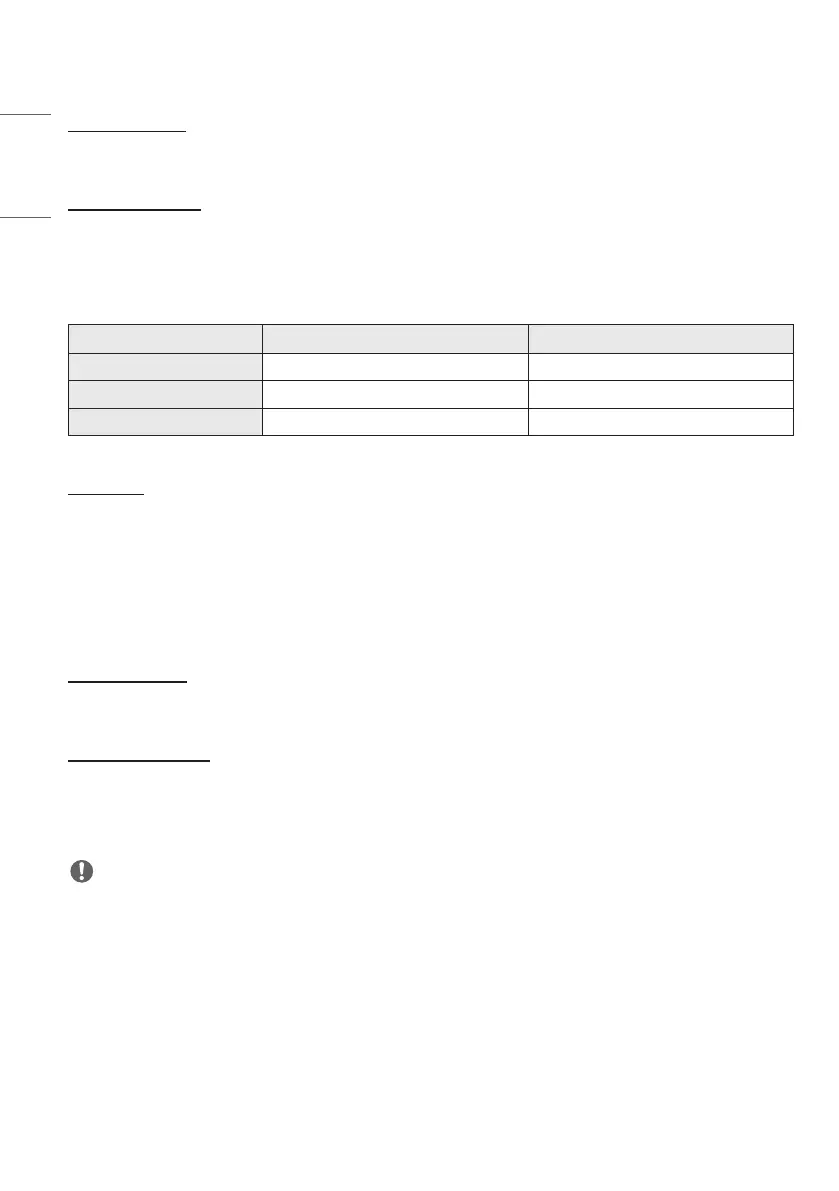
• [Standby]: Sets the scenarios for sending and receiving the OpStandBy (0x0c) command. Detailed scenarios are as
follows:
Transmission Reception
All O O
Send Only O X
Receive Only X O
[Crestron]
• This function enables synchronization with applications provided by Crestron.
• Server: This menu sets the server’s IP address for the network connection with the server (equipment provided by
Crestron).
• Port (1024~65535): This menu sets the port for the network connection with the server. The default port number is
41794.
• IP ID (3-254): This menu sets a unique ID for synchronizing with the application.
[LED Controller]
• Allows a specific LED display manufacturer to remotely control some features of the linked display.
[USB2 to HDBaseT]
This function transfers the data received from the USB2 terminal of the display to HDBaseT.
• [On]: Transfer the data of the device connected to USB2 to the HDBaseT equipment.
• [Off]: Receive the data of the HDBaseT equipment to Signage.
NOTE
• The HDBaseT function will be temporarily interrupted when the setting is changed.



 To Next Page