78
ENGLISH
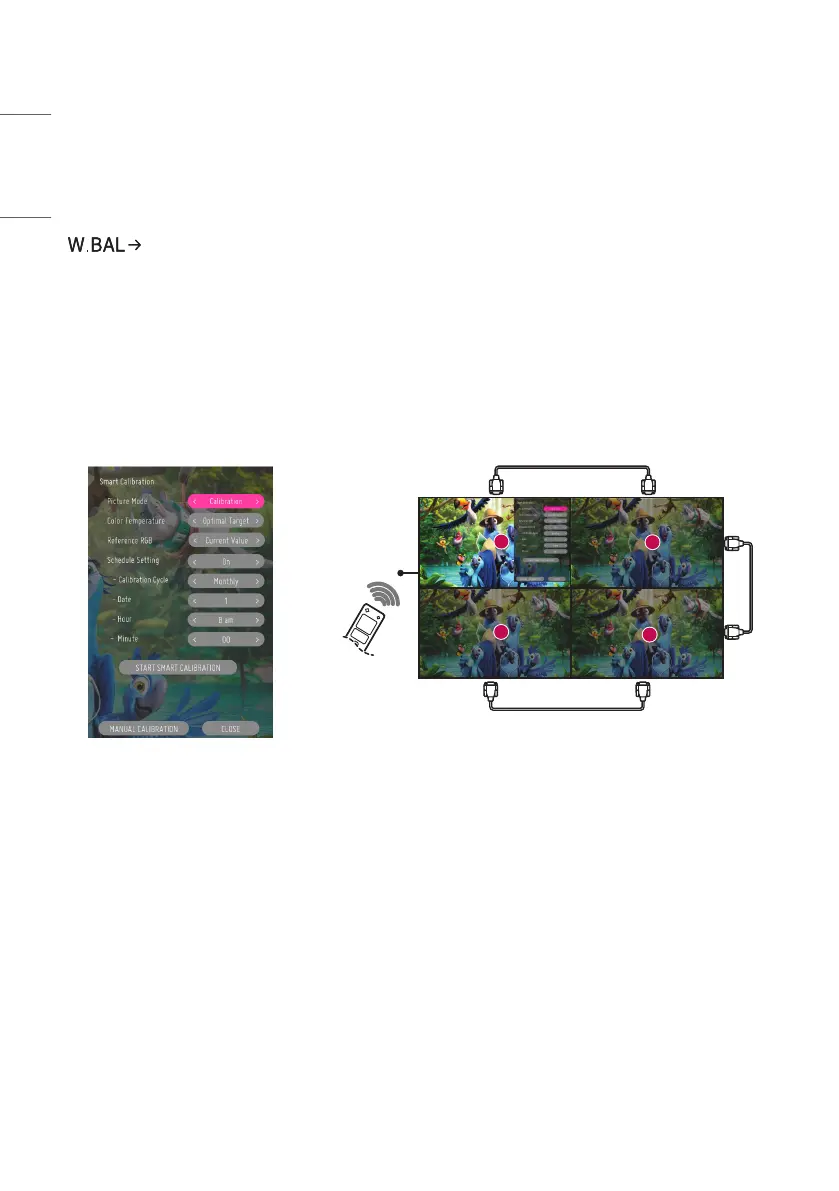
SMART CALIBRATION
How to Run
[Smart Calibration]
1 Set the Set ID of each set.
2 Select the [Picture Mode] to execute Smart Calibration.
After selecting the [Calibration] mode, you can set [Color Temperature].
- [Optimal Target]: Set the optimal color value of the installed set as the target.
- Please set the target to 3,000K in the broadcasting station environment.
- [Reference RGB]: Saves and resets the currently set Manual Calibration value during Smart Calibration.
3 With [START SMART CALIBRATION], you can correct the color/brightness.
4 If you set the [Schedule Setting] menu, calibration is performed automatically on a regular basis.
1
3
4
2
RS-232C
IR


 To Next Page