7
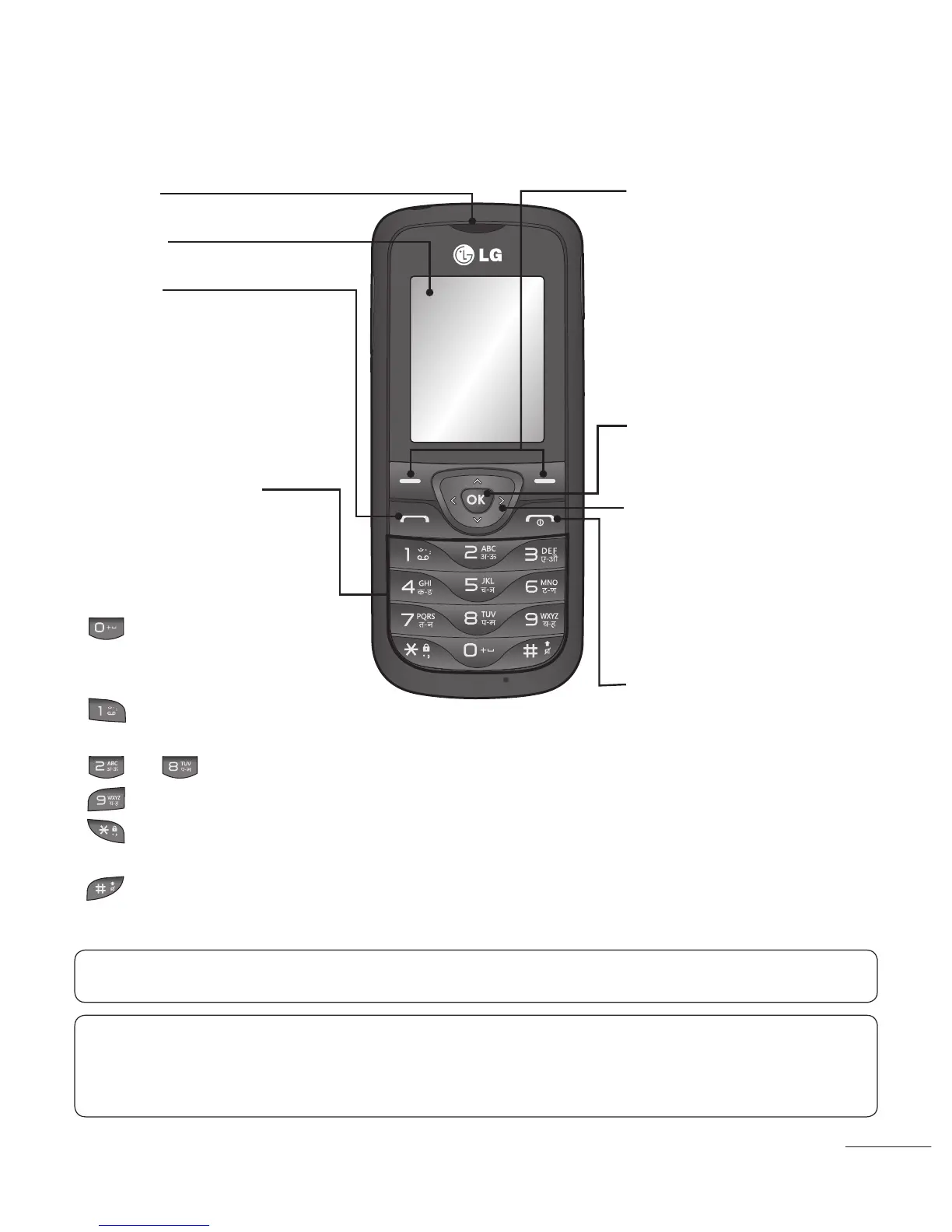
Getting to Know Your Phone
Earpiece
Main LCD
Send key
• Make call to a phone
number and answers
incoming calls.
• In standby mode: Shows
the Call log.
Alpha numeric keys
* Long press on Special
function keys allow you
activate unique features
while in Idle mode.
– Enter + symbol for
making international
call.
– Connect voice mail
centre
to – Speed dials
– SOS Mode
– Long press to Lock
handset.
– to go Silent mode in
Idle screen
Soft keys
(Left soft key / Right soft
key)
• These keys perform the
function Indicated in the
bottom of the display.
Menu key / OK key
• Selects menu options and
confirms actions.
End key
• Switch on/off (hold down)
• End or reject a call.
4-way navigation key
• In ldle mode, access pre-
defined menus. In Menu
mode, scroll through
menu options.
TIP!
Widget Applications:
From Idle screen, by pressing Up Navigation key User can
access widget applications like Weather, Facebook, Twitter, Orkut and Google Search.
To scroll through different applications from widget press right and left navigation keys.
Note: Depending on your service provider, pre-defined menus may differ.



 To Next Page