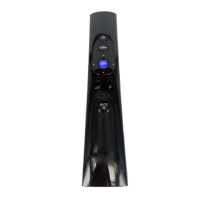
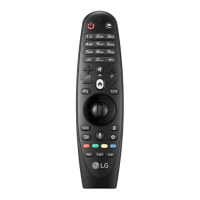
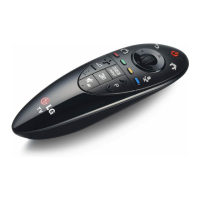
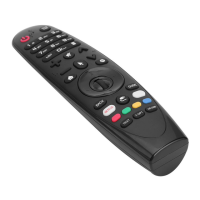
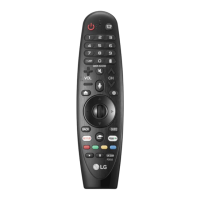
This document is an owner's manual for the LG Magic Remote, model AN-MR18BA. It provides instructions for its use, technical specifications, and precautions.
Function Description
The LG Magic Remote is a versatile remote control designed to operate LG televisions and potentially connected set-top boxes. Its primary function is to allow users to navigate TV menus, change channels, adjust volume, and access various smart TV features. A key characteristic of the Magic Remote is its pointer functionality, which allows users to interact with the TV screen much like a computer mouse. It also includes voice recognition capabilities for hands-free control.
Important Technical Specifications
- Model No.: AN-MR18BA
- Range of frequency: 2.400 GHz to 2.4835 GHz
- Output Power (Max.): 4 dBm
- Channel: 40 channels
- Power source: AA 1.5 V (2 alkaline batteries are used)
- Operational temperature range: 0 °C to 40 °C
Usage Features
The Magic Remote offers a wide array of features for controlling the TV:
- Power Button: Turns the TV on or off.
- STB PWR/機上盒電源: Can turn a connected set-top box on or off if added to the universal remote control settings.
- Number Buttons: Used to enter numbers, typically for channel selection.
- (DASH) Button: Inserts a dash between numbers (e.g., 2-1).
- LIST/節目列表: Accesses saved channels or programs. A long press on this button (LIST*/節目列表*) can bring up BML data broadcasting, depending on the region.
- QUICK ACCESS/智慧快選:** Allows quick access to apps or Live TV features using corresponding number buttons.
- (Screen remote): Displays the Screen Remote interface and can access the Universal Control Menu in some regions.
- (Screen remote) / AD:** Enables video/audio descriptions. A long press on this button can also enable SAP (Secondary Audio Program) feature.
- + VOL //音量 -: Adjusts the volume level.
- (MUTE): Mutes all sounds.
- Accessibility Menu (*): Accesses the Accessibility menu.
- CH/P/頻道: Scrolls through saved channels or programs.
- (Voice recognition)*: Activates the voice display bar on the TV screen, allowing users to speak commands while holding the button.
- (HOME): Accesses the Home menu.
- (HOME) / RECENTS:* Shows the previous history.
- STB MENU: Displays the set-top box Home menu. If not watching via a set-top box, this button changes the display to the set-top box screen.
- Wheel (OK): The central button used to select menu items. It also allows changing channels or programs.
- (up/down/left/right): Navigation buttons for scrolling through menus. If pressed while the pointer is in use, the pointer disappears, and the remote operates like a general remote control. Shaking the remote to the left and right can redisplay the pointer.
- BACK/返回: Returns to the previous screen.
- BACK/返回:** Clears on-screen displays and returns to the last input viewing.
- GUIDE/節目導覽: Shows channels or programs guide.
- (INPUT): Changes the input source.
- (INPUT)*: Displays a list of all external inputs.
- Streaming Service buttons: Dedicated buttons for connecting to video streaming services.
- (Q. Settings): Accesses Quick Settings.
- (Q. Settings)*: Displays the All Settings menu.
- Coloured buttons: Provide access to special functions in some menus. The Red Button* can run the record function, depending on the country.
- Control buttons (▸, II): Controls media content (play, pause).
- TEXT/ T.OPT (TELETEXT buttons): Used for teletext functions.
- LIVE ZOOM/即時縮放: Zooms in on a selected area to view it in full screen.
- FOCUS/畫面放大:** Zooms in on the area where the remote control is pointed. (Requires pressing and holding for more than 3 seconds).
Pairing and Unpairing
- To register (pair) the Magic Remote:
- Insert batteries and turn on the TV.
- Point the remote at the TV and press the Wheel (OK) button. If registration fails, turn the TV off and back on, then try again.
- To deregister (unpair) the Magic Remote:
- Press and hold the (HOME) and BACK / 返回 buttons simultaneously for five seconds.
- Pressing and holding the GUIDE/節目導覽 button will also allow cancellation and re-registration of the Magic Remote.
Usage and Precautions
- Range: The remote should be used within 10 meters of the TV. Communication failures may occur outside this range or if there are obstacles.
- Interference: Communication failures can be caused by other accessories or devices operating in the same frequency band (2.4 GHz), such as microwave ovens or wireless LANs.
- Wireless Router Placement: The Magic Remote may not work properly if a wireless router (AP) is within 0.2 meters of the TV. The router should be more than 0.2 meters away.
- Pointer Behavior:
- Shake the remote slightly or press (HOME), (INPUT), or (Q. Settings) buttons to make the pointer appear. (On some models, the pointer appears when turning the Wheel (OK) button).
- The pointer will disappear if not used for a certain period or if the remote is placed on a flat surface.
- If the pointer is not responding smoothly, reset it by moving it to the edge of the screen.
- Battery Life: The Magic Remote depletes batteries faster than a normal remote due to its additional features.
- Battery Safety:
- Do not disassemble or heat the batteries.
- Avoid dropping the battery or subjecting it to extreme shocks.
- Do not immerse batteries in water.
- There is a danger of explosion if batteries are inserted incorrectly.
- Properly dispose of used batteries.
- Failure to match the correct polarities of the battery may cause the battery to burst or leak, resulting in fire, personal injury, or environmental pollution.
- Inserting a battery incorrectly may result in an explosion.

 Need help?
 General

 To Next Page