B2100
User Guide
55
FM Radio [Menu 6 ]
1. Center the desired option menu using the left/right
navigation keys.
2. Select the desired value with the up/down
navigation keys.
3. After finishing all the setting, focus on the subject
to capture and press the side camera key or the left
soft key. With a click, the image is captured and the
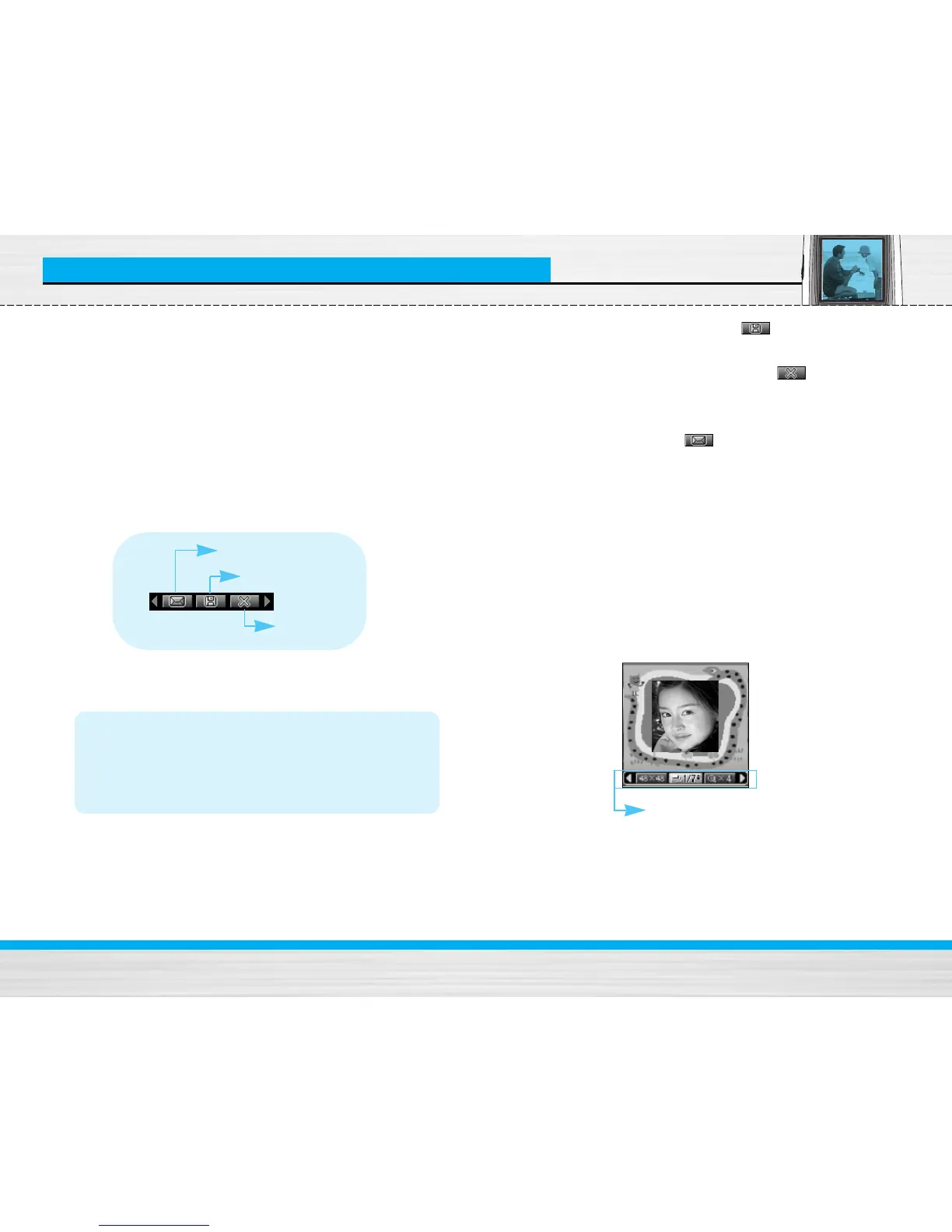
following menu bar appears.
Note
• If Auto save [Menu-6-4-1] is set to On, the
captured image is automatically saved
without displaying this menu bar. (Refer to
page 57.)
4. To save the image, center the “ ” and press the
left soft key or the side camera key. If you don’t
want to save the image, center the “ ” and
press the left soft key or the side camera key.
You can also send the image via multimedia
message by selecting “ ”. For further
information regarding multimedia message writing,
refer to page 26.
Take in modes [Menu 6-2]
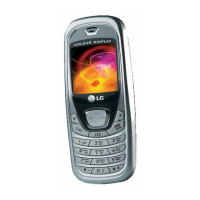
You can enjoy taking pictures in diverse preset frames.
7 preset frames are available. Press the Menu key and
select Camera ➝ Take in modes using navigation
keys.
Before shooting, you can set the following options.
Delete
MMS message
Save
preview option
menu bar



 To Next Page