Operating40
Operating
4
Repeating a specific portion
erot
This player can repeat a portion you have selected.
1. While playback, press REPEAT (
h
) to select
[A-] at the beginning of the portion you wish to
repeat.
2. Press ENTER (
b
) at the end of the portion. Your
selected portion will be repeated continually.
3. To return to normal playback, press REPEAT
(
h
) repeatedly to select [O ].
y
You cannot select a portion less than 3
seconds.
y
This function may not work on some disc or
title.
,
Note
Viewing content information
y
The player can display the content information.
1. Select a le using
w/s/a/d
.
2. Press INFO/MENU (
m
) to display the option
menu.
3. Select the [Information] option using
w/s
, and
press ENTER (
b
).
The le information appears on the screen.
While movie playback, you can display the le
information by pressing TITLE/POP-UP.
The information displayed on the screen
may not correct comparing actual content
information.
,
Note
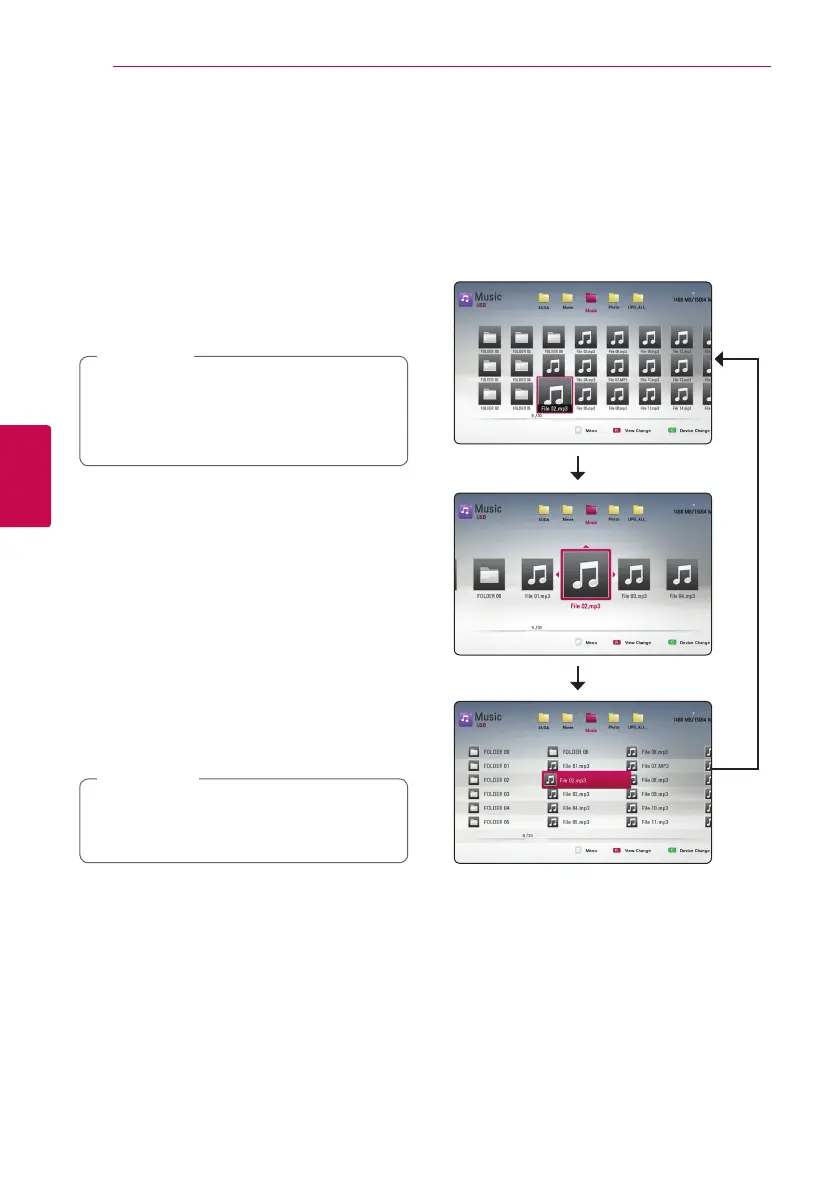
Changing content list view
yui
On the [Movie], [Music] or [Photo] menu, you can
change the content list view.
Method 1
Press red (R) colored button repeatedly.
Method 2
1. On the content list, press INFO/MENU (
m
) to
display the option menu.
2. Use
w/s
to select the [View Change] option.
3. Press ENTER (
b
) to change the content list
view.


 To Next Page