28
Operating
4
Playing a file on disc/USB
device
yui
This player can play video, audio and photo les
contained in the disc or USB device.
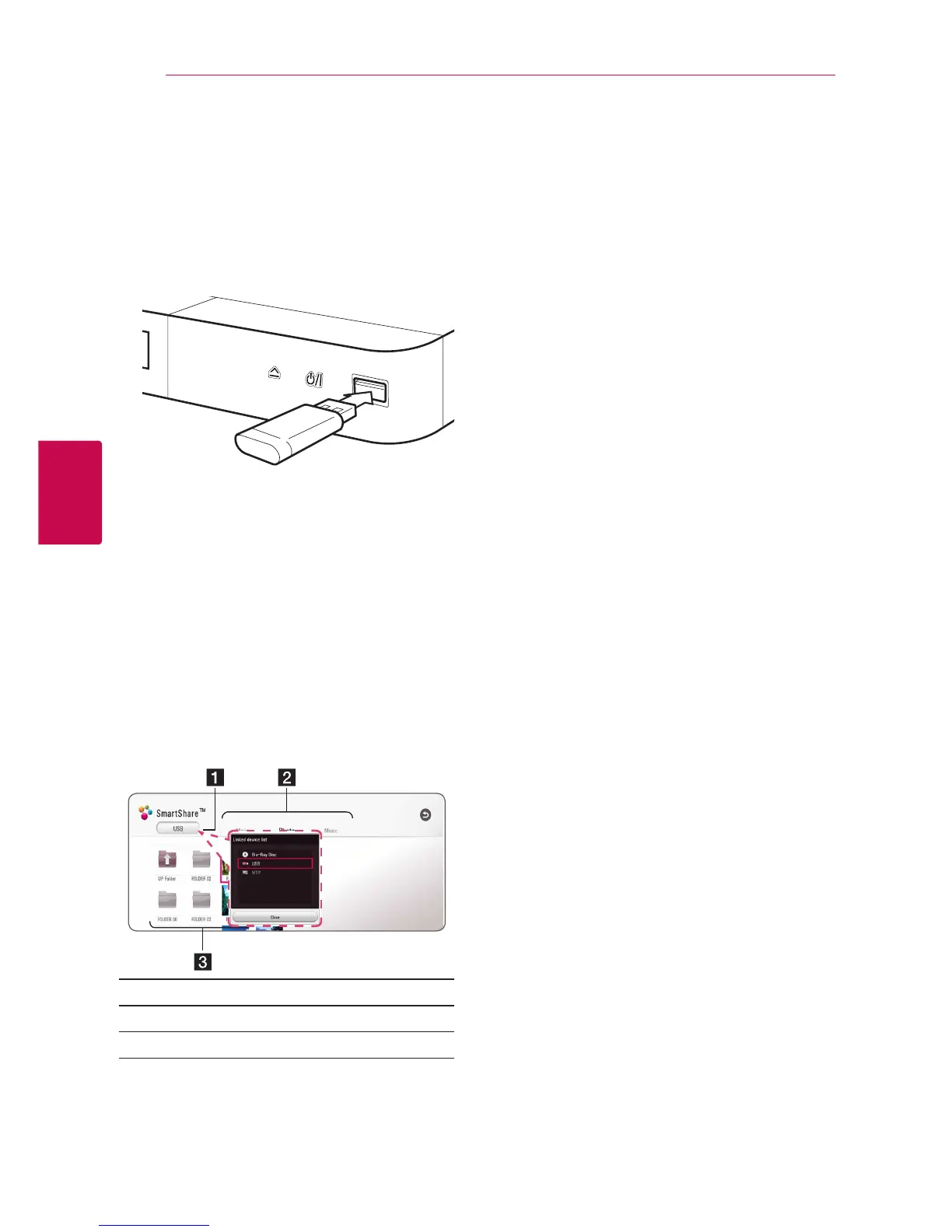
1. Insert a data disc on the tray or connect a USB
device.
When you connect the USB device on the HOME
menu, the player plays an audio le contained in
the USB storage device automatically. If the USB
storage device is containing various types of les, a
menu for the le type selection will appear.
File loading may take few minutes depending on
the number of content stored in the USB storage
device. Press ENTER (
b
) while [Cancel] is selected
to stop loading.
2. Press HOME (
1
).
3. Select [Movie], [Photo] or [Music] using
a/d
,
and press
s
.
4. Select Disc or USB and press ENTER (
b
).
a
Displays all linked devices.
b
Displays video, photo or audio content.
c
Displays the le or folder on linked device.
5. Select a file using
w/s/a/d
, and press
z
(PLAY) or ENTER (
b
) to play the file.
Notes on USB device
y
This player supports USB ash drive/external
HDD formatted in FAT32 and NTFS when
accessing les (music, photo, movie). However,
for BD-Live and Audio CD recording, use the USB
ash drive / external HDD formatted in FAT32.
y
This unit can support up to 4 partitions of the
USB device.
y
Do not extract the USB device during operation
(play, etc.).
y
A USB device which requires additional program
installation when you have connected it to a
computer, is not supported.
y
USB device: USB device that supports USB1.1
and USB2.0.
y
Video, audio and photo les can be played. For
details of playing each le type, refer to the
relevant pages.
y
Regular back up is recommended to prevent
data loss.
y
If you use a USB extension cable, USB HUB or
USB Multi-reader, the USB device may not be
recognized.
y
Some USB device may not work with this unit.
y
Some digital cameras and mobile phones are
not supported.
y
USB Port of the unit cannot be connected to PC.
The unit cannot be used as a storage device.



 To Next Page