36
Operating
4
To control photo view
Controls playback and sets options while viewing
pictures in full screen.
You can control playback and set options while
viewing pictures in full screen.
While viewing pictures, press INFO/MENU (
m
).
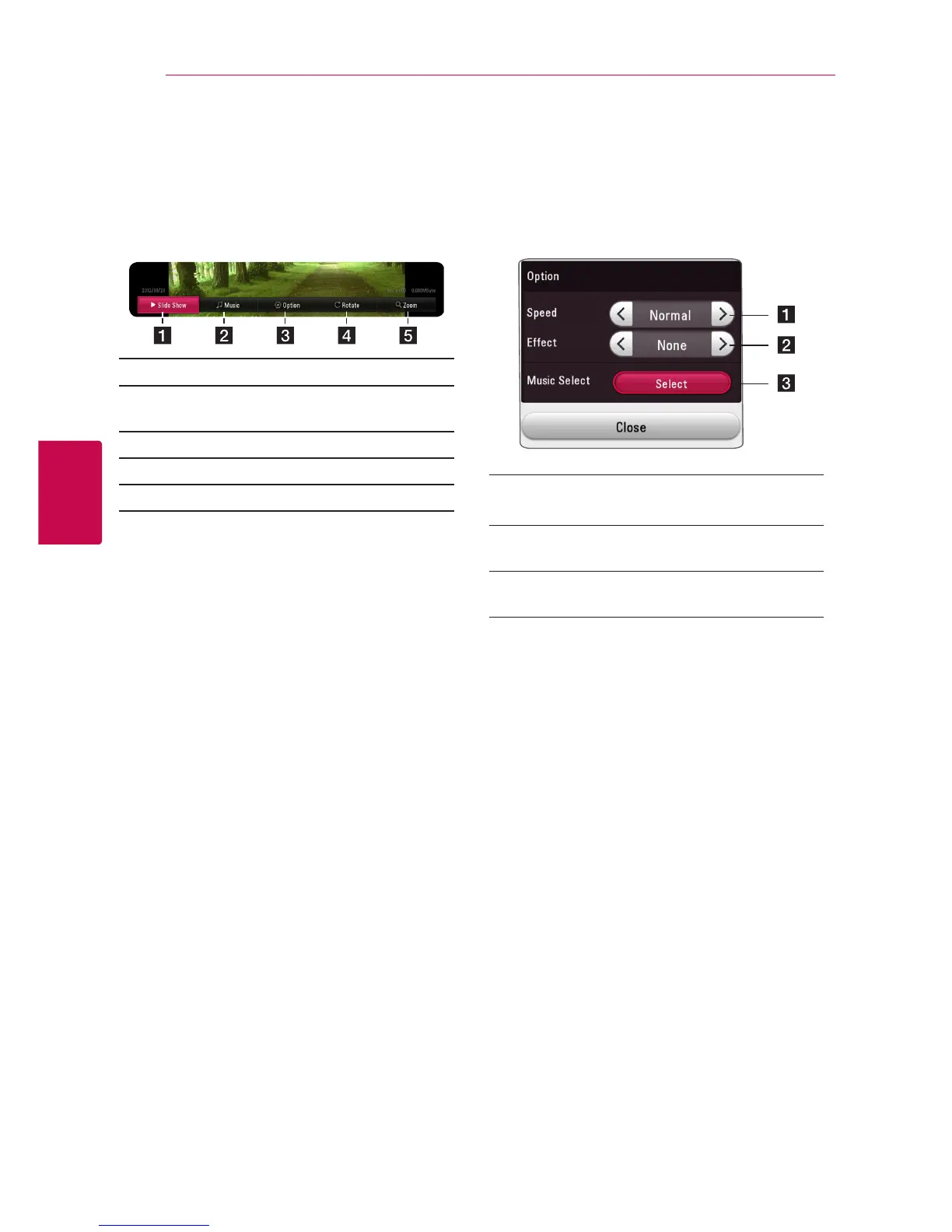
a [Slide show] - Starts or pause slide show.
b [Music] - Select the background music for the
slide show (page 41).
c [Option] - Displays slide show options.
d [Rotate] - Rotates the photo clockwise.
e [Zoom] - Displays the [Zoom] menu.
Setting the slide show option
You can use various options during viewing a
photo in full screen.
1. While viewing pictures, press INFO/MENU (
m
).
2. Select [Option] using
a/d
, and press ENTER
(
b
)
a [Speed] - Use
a/d
to select a delaying
speed between photos in a slide show.
b [Eect] - Use
a/d
to select a transition
effect between photos in a slide show.
c [Music Select] – Select the background music
for the slide show (page 41).



 To Next Page