Information
40
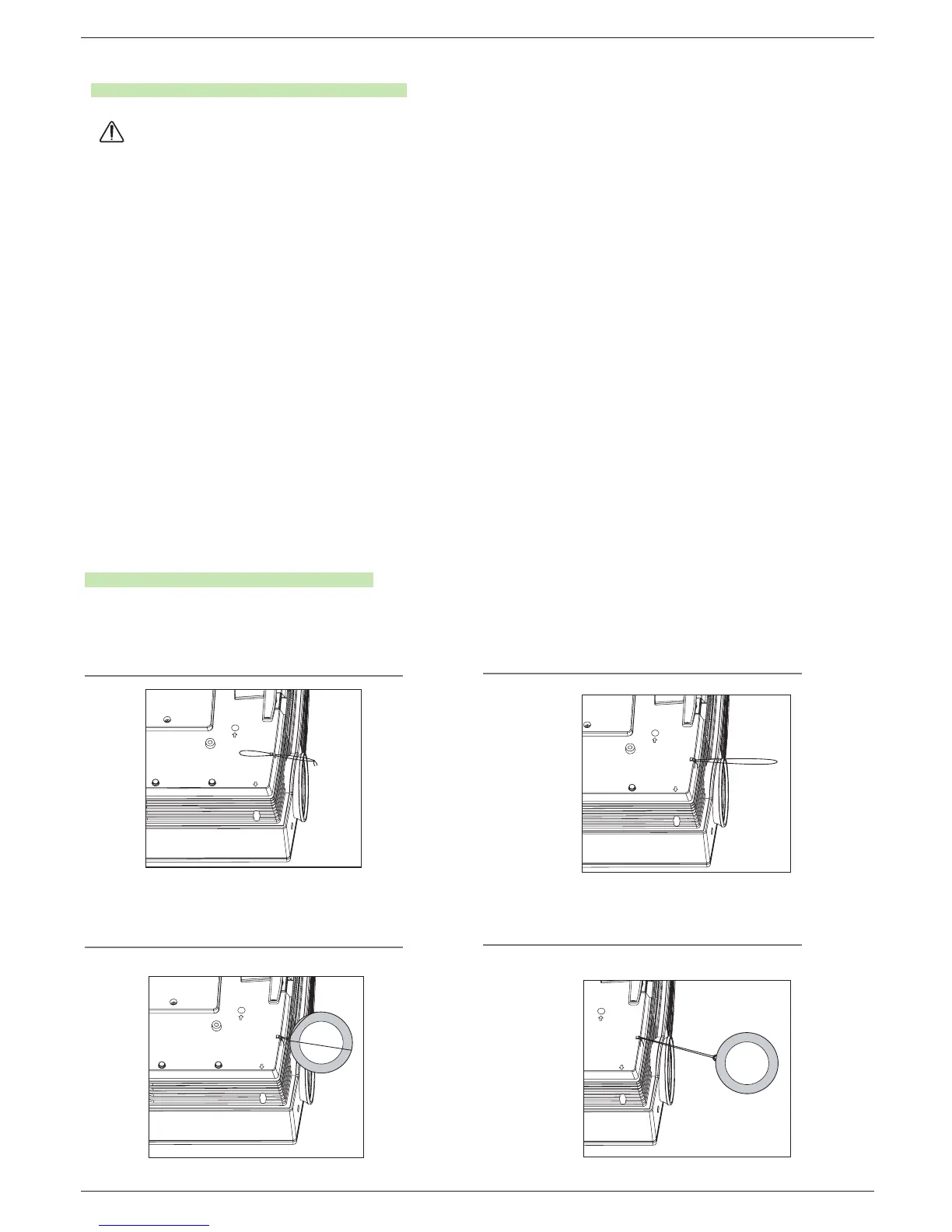
How to fix the lens cap to the projector
How to fix the lens cap
1
Prepare the lens cap and the strap supplied as
accessories.
2
Insert the non-knot end of the strap into the hole at
the bottom of the lens section of the projector.
3
Fix the strap at the hole of the projector into the
hole of the lens cap, and then pass the lens cap
through the strap lasso.
4
They are completely assembled as shown at
the below figure.
Regarding the projector lamp control
● Don’t turn off the projector at least in 5 minutes after activating it.
- The frequent On/Off changes may cause the lamp function to deteriorate.
● Don’t pull out the power cord while activating the projector and the cooling fan.
- It may cause the lamp life-span to shorten and get damaged.
● The life-span of projector may considerably depend on the use environment and treatment conditions.
● The projector uses the high pressure mercury lamp so that the serious caution is essential. The shock or abuse while using
may cause lamp to blow off with explosion.
● When you continue to use the projector after an interval of lamp replacement, the lamp may be blown off with explosion.
● The following treatment should be done, in case of lamp blow-off.
- Pull off the power cord immediately.
- Let some fresh air in immediately (Ventilation).
- Check the product condition at the nearer service center and replace it with new lamp, if necessary.
- Don’t try to disassemble the product without the authorized technician.
WARNING


 To Next Page