Installing and Composition
13
1. Place the projector on a sturdy and horizontal surface with the PC or AV source.
2. Place the projector with the desired distance from the screen. The distance between the projector and
the screen determines the actual size of the image.
3. Position the projector so that the lens is set at a right angle to the screen. If the projector is not set at a
right angle, the screen image will be crooked. Although, slight angles can be counteracted using the
Keystone adjustement. (Refer to page 26.)
4. Connect the power cable to the projector and the wall outlet after placing the projector in its desired
location.
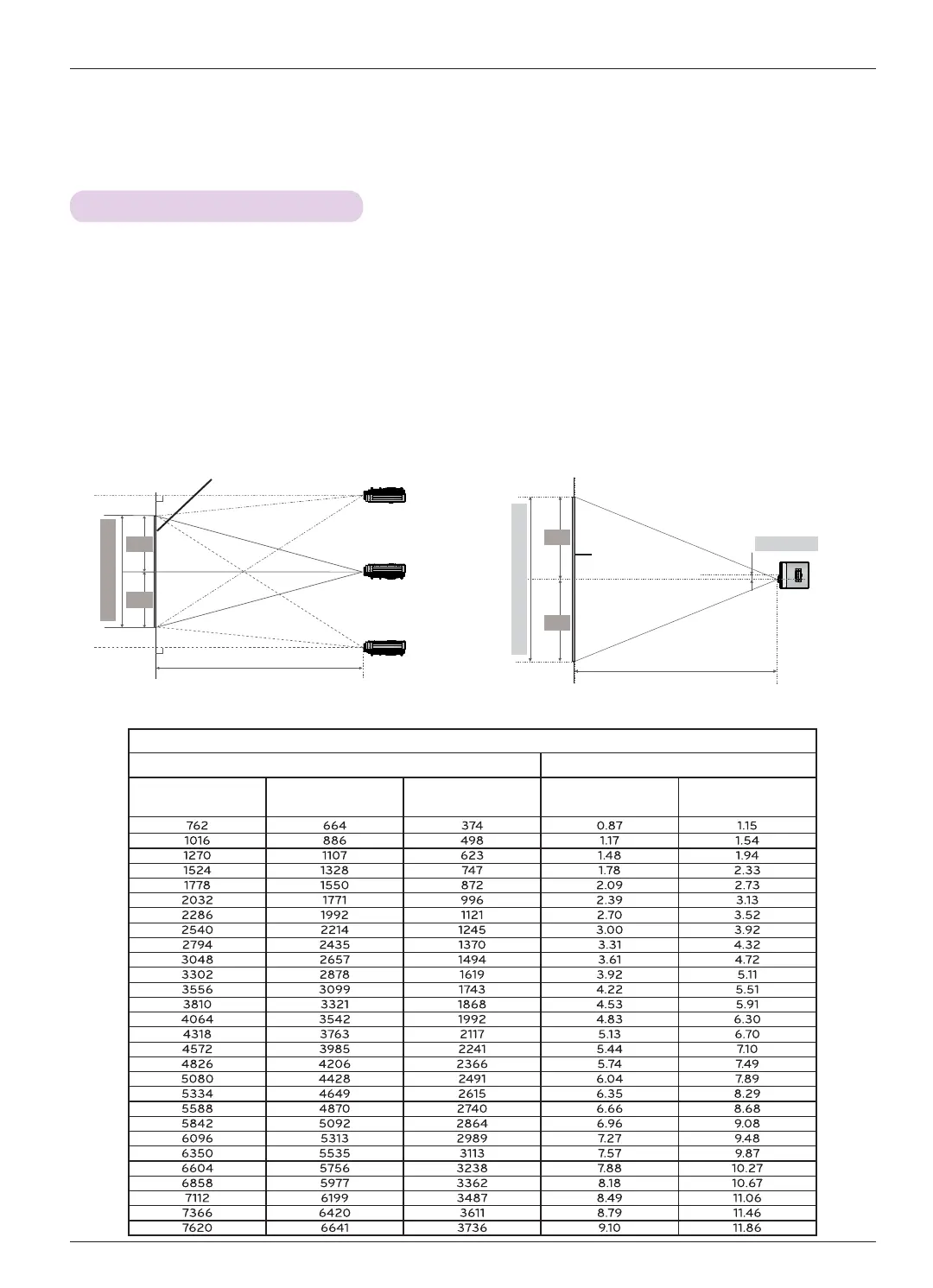
Projection distance (D)
Lens shift
Max
Max
0%
80.5 mm
Projection distance (D)
Positioning the Projector
Screen
< Projection Distance Based on the Picture Format >
Screen height (X)
X/2
X/2
Y/2
Y/2
Screen
Screen Width (Y)
16 : 9 Scale
Screen Projection Distance
Diagonal Size (mm)
Screen Width (Y)
(mm)
Screen height (X)
(mm)
Minimum Projection
Distance (D1) (m)
Maximum Projection
Distance (D2) (m)


 To Next Page