Installing and Composition
14
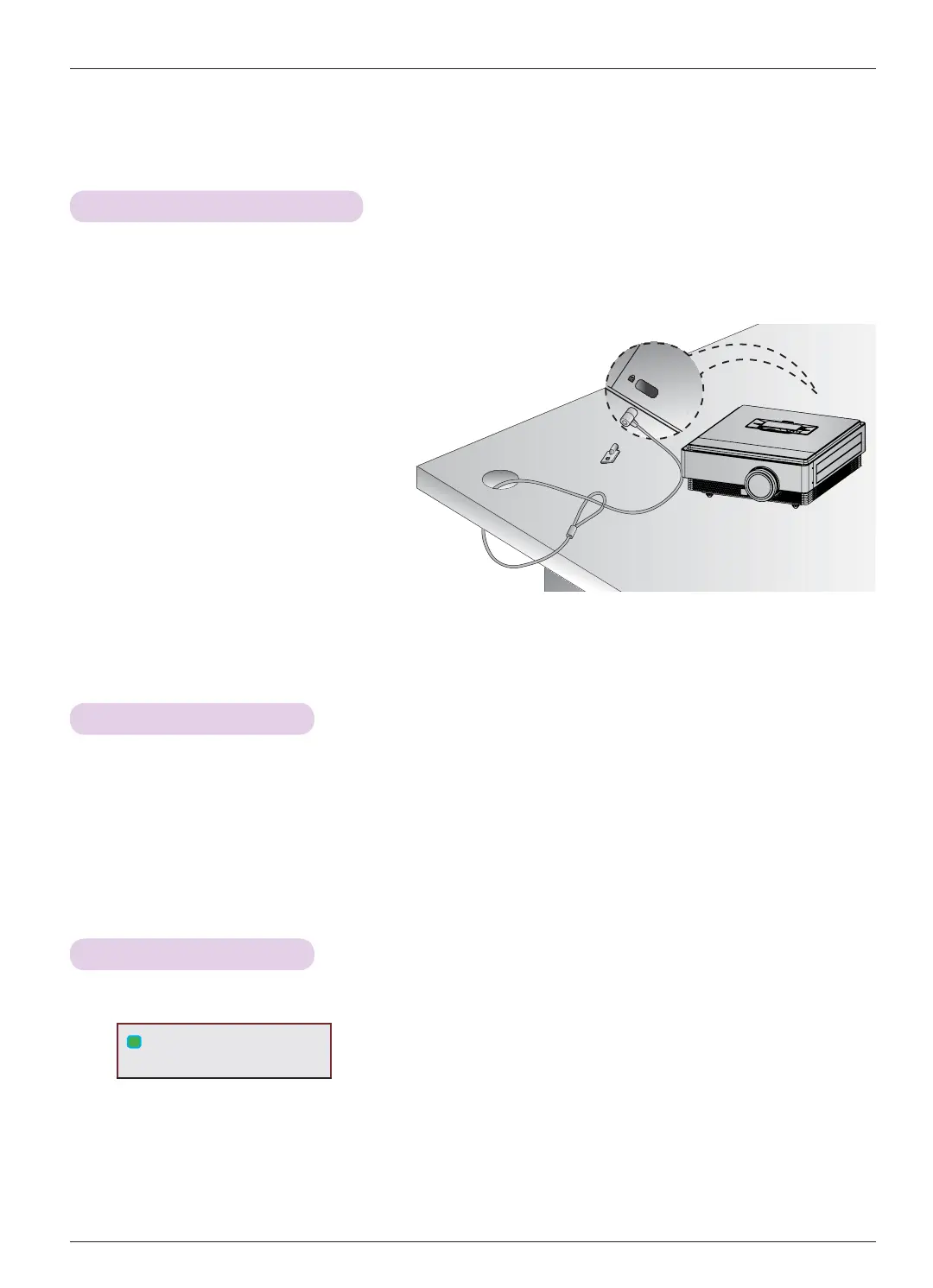
• This projector has a Kensington Security System Connector on the side panel. Connect the Kensington Security System
cable as below.
• For the detailed installation and use of the Kensington Security System, refer to the user’s guide included with the
Kensington Security System set. And for further information, contact http://www.kensington.com, the internet homepage
of the Kensington company that deals with expensive electronic equipment such as notebook PCs or projectors.
• The Kensington Security System is an optional item.
Kensington Security System
Turning on the Projector
1. Make sure the power cord is connected correctly.
2.
Press the POWER button. The operation indicator is blinking green.
• 6G#Surmhfwru⠂#㍣⇛Ⅻ#Srzhu#rq#wlph⠞#፲ᎎ1
• Press the INPUT button to select the input signal you want.
• There will be short sound when the projector is being turned on.
• Check if the lens cap is open before turning on the power.
Turning off the Projector
1. Press the POWER button.
2. Press the POWER button again to turn off the power. If the operation indicator is blinking cyan, in other
words the fan is working (90 seconds), do not disconnect the projector. When the indicator turns blue, you
may remove the power cord (Refer to page 10).
L
Power off?
Please press Power key again.


 To Next Page