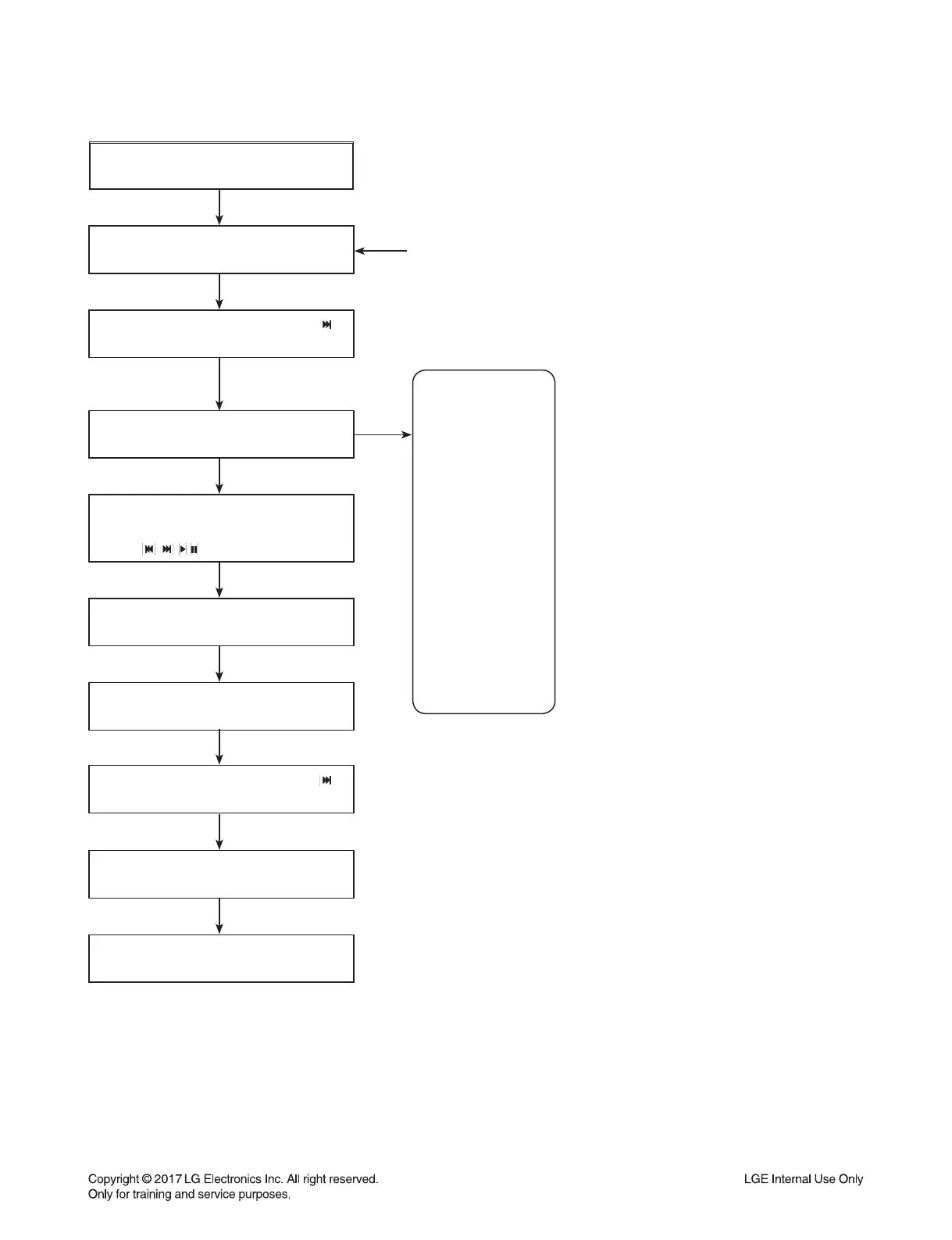
POWER ON
VFD “NO DISC” status
It is possible at any function.
(ex. It is possible at VFD “NO USB” status, too.)
This is an example.
Front ‘Stop’ + Remote control ‘ ’
push same timing during 5 s
FLD “OP00-…..”
Move to appropriate position
And make changes with remote control
“ , , , REPEAT” key.
Press ‘Stop’ Key
VFD “WRITE OK”
Front ‘Stop’ + Remote control ‘ ’
push same timing during 5 s
VFD “E2P CLR”
Completed
1-9
SERVICE INFORMATION FOR EEPROM
/
NAME
OPT0
OPT1
OPT2
OPT3
OPT4
OPT5
OPT6
OPT7
OPT8
OPT9
OPT10
OPT11
OPT12
OPT13
OPT14
DETECT NEW EEPROM
(OPTION EDIT SCREEN)
HEX
01
31
2D
26
19
00
00
43
4A
38
37
00
00
00
00



 To Next Page