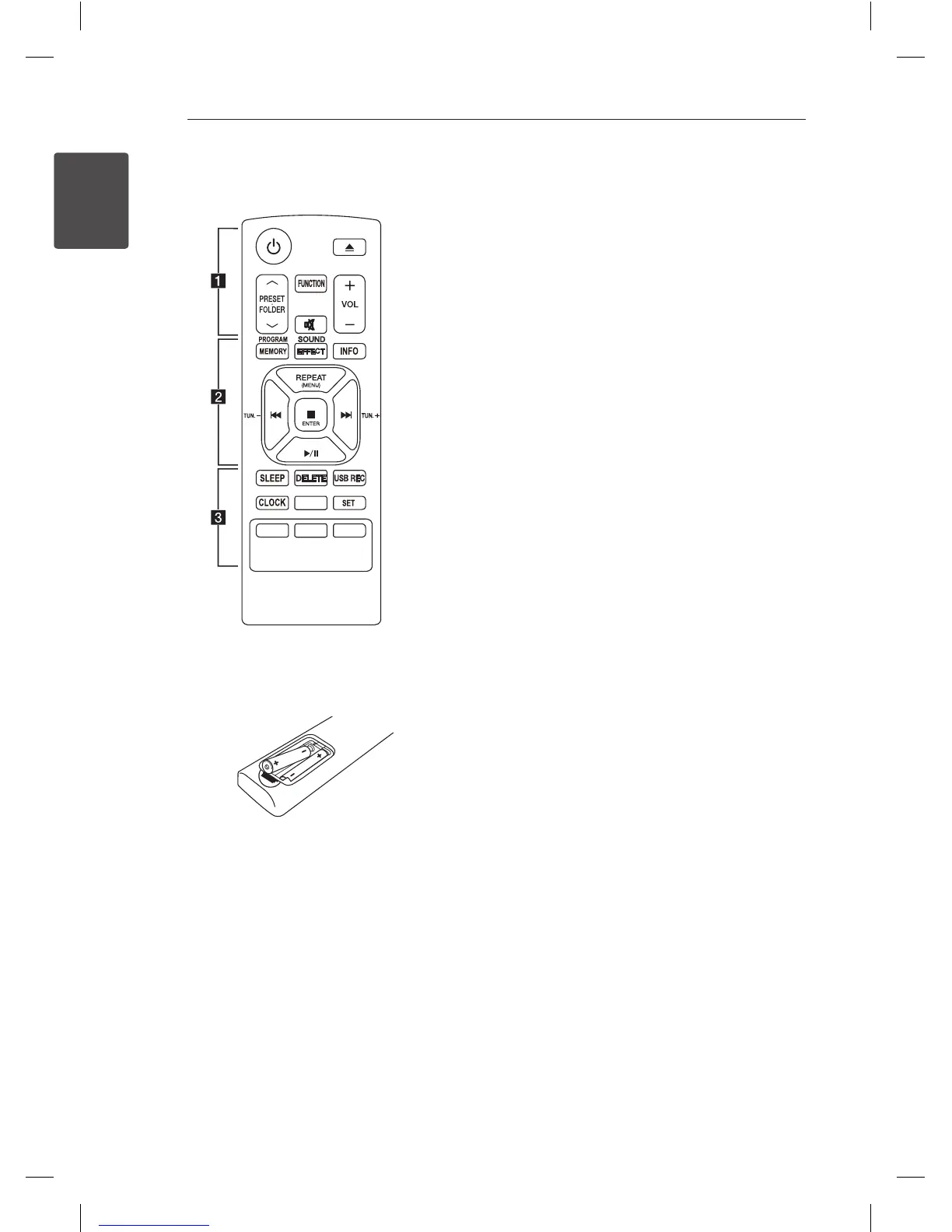
Battery Installation
Remove the battery cover on the rear of the
Remote Control, and insert two (size AAA) batteries
with
4
and
5
matched correctly
• • • • • • • • • • • • • •
a
••••••••••••••
1
(POWER): Switches the unit ON or OFF.
B
(OPEN/CLOSE) : Ejects the disc from slot loader.
PRESETFOLDER
W
/
S
:
-
Searches for a folder of mp3/wma les. When
a CD/USB containing mp3/wma les in several
folders is being played, press PRESETFOLDER
W
/
S
to select the folder you want to play.
-
Chooses a preset number for a radio station.
FUNCTION : Selects the function and input source.
@
: Mutes the sound.
VOL (
o
/
p
) : Adjusts speaker volume.
• • • • • • • • • • • • • •
b
••••••••••••••
PROGRAM/MEMORY :
-
Stores radio stations.
-
Creates a playlist you want to listen to.
SOUND EFFECT : Chooses sound impressions.
INFO : Sees information about your music. mp3/
wma les often come with ID3 tags. The tag gives
the Title, Artist, Album or Time information.
REPEAT (MENU) :
-
Listens to your tracks/les repeatedly or
randomly.
-
Move to the previous menu on iPod mode.
TUN.(-/+) : Selects the radio stations.
C
/
V
(SKIP/SEARCH):
-
Skips Fast backward or Forward.
-
Searches for a section within a track/le.
Z
ENTER :
-
Stops playback or recording.
-
Choose an item on iPod mode.
d
/
M
(PLAY/PAUSE) :
-
Starts or pauses playback.
-
Selects STEREO/MONO.
CM2540-FG.AAUSLLK_3469-ENG.indd 8 2014-05-15 �� 10:19:04


 To Next Page