Getting Started 9
Getting Started
1
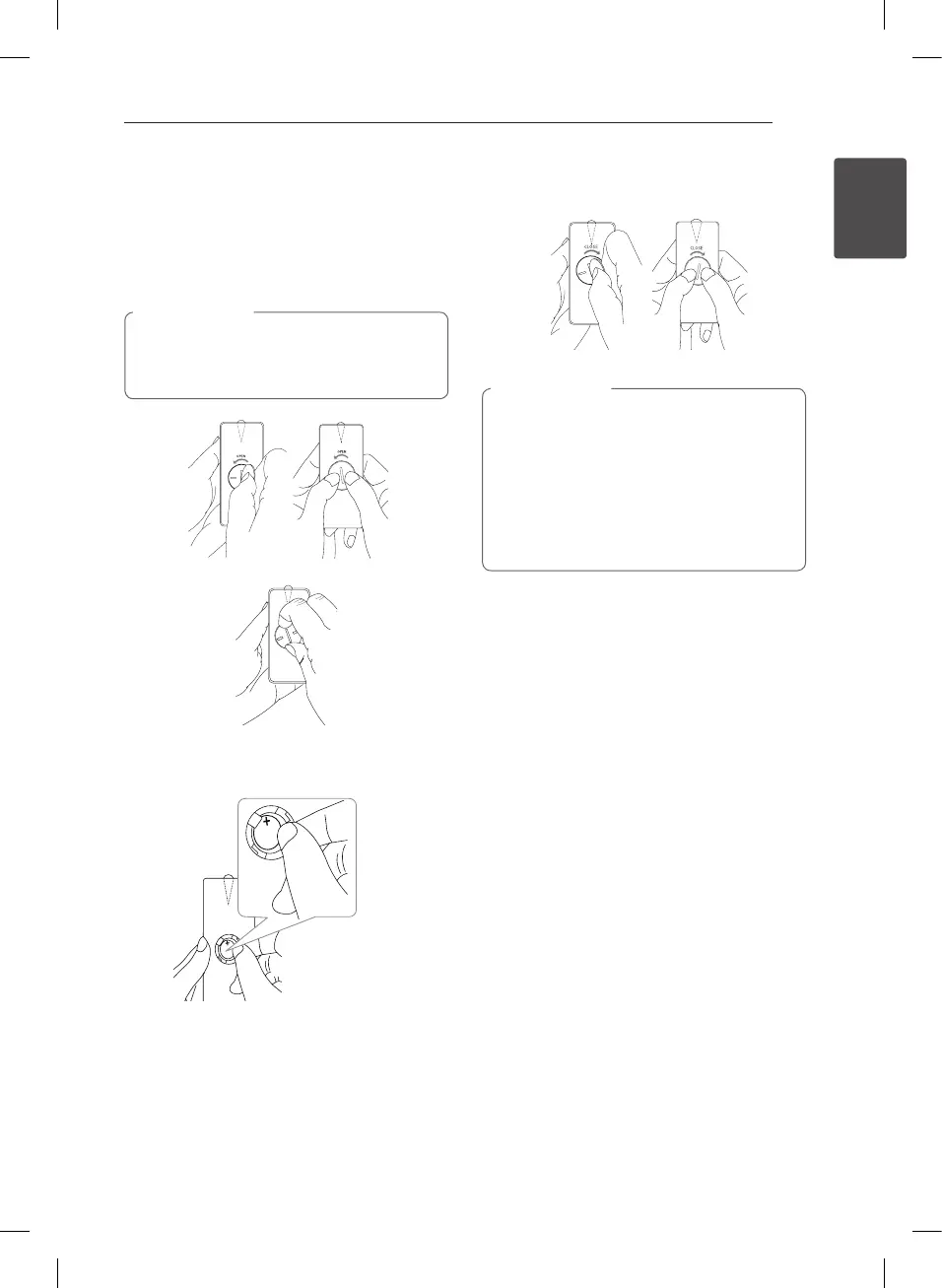
Battery Installation
You have two ways to open the battery
compartment.
1. Turn the battery compartment
counterclockwise by using a coin or your finger.
Then take a battery compartment out.
If you have long nails, do not open the battery
compartment by using your nger. Or else,
your nail would be broken.
>
Caution
2. Insert and fix the battery with the minus(-)
facing in the same direction as the minus(-).
+
+
3. Put the battery compartment on the remote
control and turn it clockwise to close.
The battery used in this device may present a
re or chemical burn hazard if mistreated. Do
not recharge, disassemble, incinerate, or heat
above 100 °C (212 °F). Replace the battery part
no. CR2025 only. Use of another battery may
present a risk of re or explosion. Dispose of
used battery. Keep battery away from children.
Do not disassemble or dispose of in re.
>
Caution
CM3330G-DG.DDEULLG_ENG.indd 9 2013-02-21 12:36:14
Downloaded from www.vandenborre.be



 To Next Page