Getting Started10
Getting Started
1
Remote control
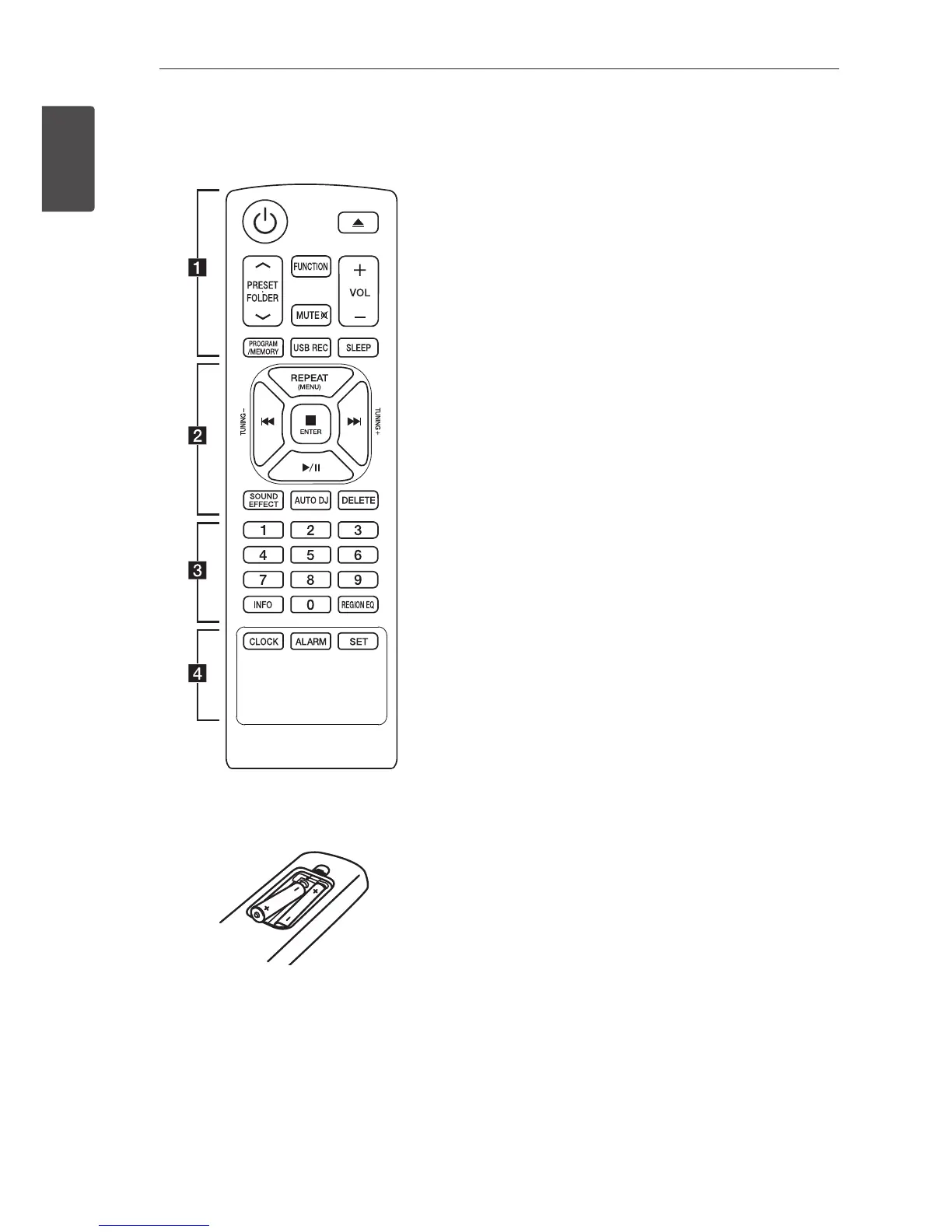
Battery Installation
Remove the battery cover on the rear of the
Remote Control, and insert two (size AAA) batteries
with 4 and 5 matched correctly.
• • • • • • • • • • a • • • • • • • • •
1 (Power) : Switches the unit ON or OFF.
B (Open/Close) : Opens and closes the disc tray.
PRESETFOLDER W/S :
- Searches for a folder of MP3/WMA les. When
a CD/USB containing MP3/WMA les in several
folders is being played, press PRESETFOLDER
W/S to select the folder you want to play.
- Chooses a preset number for a radio station.
FUNCTION : Selects the function and input source.
MUTE@ : Mutes the sound.
VOL +/- : Adjusts speaker volume.
PROGRAM/MEMORY :
- Stores radio stations.
- Deletes all the saved stations.
- Creates a programmed list you want to listen to.
USB REC : USB direct recording.
SLEEP : Sets the system to turn off automatically at
a specified time.
(Dimmer : The display window will be darkened
by half.)



 To Next Page
 Loading...