EasyManua.ls Logo

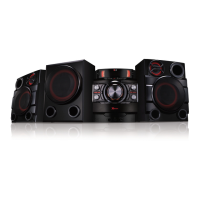
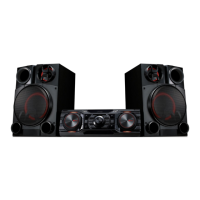
LG CM8350 - User Manual

LG CM8350
41 pages
Print Icon
To Next Page IconTo Next Page
Loading...
www.lg.com
Please read this manual carefully before operating
your set and retain it for future reference.
CM8350 (CM8350, NS8350F)
OWNER’S MANUAL
MINI HI-FI
SYSTEM

Table of Contents

Other manuals for LG CM8350

Questions and Answers

  • L
    Lauren CaldwellAug 6, 2025
    Why is there no sound coming from my LG CM8350?
    • C
      clifford03Aug 6, 2025
      If you are experiencing a lack of sound from your LG Stereo System, there might be a few reasons. First, ensure that you have selected the correct function by pressing the FUNCTION button. Also, check that the speakers are connected correctly and that the speaker cables are properly connected.
  • O
    Olivia BrownAug 11, 2025
    What to do if my LG Stereo System remote control does not work properly?
    • C
      Casey LaneAug 11, 2025
      If the remote control for your LG Stereo System isn't working, first make sure you're within about 23 ft (7 m) of the unit. Then, check for any obstacles between the remote and the unit and remove them. Finally, replace the batteries in the remote control with new ones.
  • M
    Monique BrownAug 16, 2025
    What to do if my LG CM8350 does not work properly?
    • M
      Michael JohnsonAug 16, 2025
      If your LG Stereo System isn't working correctly, try these steps: Turn off the power of the unit and any connected external devices like your TV, Woofer, DVD-player, or Amplifier, and then turn them back on. If that doesn't work, disconnect the power cord of the unit and the connected external devices, and then reconnect them. Keep in mind that previous settings may not be saved when the device power is shut off.
  • M
    Matthew KleinAug 21, 2025
    What to do if my LG Stereo System has no power?
    • J
      Jason WhiteAug 22, 2025
      If your LG Stereo System has no power, first ensure that the power cord is properly plugged in. If it is, check whether there is a general electricity failure by testing other electronic devices.
  • C
    Chelsea DavisAug 27, 2025
    Why are radio stations not tuning in properly on my LG Stereo System?
    • M
      Mr. Craig Phillips MDAug 27, 2025
      If you're having trouble tuning into radio stations on your LG Stereo System, ensure the antenna is securely connected and properly positioned. If the signal strength of the radio station is weak, try tuning to the station manually.
  • B
    Bryan BrennanAug 31, 2025
    How to fix LG Sound Sync not working on my LG CM8350?
    • T
      Todd PrestonAug 31, 2025
      To troubleshoot LG Sound Sync issues with your LG Stereo System: * Verify that your LG TV supports LG Sound Sync. * Check the connection of LG Sound Sync. * Review the sound settings on both your TV and the stereo system.

Summary

Getting Started Guide

Safety Information

General safety precautions, electrical shock, laser, and ventilation warnings.

Power Cord Precautions

Guidelines for safe use and maintenance of the power cord.

System Features and Accessories

Highlights of system features like Bluetooth and included accessories such as antennas.

File Playback Requirements

Details on supported file formats, bit rates, and USB device compatibility.

Remote Control and Battery Installation

Explanation of the remote control buttons and battery installation process.

Front Panel Description

Identification and description of buttons and ports on the front of the unit.

Rear Panel Connections

Details on ports and connections at the back of the unit.

Connecting the System

Ferrite Core Installation

Instructions for attaching ferrite cores to power and speaker cables to reduce interference.

Speaker Connection

Guide on how to connect speaker cables to the unit's speaker terminals correctly.

AUX IN Connection

How to connect audio auxiliary devices (e.g., camcorder, TV) to the AUX IN jacks.

Auxiliary and Portable Device Connections

Connecting portable players, external devices via AUX OUT/PORT IN for audio.

USB and Antenna Connections

How to connect USB devices and antennas for radio reception.

Operating the System

Basic CD;USB Operations

Fundamental operations for playing music from CDs and USB devices.

File Selection and Management

How to select, play, and delete MP3/WMA files and folders.

Playback Effects and Modes

Using sound effects, DJ features, SCRATCH, and AUTO DJ for enhanced playback.

Bluetooth Wireless Connectivity

Connecting and using Bluetooth devices to stream music wirelessly.

NFC Bluetooth Pairing

How to pair Bluetooth devices using NFC technology for simplified connection.

Music Flow Bluetooth App Installation

Installing and using the "Music Flow Bluetooth" app for device control.

Music Flow App Activation

Steps to activate and connect the "Music Flow Bluetooth" app to the unit.

Radio Operations

Tuning, improving reception, saving, and managing radio stations.

Sound Modes and EQ Settings

Adjusting sound modes and customizing EQ settings for preferred audio.

USB Recording and Copying

Recording audio to USB devices and copying files between USB ports.

Programmed Playback

Creating, playing, and deleting programmed music lists from discs or USB.

Miscellaneous Unit Operations

Various functions like temporary mute, CHILDSAFE mode, file info display, and demo mode.

Microphone Usage

Instructions for connecting and using a microphone with the unit.

Clock, Alarm, and App Synchronization

Setting the unit's clock, alarm functions, and app-based clock synchronization.

Sleep Timer and Dimmer Settings

Setting the sleep timer and adjusting the display brightness (dimmer).

Automatic Power and Function Changes

Automatic power on/off features and automatic function switching based on input.

LG Sound Sync Operation

Using LG TV remote control for unit functions via LG Sound Sync.

Troubleshooting

General Troubleshooting Guide

Solutions for common issues like unit not working, no power, no sound, or playback errors.

Appendix

General Specifications

Technical details about power, dimensions, inputs, tuner, CD, and amplifier.

Speaker Specifications

Detailed technical specifications for the front speakers.

Trademarks and Licenses

Information on trademarks, logos, and licensing, including Bluetooth.

Maintenance and Unit Handling

Guidelines for disc care, unit cleaning, and proper handling for shipping.

LG CM8350 Specifications

General IconGeneral
BrandLG
ModelCM8350
CategoryStereo System
LanguageEnglish

Related product manuals