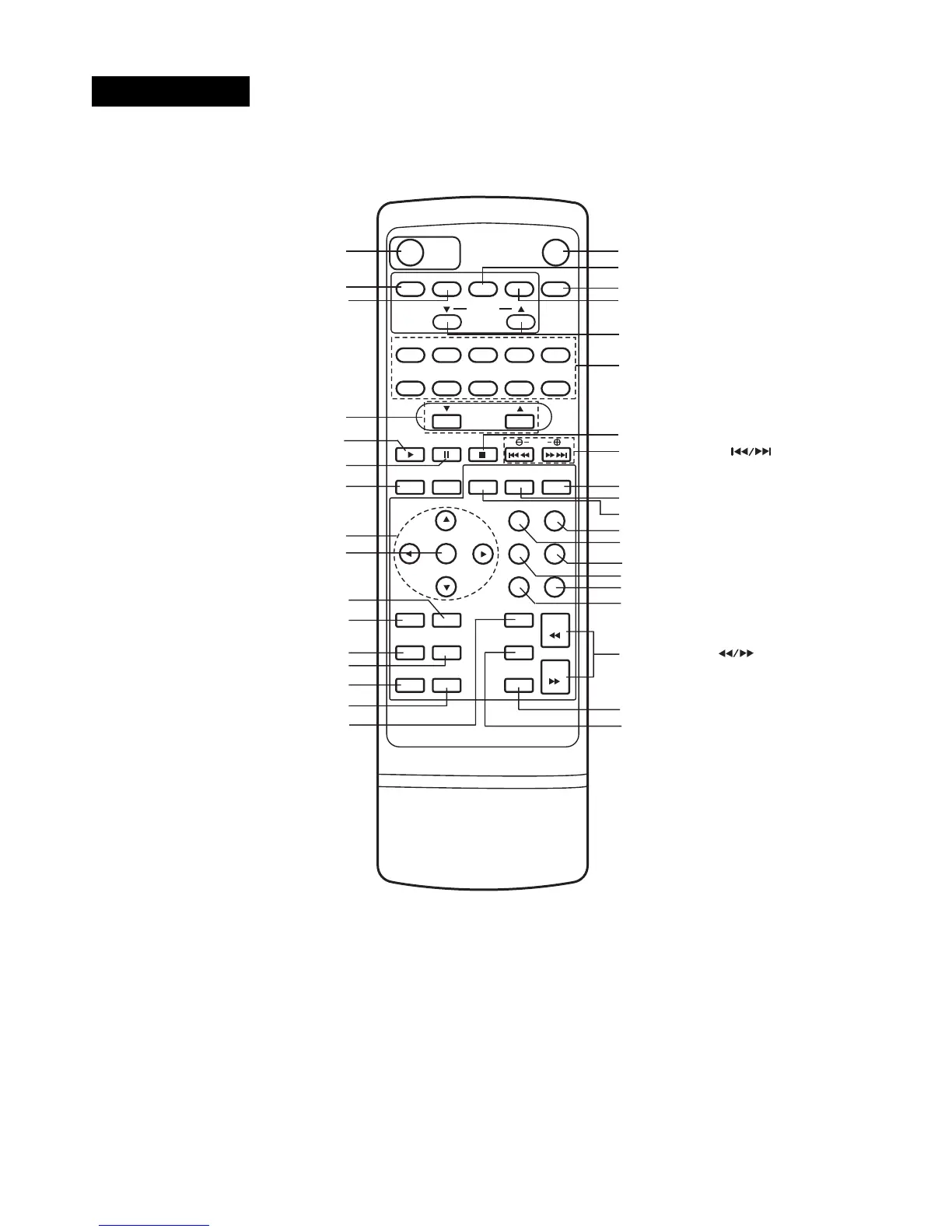
POWER button
MUTE button
VIDEO 1 buttonVIDEO 1 button
SLEEP button
VIDEO 2 buttonVIDEO 2 button
NUMBER buttons
STOP button
BY PASS button
SOUND MODE button
TEST TONE button
DELAY button
LEVEL button
RETURN button
DISPALY button
*MENU button*MENU button
SET-UP button
SEARCH button
MARKER button
SLOW SCAN ( ) buttons
SKIP(*SEARCH) button
PREST(▲/▼) buttons
FM/AM button
CD/DVD button
VOLUME(▲/▼) buttons
PAUSE button
PROGRAM buttons
**ARROW buttons
ENTER button
ANGLE button
SUBTITLE button
REPEAT A-B button
ZOOM button
***TITLE button
CLEAR button
AUDIO button
PLAY button
*MENU button
Use the MENU button to display the menu screen included on DVD video discs.
***TITLE button
Use the TITLE button to display the title screen included on DVD video discs.
**Directional arrow buttons
(up, down, left, right) for use in highlighting a selection on a GUI menu screen, TITLE and MENU screen.
* Press and hold button for about two seconds for search function.



 To Next Page