Getting Started10
Getting Started
1
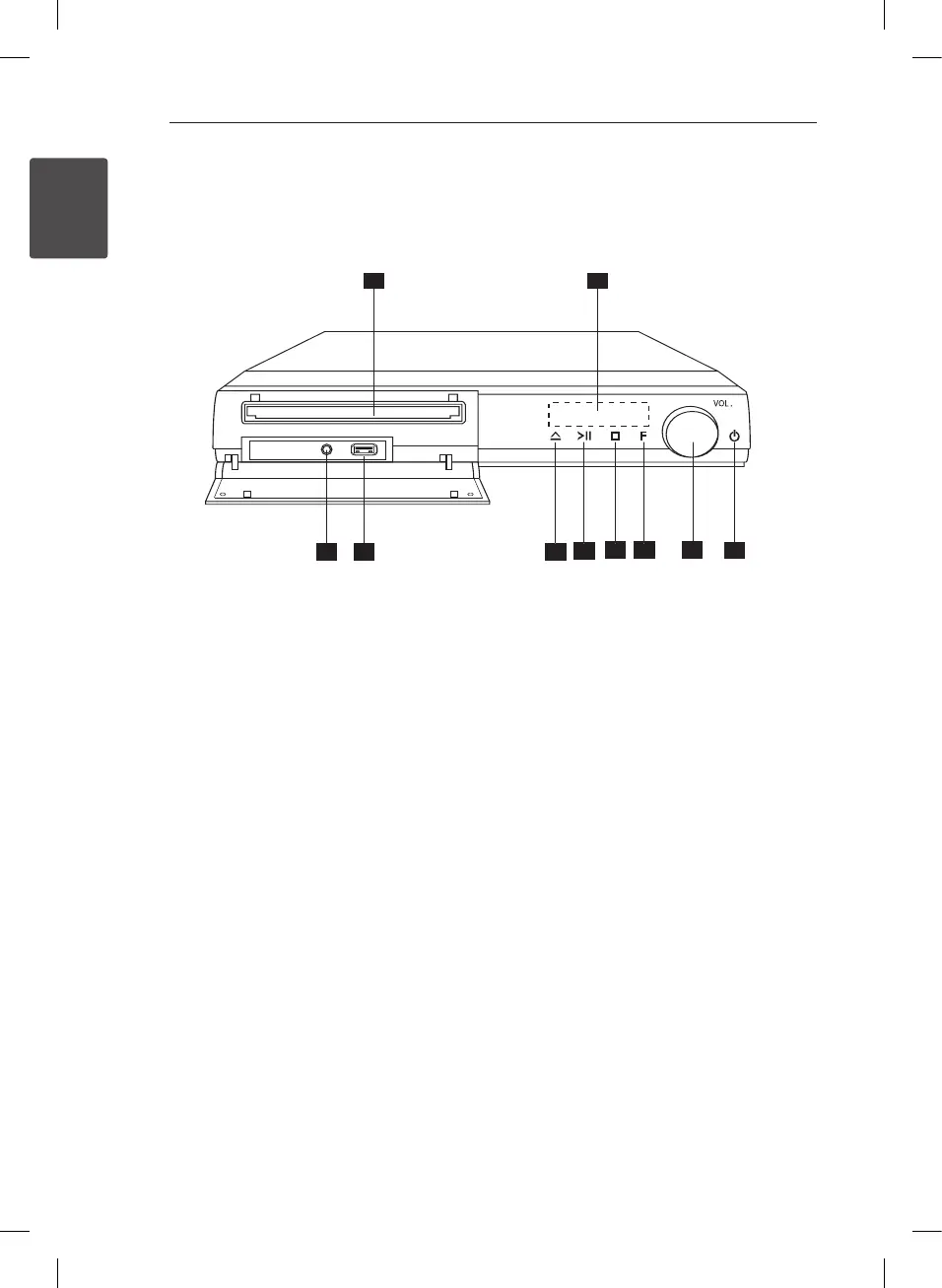
Front panel
a
DVD/CD Disc Tray
b
Display window
Shows the current status of the unit.
c
PORT. IN (Portable in)
You can enjoy music from portable device on
your unit.
d
USB port
You can play video, image and sound les by
connecting the USB device.
e
R
(OPEN/CLOSE)
Opens or closes the disc tray.
f
T
(PLAY/PAUSE)
Starts playback.
Pauses playback temporarily, press again to exit
pause mode.
g
I
STOP
Stops playback.
h
F (Function)
Selects the function and input source.
i
VOL . (Volume)
Adjusts speaker volume.
j
1
(Power)
Switches the unit ON or OFF.
DH4530T-D0_DPOLLLK_ENG_5962.indd 10 2013-02-13 4:19:35


 To Next Page