INTRODUCING YOUR DRYER 11
Display
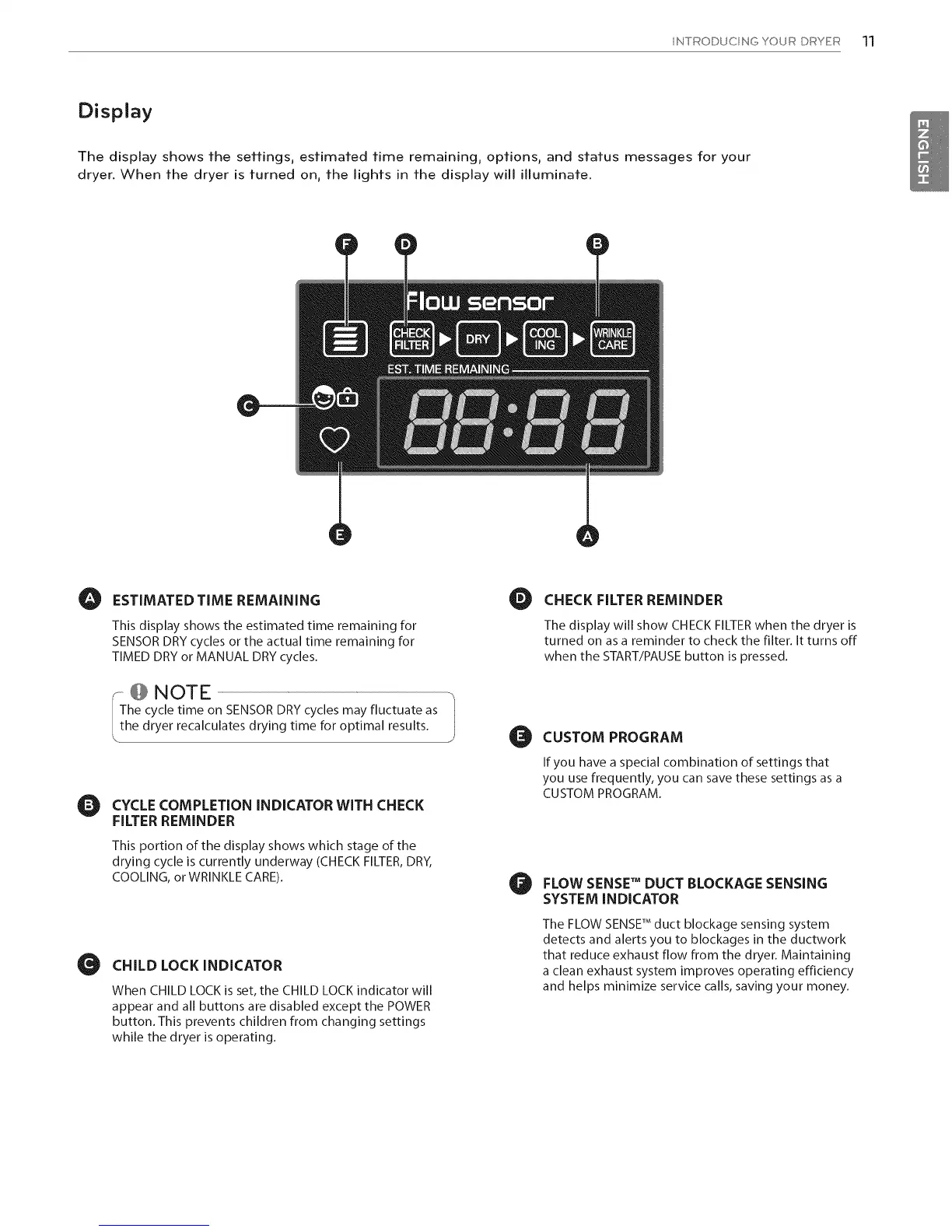
The display shows the settings, estimated time remaining, options, and status messages for your
dryer, When the dryer is turned on, the lights in the display will illuminate,
O ESTIMATED TIME REMAiNiNG O
This display shows the estimated time remaining for
SENSORDRYcycles or the actual time remaining for
TIMED DRYor MANUAL DRYcycles,
@NOTE
The cycle time on SENSOR DRY cycles may fluctuate as "!
I
the dryer recalculates drying time for optimal results, j
O CYCLECOMPLETION iNDiCATORWiTH CHECK
FILTERREMINDER
O
This portion of the display shows which stage of the
drying cycle is currently underway (CHECKFILTER,DRY,
COOLING,or WRINKLECARE),
CHILD LOCK iNDiCATOR
When CHILD LOCK is set, the CHILD LOCK indicator will
appear and all buttons are disabled except the POWER
button. This prevents children from changing settings
while the dryer is operating.
0
CHECK FILTER REMINDER
The display will show CHECKFILTERwhen the dryer is
turned on as a reminder to check the filter. It turns off
when the START/PAUSEbutton ispressed.
CUSTOM PROGRAM
If you have a special combination of settings that
you use frequently, you can save these settings as a
CUSTOM PROGRAM.
O LOW SENSETM DUCT BLOCKAGE SENSING
SYSTEM INDICATOR
The FLOW SENSETM duct blockage sensing system
detects and alerts you to blockages in the ductwork
that reduce exhaust flow from the dryer. Maintaining
a clean exhaust system improves operating efficiency
and helps minimize service calls, saving your money.


 To Next Page
 Loading...