46
SMART FEATIRES
4
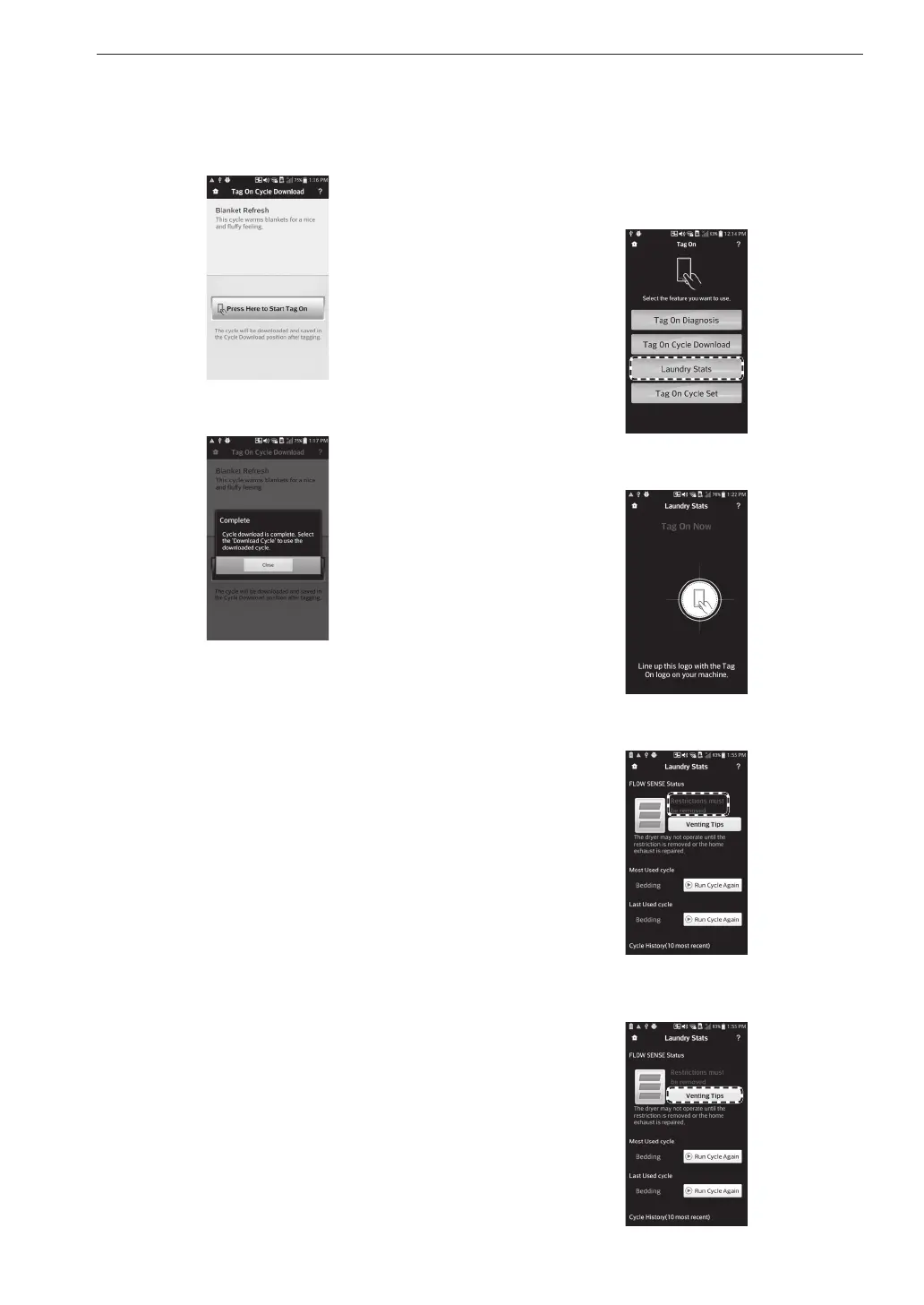
Touch the Tag On logo.
•
When a Tag On screen appears, tap your
smart phone on the Tag On icon on the right
side of the dryer’s control panel.
5
The new cycle is downloaded successfully!
•
Check whether the new cycle is downloaded
by turning the cycle selector knob to Download
Cycle.
Laundry Stats
Tag On Laundry Stats allows you to check the Flow
Sense status on your appliance to check if your
home exhaust system is clogged and also display the
details of your last ten cycles.
Flow Sense
TM
Status
•
LG’s Flow Sense duct blockage sensing system
detects and alerts you to restrictions in the installed
household ductwork that reduce exhaust airflow
through the dryer.
1
Select Laundry Stats.
2
Touch the Tag On logo.
3
Check the Flow Sense status result.
4
If the status shows your home exhaust system is
blocked, press the Venting Tips button.
MFL67652510_en_170713.indd 46 2017-07-13 오전 11:27:39



 To Next Page