EasyManua.ls Logo

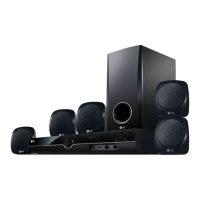
LG DVS450H - User Manual

LG DVS450H
17 pages
Print Icon
To Next Page IconTo Next Page
Loading...
DVS450H
P/No. : MFL58825917
As an ENERGY STAR
®
Partner,
LG has determined that this
product or product models meet
the ENERGY STAR
®
guidelines for
energy efficiency.
ENERGY STAR
®
is a U.S. registered mark.
ENGLISH
FOR THE GUARANTEE TERMS & CONDITIONS,
PLEASE REFER TO BACK COVER OF THIS MANUAL.
DV4S2H-P.BGBRLLK_5917_ENG 9/22/08 3:42 PM Page 1

Questions and Answers

  • K
    Kelly OlsenAug 10, 2025
    What to do if my LG DVS450H Home Theater System has no sound?
    • H
      hcrawfordAug 10, 2025
      If your LG Home Theater System has no sound, ensure that the equipment connected with the audio cable is set to receive the signal from the unit by selecting the correct input mode on the audio amplifier. Also, check that the AUDIO options are set correctly.
  • E
    Erika ParkerAug 19, 2025
    Why is there no picture on my LG Home Theater System?
    • H
      Heather FischerAug 19, 2025
      If you're not getting a picture on your LG Home Theater System, it could be that your TV isn't set to receive the signal from the unit. Try selecting the appropriate video input mode on your TV. Also, check that the video cable is securely connected.
  • T
    Trevor AdkinsAug 29, 2025
    What to do if my LG Home Theater System does not start playback?
    • A
      Ashley SheltonAug 29, 2025
      If your LG Home Theater System isn't starting playback, it might be due to several reasons: * An unplayable disc might be inserted. Try inserting a playable disc, checking its type and regional code. * The rating level might be set. Attempt to change the rating level. * The remote control might not be pointed correctly. Ensure the remote control is pointed at the remote sensor on the unit.

Summary

Safety Precautions

General Electrical and Fire Safety

Essential safety instructions for preventing electric shock, fire, and damage.

Installation and Ventilation Guidelines

Recommendations for safe installation and maintaining proper ventilation.

Laser System and Water Exposure Warnings

Precautions regarding laser safety and avoiding contact with liquids.

Connecting the Unit

Audio;Video and SCART Connections

Guide to connecting the unit to a TV using RCA and SCART cables.

HDMI Interface and Settings

HDMI Connection Procedure

Steps for connecting the unit to an HDMI-compatible television.

Remote Control Guide

Remote Control Button Functions

Comprehensive explanation of each button on the remote control and its operation.

Battery Installation and Warnings

Steps for inserting the remote battery and important safety precautions.

Main Unit Features

Main Unit Controls and Display

Identification of buttons, the display window, and the USB port on the player.

Adjusting Unit Settings

Navigating the Setup Menu

How to access and navigate the main setup menu for various configurations.

Disc Playback Operations

Basic Playback Controls

Opening tray, inserting discs, starting, stopping, and resuming playback.

Advanced Playback Navigation

Skipping tracks, pausing, frame-by-frame, fast forward/reverse, and A-B repeat.

DivX Movie Playback

Music and Photo File Playback

USB Flash Drive Operations

Troubleshooting and Specifications

Resolving Common Unit Issues

Solutions for power, picture, sound, playback, and remote control problems.

LG DVS450H Specifications

General IconGeneral
BrandLG
ModelDVS450H
CategoryHome Theater System
LanguageEnglish

Related product manuals