System Setting16
System Setting
3
DVB-T or DAB settings
When the rst time to turn on the unit, the “First
time installation” menu will appear. Select [YES] and
press ENTER (
b
) for auto channel scanning. (see “
Auto Scan” below for details)
Adjust the DVB-T or DAB
Settings
1. Press MODE to select the DVB-T or DAB mode.
2. Press SETUP.
3. Use
w/s
to select the rst setup option, and
press
d
to move to the second level.
4. Use
w/s
to select a second setup option, and
press
d
to move to the third level.
5. Use
w/s
to select a desired setting, and press
ENTER (
b
) to conrm your selection.
[TV] Menu
Auto Scan
This option automatically scans and sets the
available channels. Currently selected mode (TV or
Radio) will not be changed after the Auto channel
scanning.
[Country]: Use
a/d
select a country where
you operate this unit.
[Auto Scan]: Use
s/a/d
to select [Yes] then
press ENTER (
b
) to start the channel scanning.
TV Channel / Radio Channel
Displays the TV or Radio channel list.
Use
d
to select the [Select] then press ENTER (
b
)
to display the channel list. You can also display the
channel list pressing CH LIST while in DVB-T or DAB
mode.
While displaying channel list, press
a/d
to display
favorite channel list.
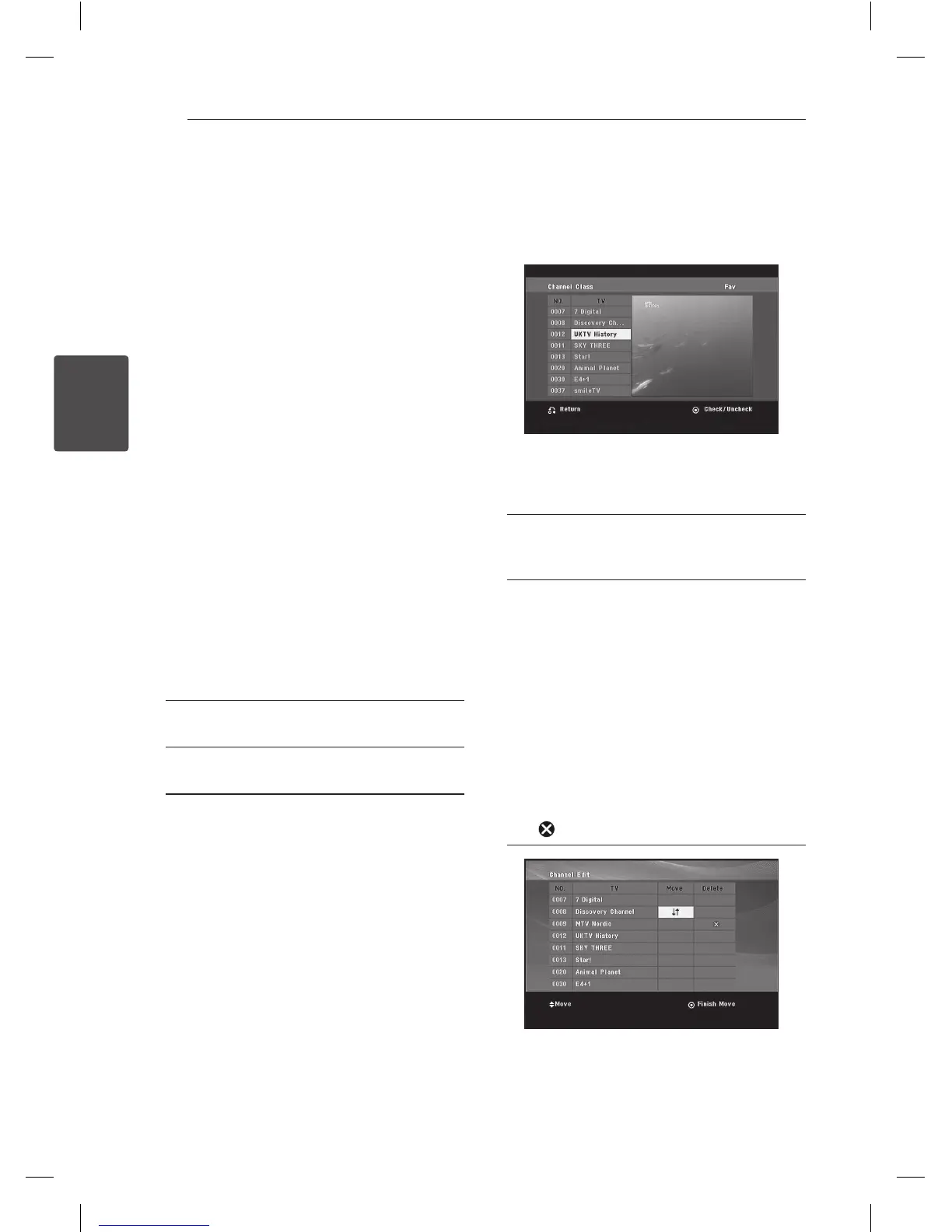
Channel Class
This option allows you to set the favorite channel.
Use
w/s
select the a channel and press ENTER
(
b
) to set the favorite class on each channel.
(shows Fav icon on top of the screen)
Channel Edit
This option allows you to edit the channels.
[Add]: This option allows you to add a new
channel. Use
w/s
to select the channel and
press ENTER (
b
) to add the selected channel.
[Select]: This option allows you to delete
or move the preset channels. To move the
location of the preset channel, use
w/s/a/
d
to highlight the channel you want to move
on the [Move] column and press ENTER (
b
).
Use
w/s
to move the selected channel to the
desired position and then press ENTER (
b
) to
complete move.
To delete a preset channel, use
w/s/a/d
to highlight the channel you want to delete
on the [Delete] column and press ENTER (
b
).
Themarked channel will not be displayed on
the channel list. Press ENTER (
b
) again to clear
the
mark.



 To Next Page