EasyManua.ls Logo

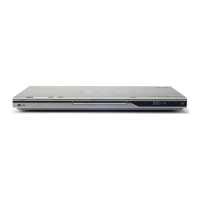
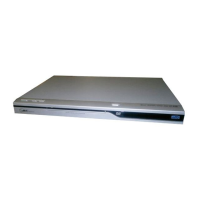
LG DVX298H - User Manual

LG DVX298H
24 pages
Print Icon
To Next Page IconTo Next Page
Loading...
DVD PLAYER
OWNER’S MANUAL
MODEL : DVX298H
Before connecting, operating or adjusting this product,
please read this instruction booklet carefully and completely.
DV298H-E3T.BGBRLLS_ENG_5774
FOR THE GUARANTEE TERMS & CONDITIONS,
PLEASE REFER TO BACK COVER OF THIS MANUAL.

Questions and Answers

  • K
    Katelyn JohnsonAug 13, 2025
    Why is there no sound coming from my LG DVD Player?
    • T
      Thomas ContrerasAug 13, 2025
      If you're not getting any sound, make sure the equipment connected to the audio cable is set to receive the DVD audio signal. Select the correct input mode on your audio receiver. Also, check if the connected equipment is turned on. Finally, verify that the AUDIO options are correctly set, then turn the DVD player on again.
  • J
    Jason LopezAug 16, 2025
    How to fix an LG DVX298H DVD Player that has no power?
    • Y
      yturnerAug 16, 2025
      If your LG DVD Player has no power, ensure the power cord is securely plugged into the wall outlet.
  • E
    Emily ArnoldAug 20, 2025
    How to fix no sound on LG DVD Player?
    • B
      Barbara HughesAug 20, 2025
      If your LG DVD player isn't producing sound, ensure the equipment connected via the audio cable is set to receive DVD sound output by selecting the correct input mode on the audio receiver. Also, verify that the connected equipment is powered on. Finally, check that the AUDIO options are correctly set, then restart the DVD player.
  • J
    Jeffery EricksonAug 25, 2025
    What to do if my LG DVD Player does not start playback?
    • E
      Emma DurhamAug 25, 2025
      If your LG DVD player isn't starting playback, make sure you've inserted a playable disc, checking both the disc type and regional code. If the disc is playable, verify that the rating level isn't set. Also, ensure that you are pointing the remote control directly at the remote sensor on the DVD player and that you are close enough for the remote to work effectively.
  • E
    Elizabeth GarciaAug 28, 2025
    Why is there no picture on my LG DVD Player?
    • E
      Eric KimAug 28, 2025
      If there's no picture, it might be because your TV isn't set to receive the DVD signal. Try selecting the correct video input mode on your TV. Also, check that the video cable is securely connected.
  • A
    Andrew ContrerasAug 31, 2025
    What to do if my LG DVX298H won't start playback?
    • L
      Leslie ChapmanAug 31, 2025
      If the DVD player won't start playback, it could be due to the disc you've inserted. Ensure that the disc is playable by checking the disc type and regional code. Also, check if the rating level is set and change it if necessary.
  • M
    Miguel SmithSep 4, 2025
    What to do if my LG DVX298H has no picture?
    • E
      Erika QuinnSep 5, 2025
      If your LG DVD Player shows no picture, first ensure that your TV is set to the correct input mode for DVD. If that's not the problem, check that the video cable is securely connected to both the DVD player and the TV.
  • T
    Terri CarterSep 8, 2025
    Why won't my LG DVX298H DVD Player start playback?
    • S
      Sarah FrySep 8, 2025
      If your LG DVD Player doesn't start playback, there might be several reasons: * The disc you've inserted might not be playable. Ensure it's a compatible disc type and regional code. * The rating level might be set. Try changing the rating level. * The remote control might not be pointed correctly or is too far away. Point the remote at the sensor on the DVD player and ensure you're close enough.

Summary

Safety and Warning Information

Electric Shock and Fire Hazard Warnings

Explains risks of electric shock, fire, and moisture.

Ventilation, Laser, and Power Cord Safety

Details ventilation, laser beam exposure, and power cord handling.

Environmental Disposal Guidelines

Instructions for disposing of old appliances.

Front Panel Overview

Front Panel Controls and Indicators

Describes the buttons and display on the front of the player.

Remote Control Guide

Remote Control Buttons and Operations

Details the function of each button on the remote control.

Installation and Setup Procedures

Initial Player Setup and Placement

Guides on placing the player and initial setup.

Connecting the DVD Player to Your TV

Covers general connection diagrams and types like SCART, Video, and Audio.

Component Video and Progressive Scan Setup

Explains Component Video connection and its progressive scan feature.

Resolution Setting Configuration

Details how to adjust the video output resolution.

HDMI Connection and Setup Guide

Explains how to connect and use HDMI for video and audio.

Audio Output to External Equipment

Describes connecting the player to amplifiers for audio output.

Digital Audio and Multi-Channel Sound Setup

Details digital audio connections and multi-channel sound capabilities.

Parental Control and Rating Setup

Describes how to set up parental controls and passwords.

Basic Operation and Features

Playing Discs and Files

Troubleshooting and Specifications

Common Troubleshooting Solutions

Addresses common problems and their fixes.

LG DVX298H Specifications

General IconGeneral
DVD PlaybackYes
DivX PlaybackYes
USB Media HostYes
Progressive ScanYes
HDMI OutputYes
Disc CompatibilityDVD, DVD-R, DVD-RW, DVD+R, DVD+RW, CD, CD-R, CD-RW
UpscalingUp to 1080p
Video OutputComposite, HDMI
USB PortYes
Dimensions360 x 40 x 200 mm
Audio OutputAnalog, Digital

Related product manuals