20
OPERATION
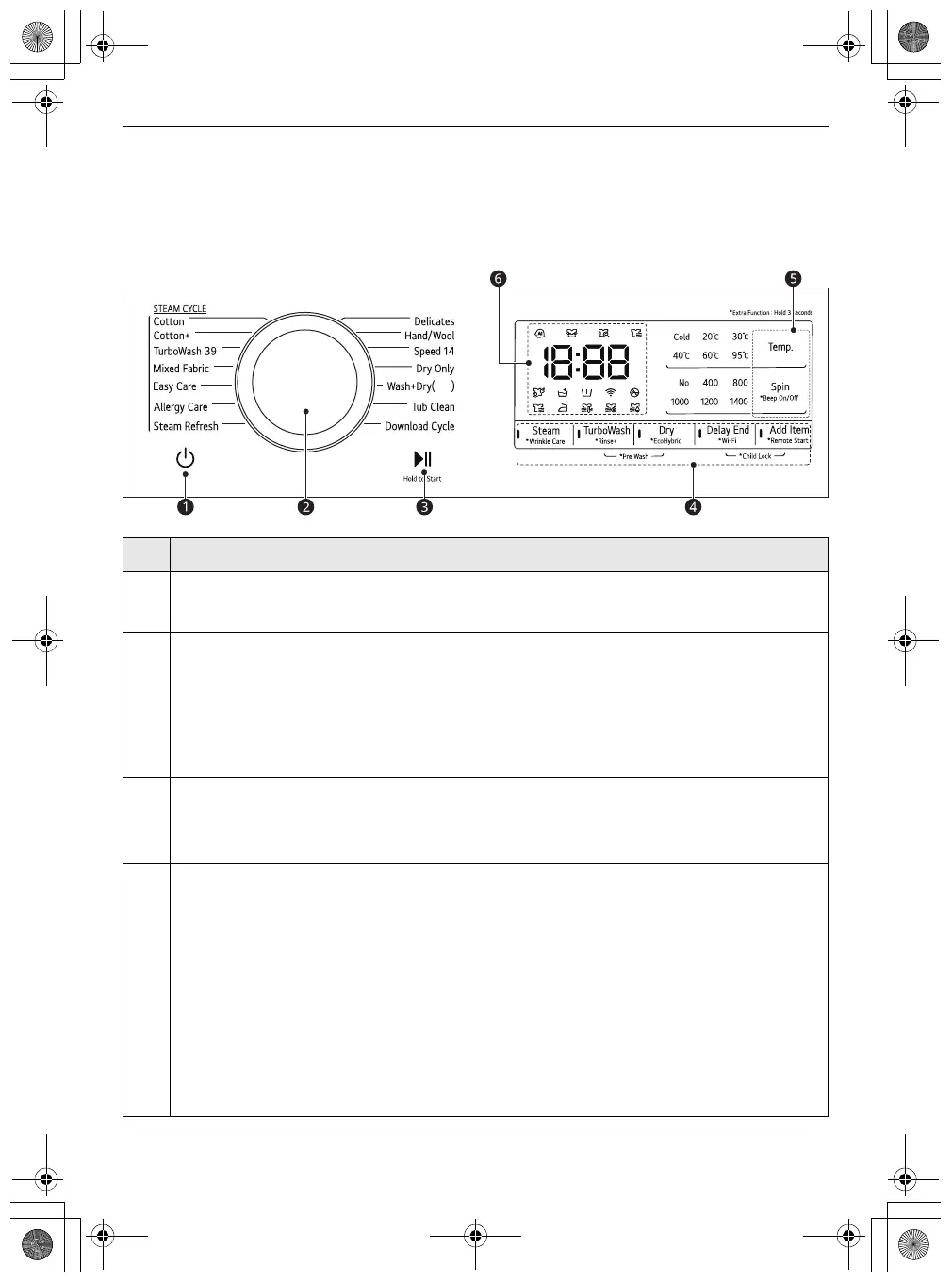
Control Panel
The actual control panel may differ from model to model.
Control Panel Features
Description
a
Power
On/Off Button
• Press this button to turn the washing machine on.
b
Programme Knob
• Programmes are available according to the clothes type.
• The lamp will light up to indicate the selected programme.
•
Wash+Dry
( ): ( ) indicates the drying capacity, which varies depending on the model.
c
Start/Pause
Button
• This button is used to start the wash programme or pause the wash programme.
• If a temporary stop of the wash programme is needed, press this button.
d
Extra Options and Functions
• To use the extra functions, press and hold the corresponding button for 3 seconds. The
corresponding symbol lights up in the display.
• This allows you to select an additional programmes and will light when selected.
Remote Start
With the
LG ThinQ
app, you can use a smartphone to control your appliance remotely.
• In order to use this function, refer to
SMART FUNCTIONS
.
Wi-Fi
Press and hold the
Delay End
button for 3 seconds to initiate the connection of the appliance to
the
LG ThinQ
application.
global_main.book.book Page 20 Wednesday, December 15, 2021 11:10 AM


 To Next Page