4
Setting up
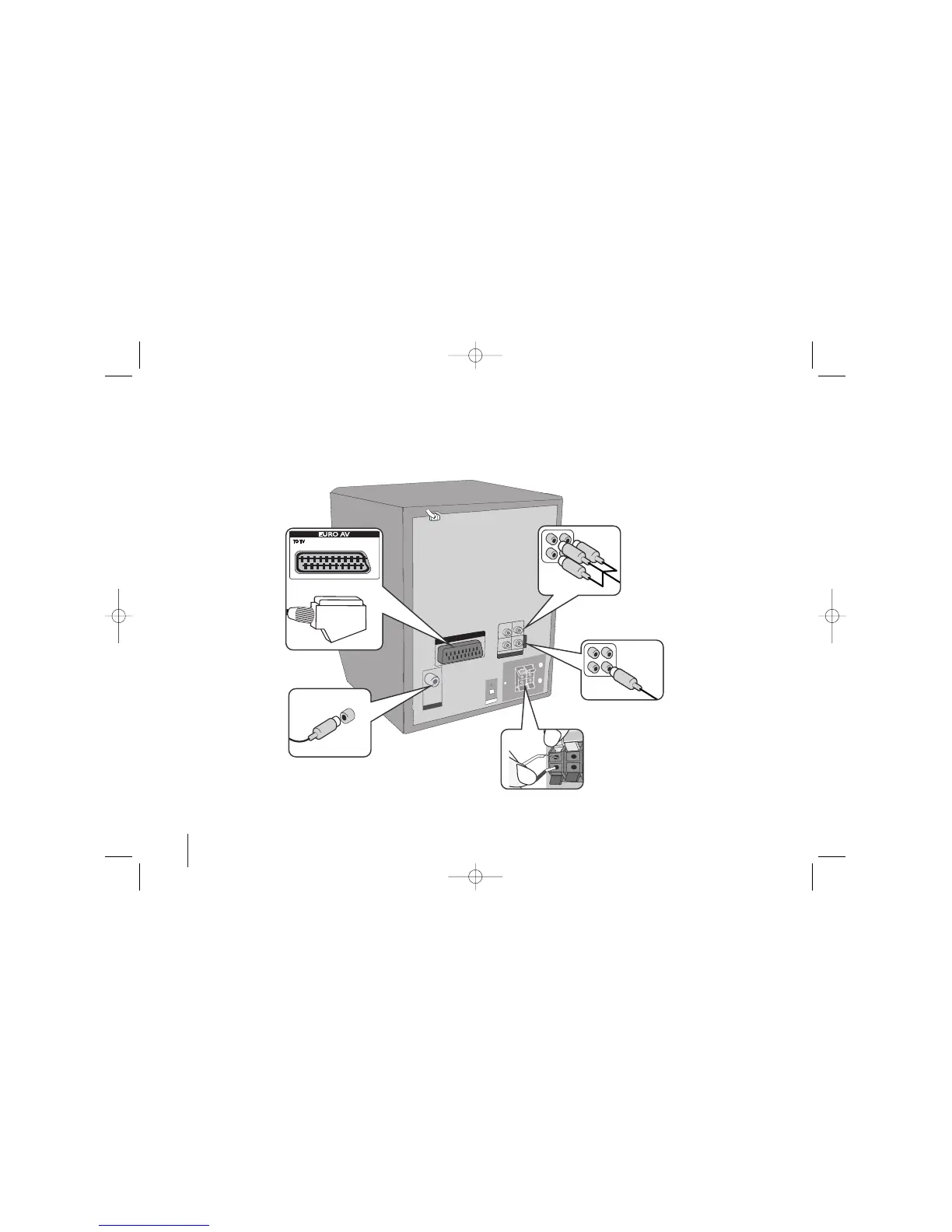
Connecting your unit to your TV and aerials.
Component Video connection (B)
Connect the COMPONENT VIDEO
(PROGRESSIVE SCAN) OUTPUT jacks
on the unit to the corresponding input
jacks on your TV using a Y PB PR cable.
- If your TV accepts progressive format
signals, you must use this connection
and set [Progressive Scan] in [Display]
setup to [On] (See page 8).
Stretch the FM aerial.
The reception will be at its best
when the end of the aerial is
stretched to be in a straight line
and horizontal.
b Plug the unit plug into a wall socket.
COMPOMENT VIDEO (PROGRESSIVE SCAN)
EURO
AV
O
P
T
IC
A
L
I
N
ANTENNA
OUT PUT
C
O
M
P
O
M
E
N
T
COMPOMENT V
ID
EO
(
P
R
O
G
RE
S
S
IV
E SC
A
N)
VIDEO (PROGRESSIVE SCAN)
P
R
P
B
Y
MONITOR
+
SCART connection (A)
Connect the TO TV jack on
the unit and your TV using
the SCART cable.
a Connect jacks on the unit and your TV (DVD player or Digital Device etc.) using the cables.
Check the jacks of your TV and choose the A, B connection. Picture quality improves in order from A to B.
Video Out connection
(A)
Connect the VIDEO
OUTPUT(MONITOR) jack on
the unit to the corresponding
input jack on your TV using a
Video cable.
Connect the speaker cables to the player
To connect the cable to the unit, press each plastic
finger pad to open the connection terminal. Insert
the wire and release the finger pad.
Connect the black end of each wire to the
terminals marked -(minus) and the other end to the
terminals marked + (plus).
FB164-D0P_DDEULL_ENG_5702 9/14/09 11:27 AM Page 4



 To Next Page