Connecting14
Connecting
2
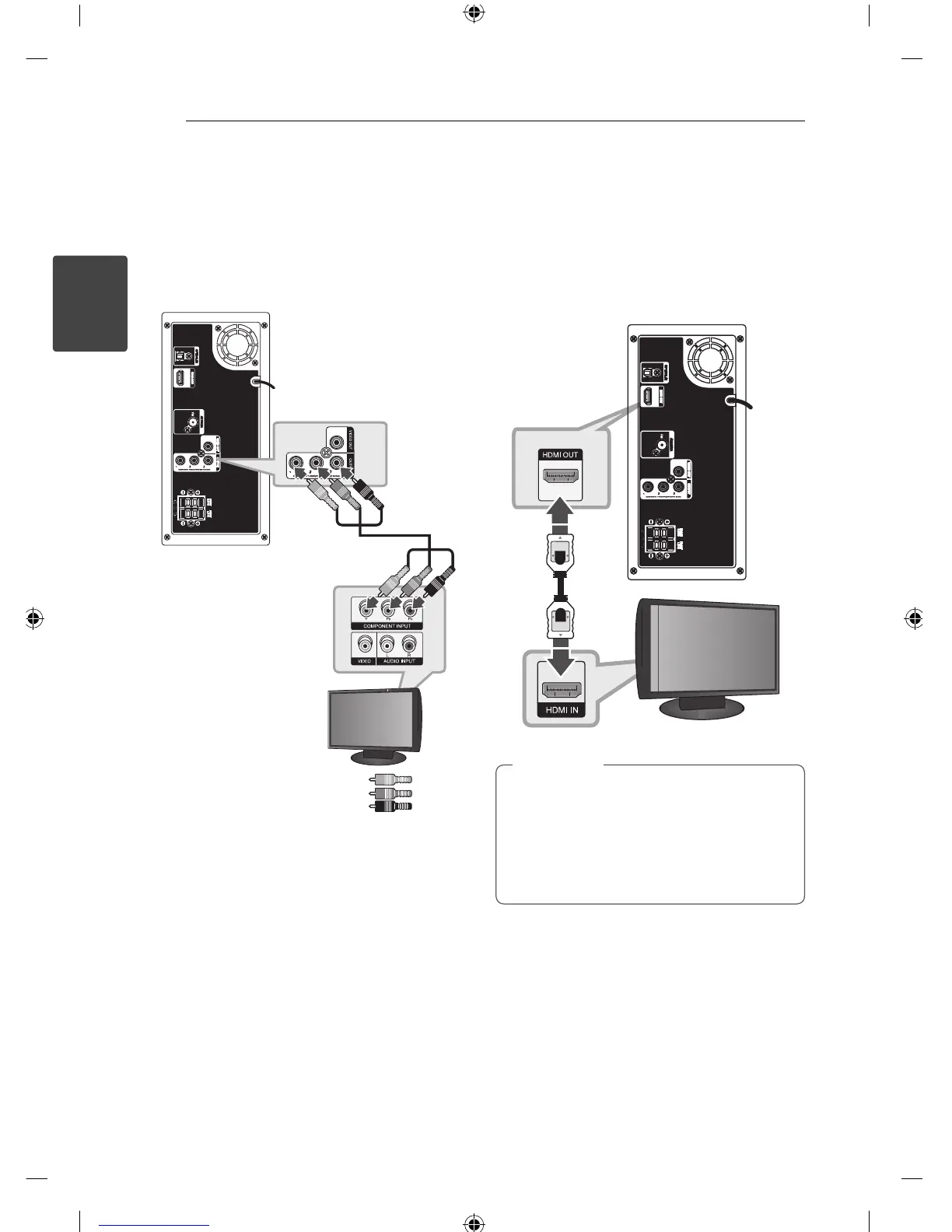
Component Video Connection
Connect the COMPONENT VIDEO OUTPUT
(PROGRESSIVE SCAN) jacks on the unit to the
corresponding input jacks on the TV using
component cables.
You can hear the sound through the system’s
speakers.
Unit
TV
Green
Blue
Red
HDMI Out Connection
If you have a HDMI TV or monitor, you can connect
it to this unit using a HDMI cable (Type A, High
Speed HDMI™ cable).
Connect the HDMI OUT jack on the unit to the
HDMI IN jack on a HDMI compatible TV or monitor.
Set the TV’s source to HDMI (refer to TV’s Owner’s
manual).
Unit
TV
You can fully enjoy digital audio and video
signals together with this HDMI connection.
When you use HDMI connection, you can
change the resolution for the HDMI output.
(Refer to “Resolution” on page 16.)
,
Tip



 To Next Page