Connecting 13
Connecting
2
Attaching the speakers
to the unit
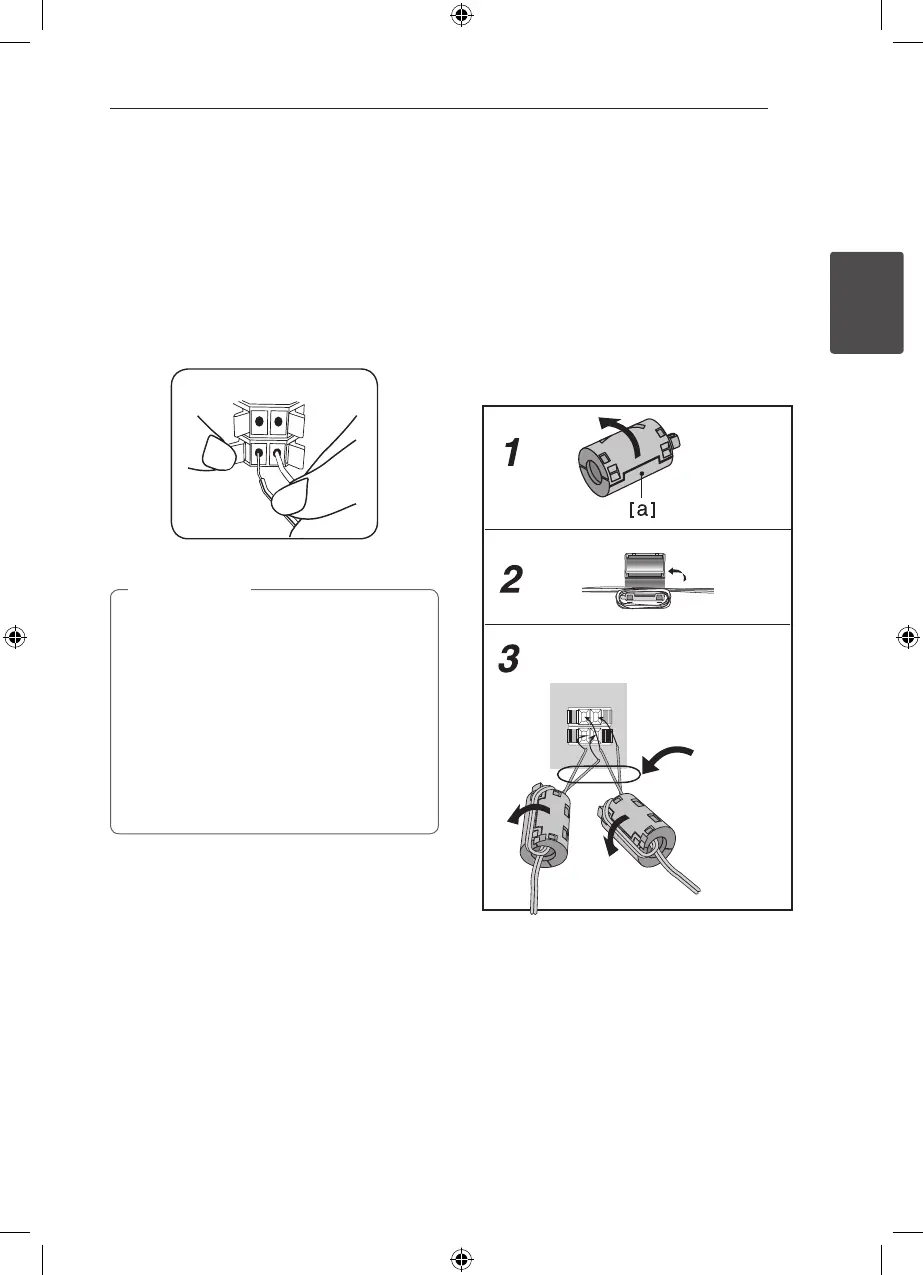
To connect the cable to the unit, press each plastic
nger pad to open the connection terminals on the
unit. Insert the wire and release the nger pad.
Connect the black stripe of each wire to the
terminals marked - (minus) and the other end to
the terminals marked + (plus).
y
Be careful to make sure children not to put
their hands or any objects into the *speaker
duct.
*Speaker duct: A hole for plentiful bass
sound on speaker cabinet (enclosure).
y
The speakers contain magnet parts, so color
irregularity may occur on the TV screen or
PC monitor screen. Please use the speakers
far away from either TV screen or PC
monitor.
>
Caution
About Ferrite Core (for EMI only)
Be sure to attach the ferrite core to the speaker
cable (for connecting to this unit and wireless
receiver). This ferrite core can reduce noises.
How to attach the ferrite core
1. Press the stopper [a] of the ferrite core to open.
2. Wind the speaker cables once on the ferrite
core.
3. Close the ferrite core until it clicks.
Refer to the g.3 and comment.
(g. 3)
Rear of wierless receiver
The length here
is as short as
possible.
FX166-F2F_DRUSLL_SIM_ENG_4932.indd 13 2011-04-28 �� 10:19:49



 To Next Page