Operating 17
Operating
4
Basic operations for video and
audio content
To stop playback
Press
Z
(STOP) while playback.
To pause playback
Press
M
(PAUSE) while playback.
Press
d
(PLAY) to resume playback.
To play frame-by-frame (video)
Press
M
(PAUSE) while movie playback.
Press
M
(PAUSE) repeatedly to play Frame-by-Frame
playback.
To scan forward or backward
Press
c
or
v
to play fast forward or fast reverse
during playback.
You can change the various playback speeds by
pressing
c
or
v
repeatedly.
To slow down the playing
speed(video)
While the playback is paused, press
v
repeatedly
to play various speeds of slow motion.
To skip to the next/previous
chapter/track/file
During playback, press
C
or
V
to go to the
next chapter/track/le or to return to the beginning
of the current chapter/track/le.
Press
C
twice briey to step back to the previous
chapter/track/le.
In the le list menu of a server, there may have
many types of contents in a folder together. In this
case, press
C
or
V
to go to the previous or
next content with same type.
On-Screen display
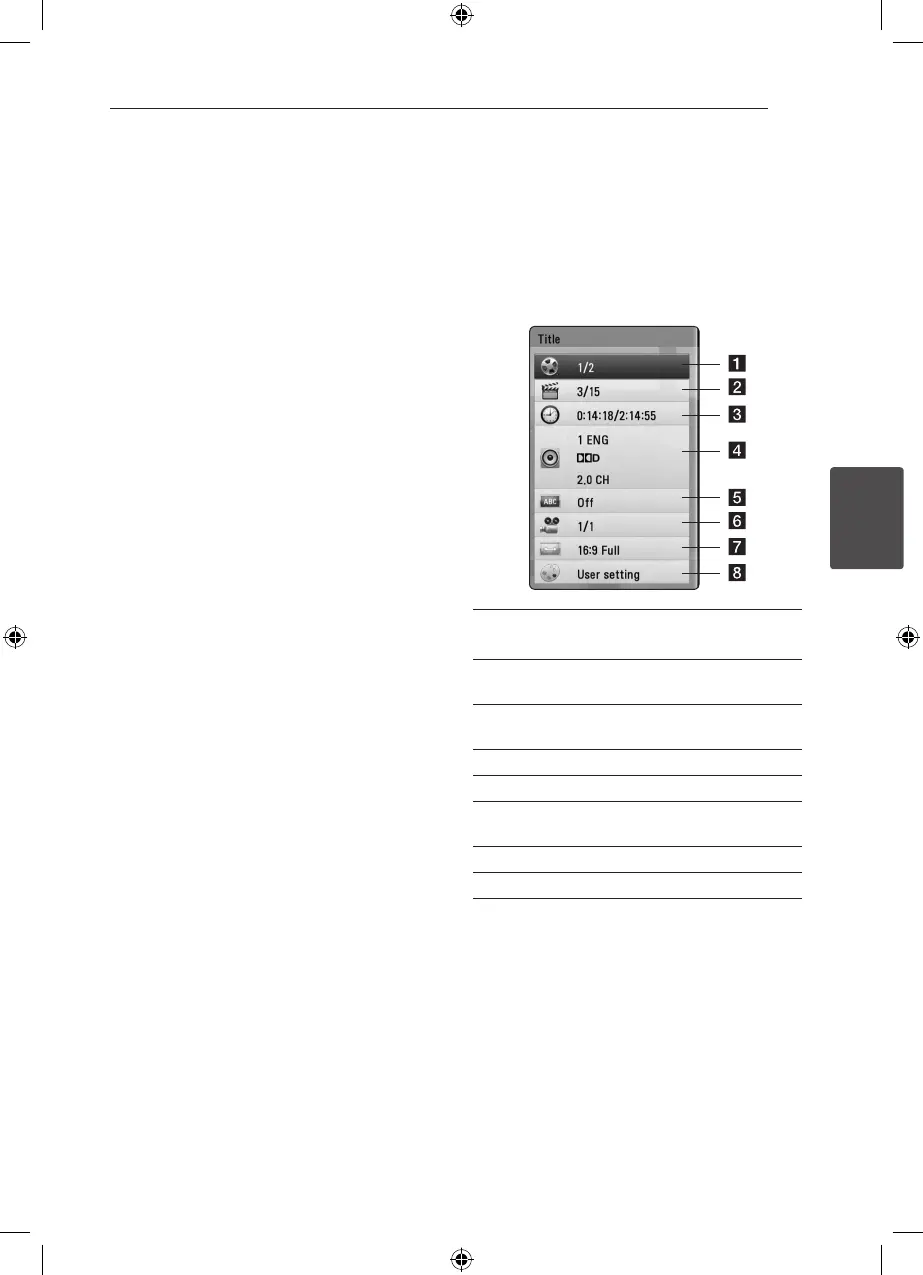
You can display and adjust various information and
settings about the content.
eroy
1. While playback, press INFO/DISPLAY (
m
) to
show various playback information.
a Title – current title number/total number of
titles
b Chapter – current chapter number/total
number of chapters
c Time – elapsed playing time/total playback
time
d Audio – selected audio language or channel
e Subtitle – selected subtitle.
f Angle – selected angle/total number of
angles
g TV Aspect Ratio – selected TV aspect Ratio
h Picture Mode – selected picture mode
2. Select an option using
W/S
.
3. Use
A/D
to adjust the selected option value.
4. Press BACK(
x
) to exit the On-Screen display.
FX166-F2F_DRUSLL_SIM_ENG_4932.indd 17 2011-04-28 �� 10:19:51



 To Next Page