19
OPERATION
ENGLISH
Control Panel
The actual control panel may differ from model to model.
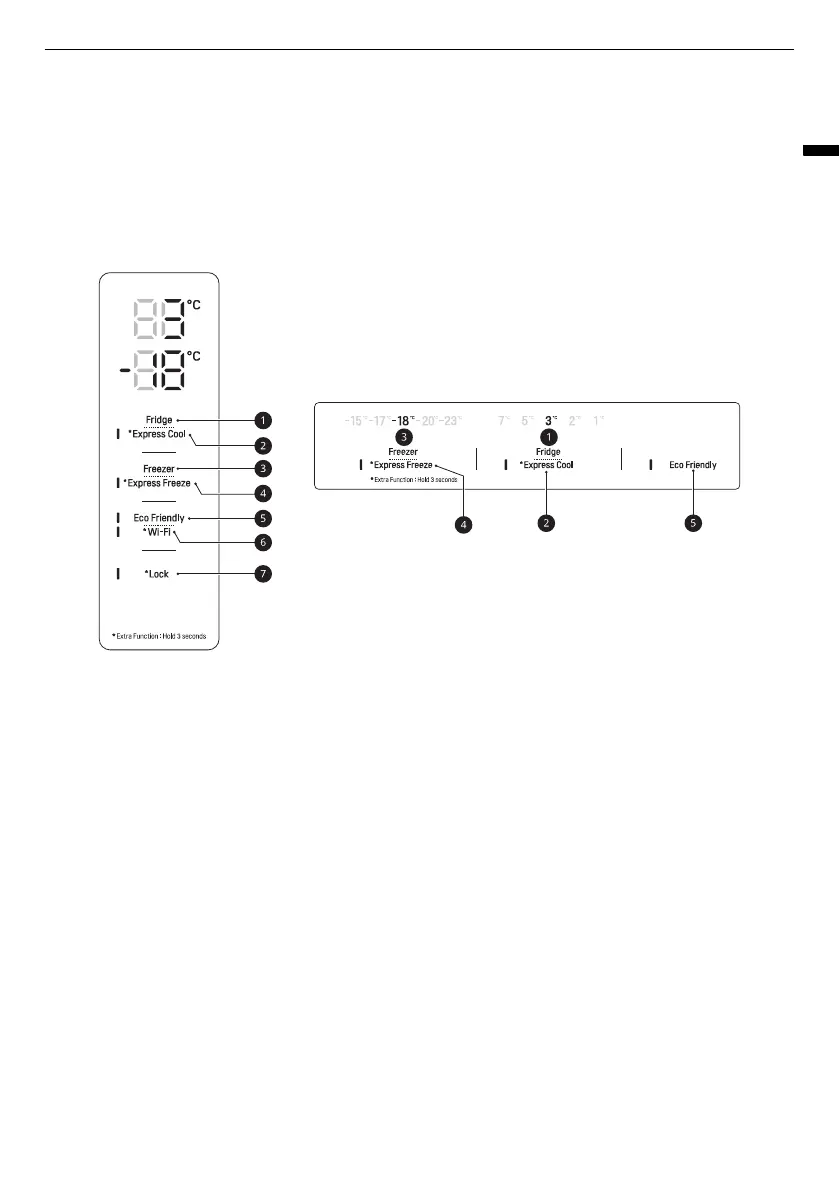
Control Panel and Functions
*1 This feature is only available on some models.
The control panel can be found either on the Fridge Door or inside the Fridge depending on the model.
a
Fridge
Press this button repeatedly to select a desired temperature between 1 °C and 7 °C.
• The default fridge temperature is 3 °C.
b
Express Cool
This function can quickly cool a large amount of foods such as vegetable, fruit and so on.
• This function is enabled and disabled in turn each time you press the button for 3 seconds.
c
Freezer
Press this button repeatedly to select a desired temperature between -15 °C and -23 °C.
• The default freezer temperature is -18 °C.
d
Express Freeze
This function can quickly freeze a large amount of ice or frozen foods.
• Press the
Express Freeze
button to activate the function for 24 hours. The function automatically
shuts off after 24 hours.
• This function is enabled and disabled in turn each time you press the button for 3 seconds.
• When this mode is on, noise may occur and energy consumption may increase.
e
Eco Friendly


 To Next Page