22 Installation
Installation
3
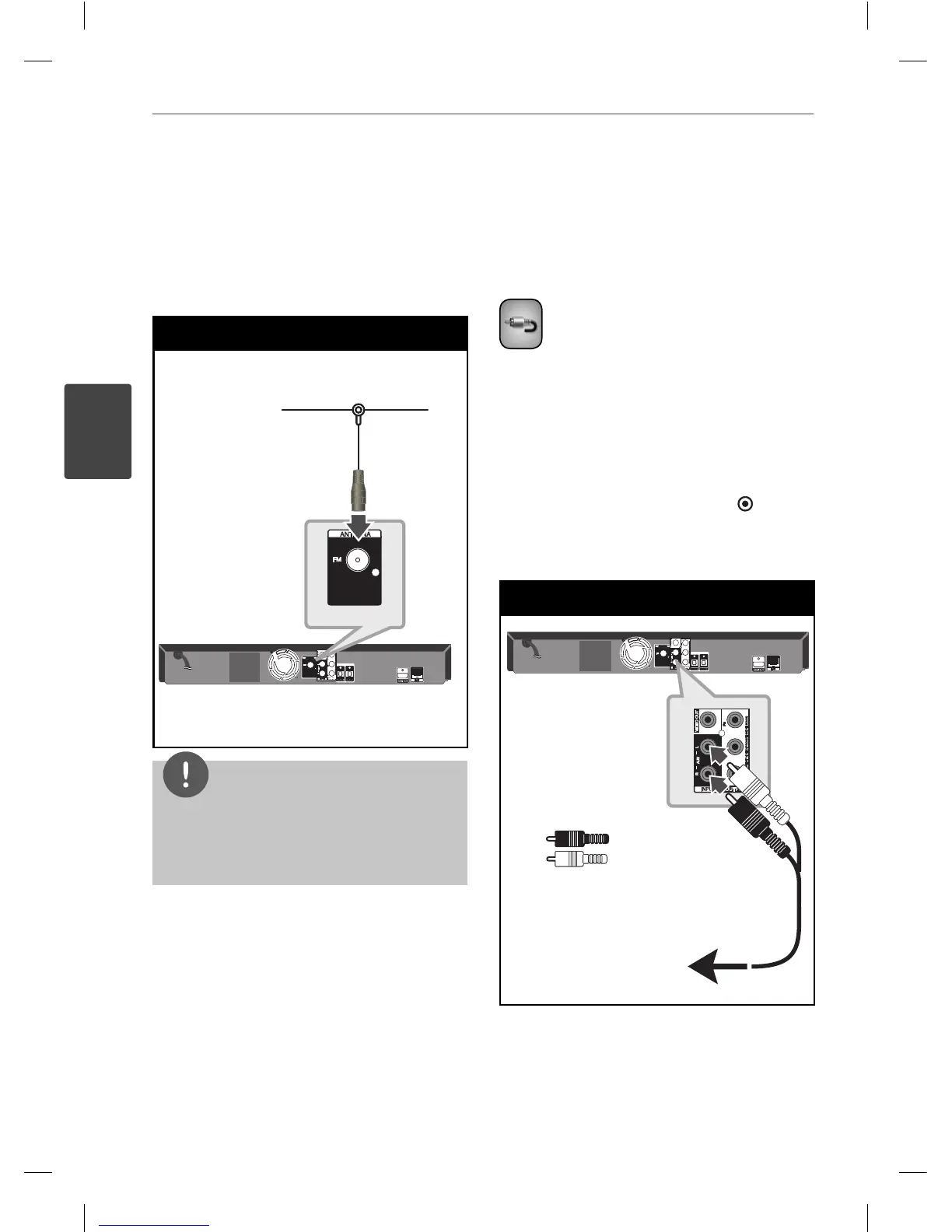
Antenna connection
Connect the supplied antenna for listening to
the radio.
Antenna Connection
Player
Player
NOTE
After connecting the FM wire antenna, keep it as
horizontal as possible. Be sure to fully extend the
FM wire antenna.
Connections with
external device
AUX Connection
You can enjoy the sound of your component
with the analogue audio output jacks from the
speakers of the system.
Connect the analogue audio output jacks of
your component into the AUX L/R (INPUT) on
this unit. And then select the [AUX] option by
pressing RADIO&INPUT and ENTER (
).
You can also use F button on the front panel to
select the input mode.
AUX Connection
Player
To the audio output jacks
of your component
(TV, VCR, etc.)
Red
White
Red
White
Player
To the audio output jacks
of your component
(TV, VCR, etc.)
HB405SU_D0.BGBRLL_ENG_4261.indd 22HB405SU_D0.BGBRLL_ENG_4261.indd 22 2010.2.11 2:22:37 PM2010.2.11 2:22:37 PM


 To Next Page