36 Operation
Operation
4
General Playback
Playing Discs
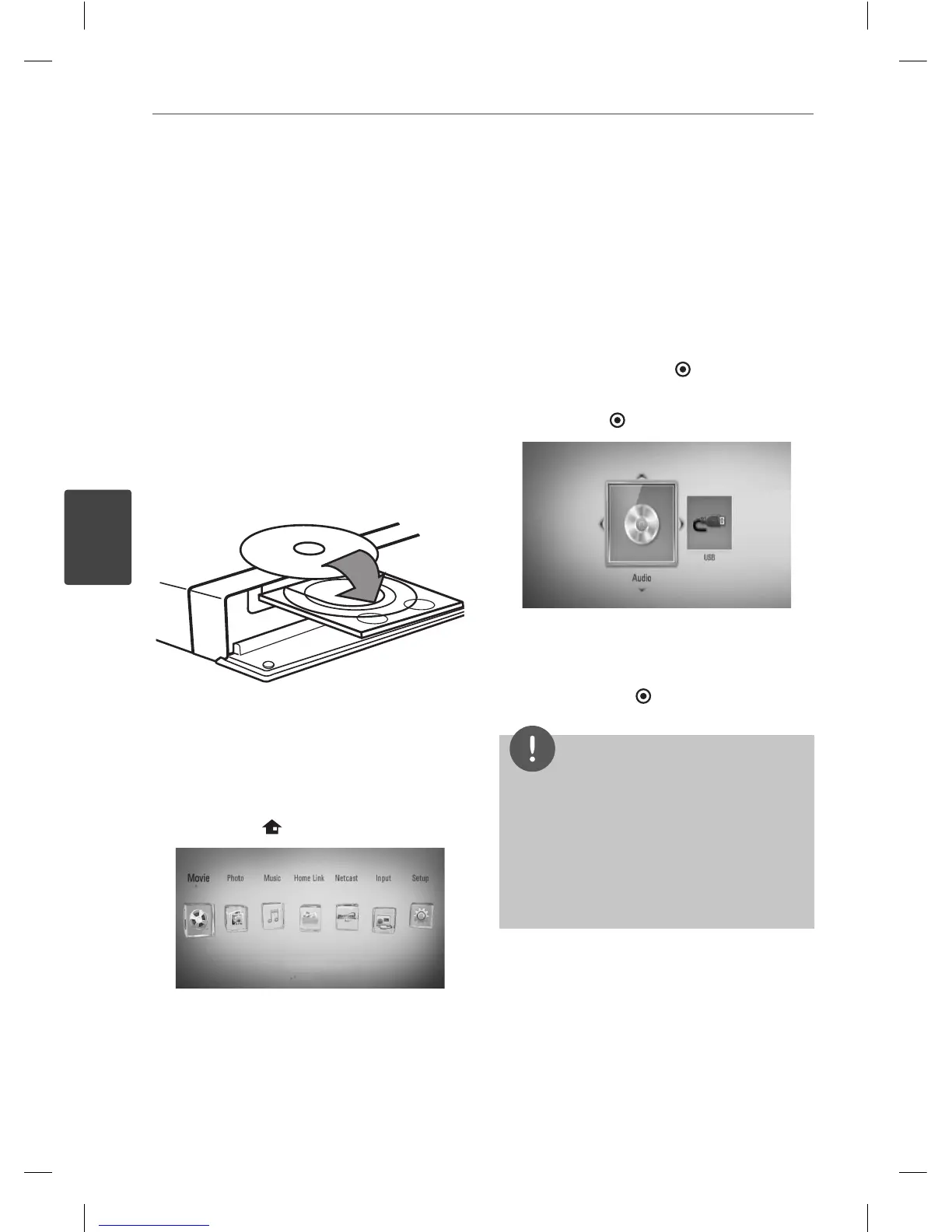
1. Press OPEN/CLOSE (
Z
), and place a disc on
the disc tray.
2. Press OPEN/CLOSE(
Z
) to close the disc
tray.
For the most Audio CD, BD-ROM and
DVD-ROM discs, playback starts
automatically.
3. Press HOME (
).
4. Select [Movie], [Photo] or [Music] using
I
/
i
, and press ENTER ( ).
5. Select the [Disc] option using
I
/
i
, and
press ENTER (
).
When you connect up to two devices, it
appears as above.
6. Select a le using
U
/
u
/
I
/
i
, and press
B
(PLAY) or ENTER (
) to play the le.
NOTE
Playback functions described in this manual are
not always available in every les and medium.
Some functions can be restricted depending on
many factors.
Depending on the BD-ROM titles, a USB device
connection may be needed for the proper
playback.
•
•
4
Operation
HB405SU_D0.BGBRLL_ENG_4261.indd 36HB405SU_D0.BGBRLL_ENG_4261.indd 36 2010.2.11 2:22:43 PM2010.2.11 2:22:43 PM


 To Next Page