53
Operation
4
Operation
Selecting a subtitle fi le
MOVIE
If a movie le name and the subtitle le
name are the same, subtitle le is played
automatically when playing the movie le.
If the subtitle le name is di erent with the
movie le name, you need to select the subtitle
le on the [Movie] menu before playing the
movie.
1. Use
U
/
u
/
I
/
i
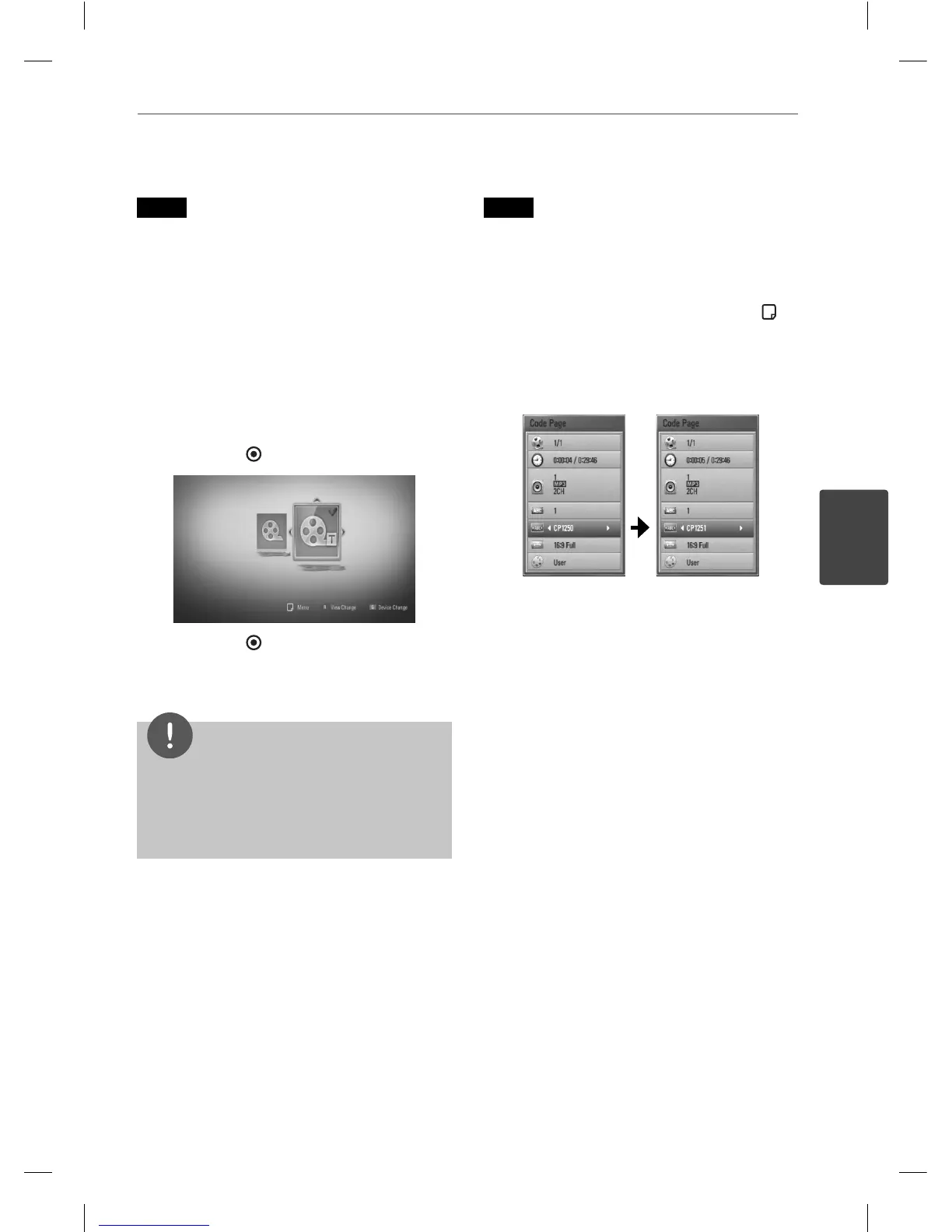
to select the subtitle le you
wish to play in the [Movie] menu.
2. Press ENTER (
).
Press ENTER ( ) again to deselect the
subtitle le. Selected subtitle le will be
displayed when you play the movie le.
NOTE
If you press
x
(STOP) while playback, the
subtitle selection is cancelled.
This function may not work in the [Home Link]
feature.
•
•
Changing subtitle code page
MOVIE
If the subtitle is not displayed properly, You
can change the subtitle code page to view the
subtitle le properly.
1. During playback, press INFO/DISPLAY (
) to
display the on-screen display.
2. Use
U
/
u
to select the [Code Page] option.
3. Use
I
/
i
to select desired code option.
4. Press RETURN(
O
) to exit the On-Screen
display.
HB965DF-DD.BGBRLL_ENG_0466.indd 53HB965DF-DD.BGBRLL_ENG_0466.indd 53 2010.2.26 1:25:2 PM2010.2.26 1:25:2 PM



 To Next Page