9
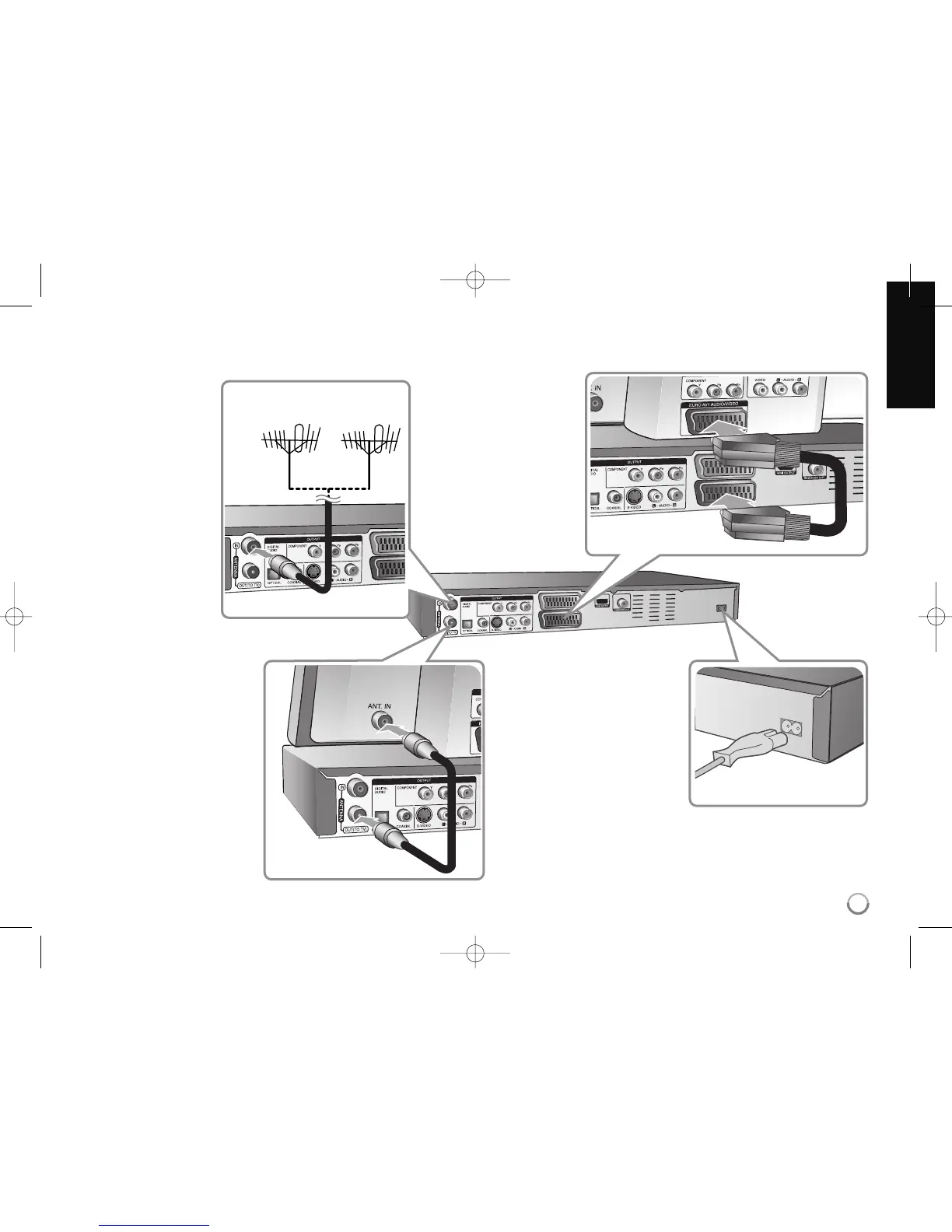
Hooking up the HDD/DVD recorder
a Antenna connection
Connect the Terrestrial
TV antenna to the
ANTENNA IN jack on
the unit.
If you want to use an
indoor antenna, use one
with a signal amplifier
rated at 5V, 100mA and
set [Antenna Feed 5V]
to [ON] in the setup
menu. (See page 19 for
details)
b Antenna connection to
your TV
Connect one end of the RF
cable to ANTENNA OUT jack
on the HDD/DVD recorder
and other end to ANTENNA
IN jack on your TV.
Passes the signal from the
ANTENNA IN jack to your
TV/monitor.
c SCART connection
Connect one end of the scart
cable into the AV1 SCART
jack on the HDD/DVD
recorder and the other end
to the corresponding in jack
on your TV.
d Power cord connection
Connect the mains lead to
the AC IN terminal on the
HDD/DVD recorder. Then
plug the power cord into the
mains.
Antenna
(Digital)
Antenna
(Analog)
and/or



 To Next Page