Getting Started 9
Getting Started
1
Battery Installation
Remove the battery cover on the
rear of the Remote Control, and
insert one (size AAA) battery with
4
and
5
matched correctly.
• • • • • •
a
• • • • •
P
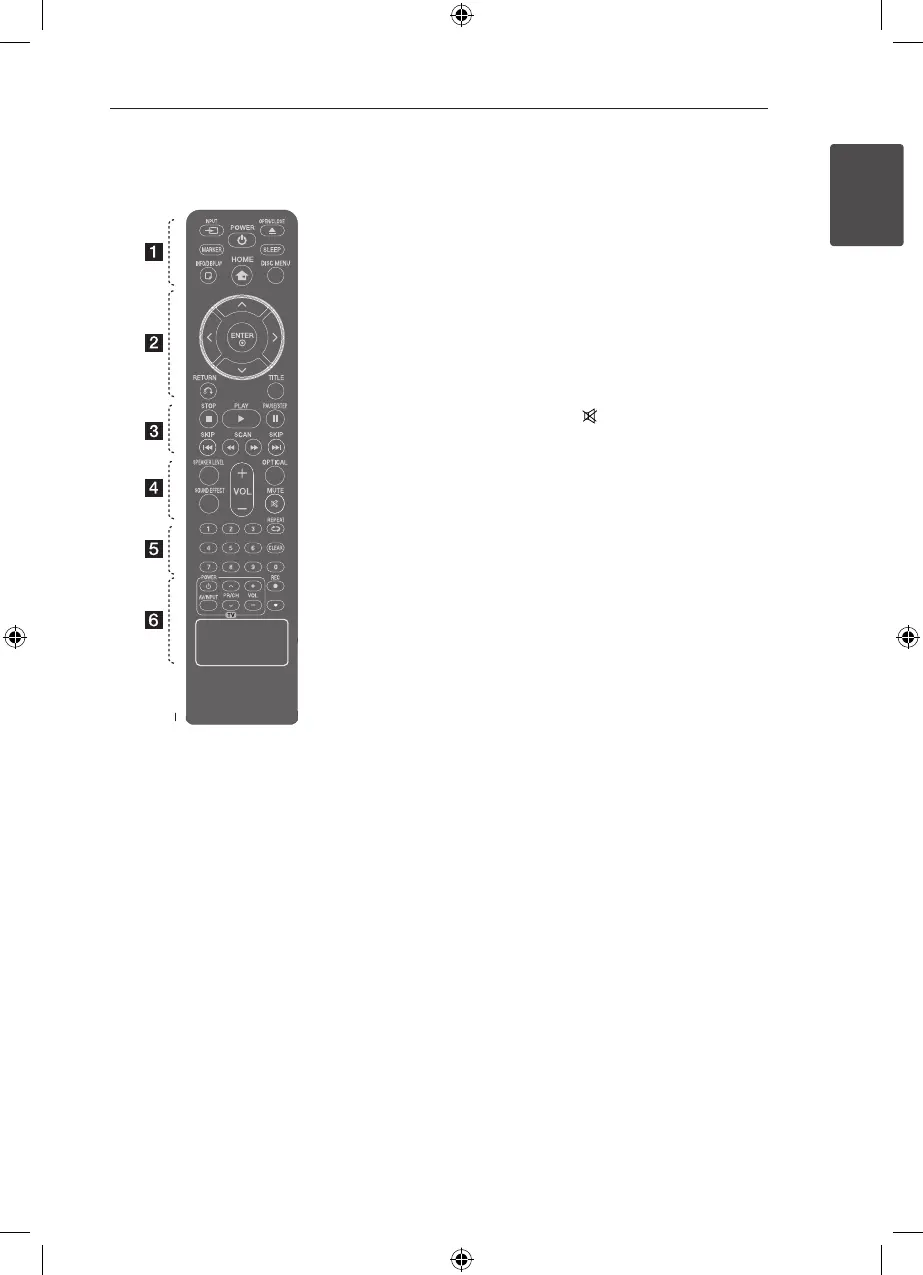
INPUT: Changes input
sources.
MARKER: Marks play list.
1
POWER: Switches the unit ON
or OFF.
B
OPEN/CLOSE: Opens and
closes the disc Drawer.
SLEEP: Sets the System to turn o
automatically at a specied time.
(Dimmer : The display window will
be darken by half.)
m
INFO/DISPLAY: Accesses On-
Screen Display.
n
HOME: Displays the [Home
Menu].
DISC MENU: Accesses the menu
on a DVD disc.
• • • • • •
b
• • • • •
W/S/A/D
(up/ down/ left/
right): Used to navigate on-screen
displays.
b
ENTER: Acknowledges menu
selection.
x
RETURN: Moves backwards
in the menu or exits the setup
menu.
TITLE: If the current DVD title has
a menu, the title menu appears
on the screen. Otherwise, the disc
menu may not appear.
• • • • • •
c
• • • • •
Z
STOP: Stops playback.
d
PLAY, MONO/STEREO: Starts
playback. Selects Mono/ Stereo.
M
PAUSE/STEP: Pauses playback.
C/V
SKIP: Goes to the next
or previous chapter / track / le.
c/v
SCAN: Searches
backward or forward.
• • • • • •
d
• • • • •
SPEAKER LEVEL: Sets the sound
level of desired speaker.
SOUND EFFECT: Selects a sound
eect mode.
VOL -/+ (Volume): Adjusts
speaker volume.
OPTICAL: Changes input source
to optical directly.
MUTE: Mutes the sound.
• • • • • •
e
• • • • •
0-9 numerical buttons: Selects
numbered options in a menu.
h
REPEAT: Selects a play
mode. (Repeat/ Random)
CLEAR: Removes a number when
setting the password.
• • • • • •
f
• • • • •
TV Control buttons: Controls the
TV. (LG TV only)
-
You can control the sound
level, input source, and power
switching of LG TVs as well.
Hold POWER (TV) and press PR/
CH (
W/S
) button repeatedly
until the TV turns on or o.
X
REC: USB Direct Recording.
?
: This button is not available.
Remote control
HT806TH-N0_BTURLLK_ENG_5895.indd 9 2012-05-31 �� 11:26:21



 To Next Page