EasyManua.ls Logo

LG HT503SH - User Manual

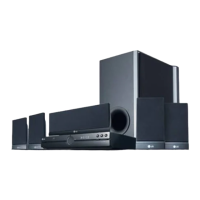
LG HT503SH
22 pages
Print Icon
To Next Page IconTo Next Page
Loading...
Model: HT503SH(HT503SH-AM, SH53SH-S/C/W)
Unique Features
P/NO : MFL56941169
5.1ch ez Set-up
Listen sound from TV, DVD
and Digital Device with vivid
5.1ch mode.
Go to page 15
Full HD up-scaling
(1080p)
View Full HD picture quality
with simple setup.
Go to page 10
USB Direct Recording
Record music from CD to
your USB device.
Go to page 17
Portable In
Listen to music from your
portable device (MP3,
Notebook, etc).
Go to page 17
HT503SH-AM_BSGPLLK_ENG_1169 6/27/08 7:17 PM Page 1

Other manuals for LG HT503SH

Questions and Answers

  • C
    Caitlin LesterAug 18, 2025
    How to fix no picture on LG HT503SH Home Theater System?
    • A
      Adrienne TaylorAug 18, 2025
      If there is no picture on your TV when using the LG Home Theater System, ensure that your TV is set to the correct video input mode to receive the DVD signal. Also, verify that the video cables are securely connected to both the TV and the DVD Receiver.
  • S
    snyderbryanAug 20, 2025
    Why is there little or no sound on my LG Home Theater System?
    • P
      Patrick FernandezAug 20, 2025
      If you experience little or no sound with your LG Home Theater System, ensure that the equipment connected via the audio cable is set to receive the DVD signal output. Check that the audio cables are securely connected to both the speakers and the receiver. If the issue persists, the audio cables may be damaged and need replacement.
  • S
    schultzfrederickAug 23, 2025
    How to stop humming noise on LG Home Theater System?
    • T
      Teresa SanfordAug 23, 2025
      If you hear a humming noise while playing a DVD or CD on your LG Home Theater System, the disc may be dirty. Clean it with a soft cloth, using outward strokes. Alternatively, the DVD receiver might be too close to the TV, causing feedback. Try moving the DVD receiver and other audio components further away from the TV.
  • K
    Kyle FrankAug 26, 2025
    Why is there no sound on my LG HT503SH?
    • J
      Jamie RandallAug 26, 2025
      If you experience little or no sound from your LG Home Theater System, verify that the connected equipment is set to receive the DVD signal output. Also, check that the audio cables are securely connected to both the speakers and the receiver. If the issue persists, consider replacing the audio cables, as they might be damaged.
  • C
    cramirezAug 28, 2025
    Why is there no picture on my LG Dvd receiver?
    • T
      Travis SilvaAug 28, 2025
      If there's no picture on your LG Dvd receiver, it could be due to a couple of reasons. First, make sure your TV is set to the correct video input mode to receive the signal from the DVD receiver. Also, check that the video cables are securely connected to both the TV and the DVD receiver.
  • V
    victoriaflynnAug 30, 2025
    What to do if there is no sound from my LG Dvd receiver?
    • L
      Lori CastilloAug 30, 2025
      If you're experiencing little to no sound from your LG Dvd receiver, there are a few things you can check: * Ensure that the equipment connected via the audio cable is set to receive the DVD signal output. * Verify that the audio cables are securely connected to both the speakers and the receiver. * If the issue persists, the audio cables may be damaged and need replacement.
  • D
    Derek RussellSep 2, 2025
    How to fix an LG Dvd receiver that won't play DVDs or CDs?
    • J
      Jerry DuncanSep 2, 2025
      If your LG Dvd receiver isn't playing DVDs or CDs, consider these possibilities: 1. Ensure a disc is actually inserted. 2. Verify that the inserted disc is a playable format, considering the disc type, color system, and regional code. 3. Make sure the disc is inserted correctly, with the label or printed side facing upwards. 4. Check if the menu is open on the screen; if so, press SETUP to close it. 5. A parental lock may be enabled, preventing playback based on the DVD's rating. Enter your password or adjust the rating level accordingly.
  • R
    Rebecca SmithSep 4, 2025
    What to do if DVD/CD will not play on LG HT503SH Home Theater System?
    • V
      vrussellSep 4, 2025
      If your LG Home Theater System isn't playing DVDs or CDs, first, make sure a disc is actually inserted and that it's a playable disc (check the disc type, colour system, and regional code). Ensure the disc is placed correctly with the label side up. If a menu is open, press SETUP to close it. Also, check if a parental lock is enabled, and if so, enter your password or adjust the rating level.
  • B
    Bonnie HermanSep 7, 2025
    What to do if LG Home Theater System DVD picture quality is poor?
    • R
      Robert JonesSep 7, 2025
      If your LG Home Theater System DVD picture quality is poor, the disc may be dirty. Clean the disc using a soft cloth, wiping from the center outwards.
  • S
    Samuel LewisSep 9, 2025
    Why won’t my LG HT503SH play DVDs?
    • A
      Amanda ReeseSep 9, 2025
      If your LG Home Theater System won’t play a DVD/CD, first, ensure that a disc is inserted correctly with the label facing upwards. Make sure you are using a playable disc and close any open menus by pressing the SETUP button. Also, check if parental lock settings are preventing playback and enter your password or adjust the rating level accordingly.

LG HT503SH Specifications

General IconGeneral
EqualizerYes
RMS rated power500 W
Audio output channels5.1 channels
Satellite speakers RMS power70 W
FM band range87.5 - 108 MHz
Preset stations quantity50
Disc types supportedCD, DVD+RW, DVD-R, DVD-RW
Number of optical discs1 discs
Optical disc player typeDVD player
Weight3600 g
Dimensions (WxDxH)430 x 310 x 70 mm
USB version2.0
Weight and Dimensions IconWeight and Dimensions
Subwoofer weight5500 g
Rear speaker weight610 g
Center speaker weight1250 g
Subwoofer dimensions (WxDxH)160 x 382 x 401 mm
Front speaker dimensions (WxDxH)105 x 103 x 193 mm
Center speaker dimensions (WxDxH)330 x 111 x 94 mm

Related product manuals