10 Preparation
Preparation
2
Remote control
a
b
c
d
e
f
• • • • • • • • • •
d
• • • • • • • • •
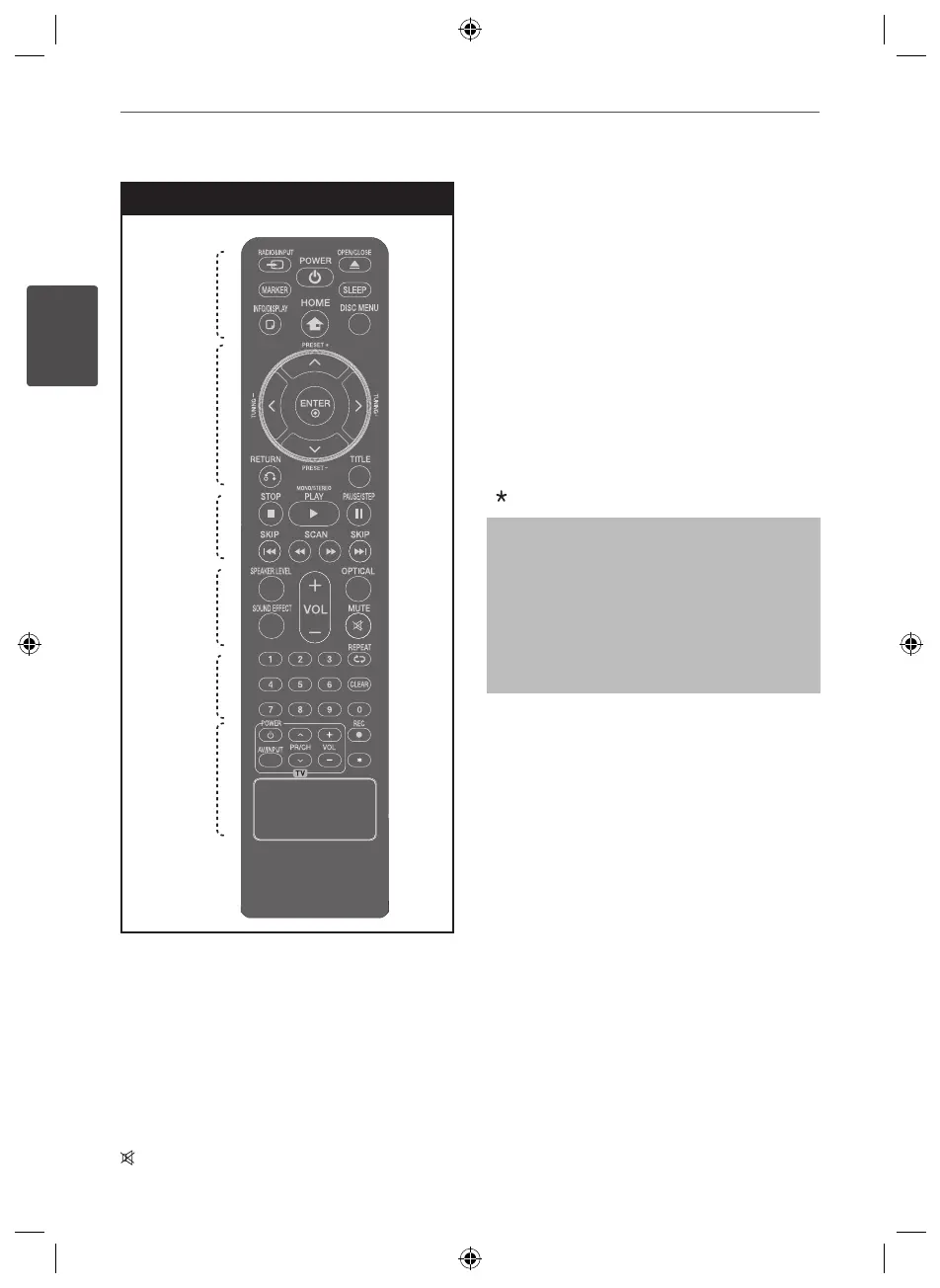
SPEAKER LEVEL: Sets the sound level of
desired speaker.
SOUND EFFECT:Selectsasoundeectmode.
VOL -/+ (Volume) : Adjusts speaker volume.
OPTICAL: Changes input source to optical
directly.
MUTE : Mutes the sound.
• • • • • • • • • •
e
• • • • • • • • •
0-9 numerical buttons : Selects numbered
options in a menu.
CLEAR : Removes a number when setting the
password.
s
REPEAT : Selects a play mode. (Repeat/
Random)
• • • • • • • • • •
f
• • • • • • • • •
TV Control buttons : Controls the TV. (LG TV
only)
z
REC : USB Direct Recording.
: This button is not available.
Controlling the TV.
You can control the sound level, input
source, and power switching of LG TVs as
well. Hold POWER (TV) and press PR/CH
(
U
/
u
) button repeatedly until the TV turns
onoro.
HT805PH-A0_DARELLK_ENG_6810.indd 10 2010-08-31 �� 7:35:35



 To Next Page