EasyManua.ls Logo

LG IPS224T - Setting up the Monitor Set; Attaching the Stand Base; Detaching the Stand Base

LG IPS224T
28 pages
Print Icon
To Next Page IconTo Next Page
To Previous Page IconTo Previous Page
Loading...
5
ENG
ENGLISH
ASSEMBLING AND PREPARING
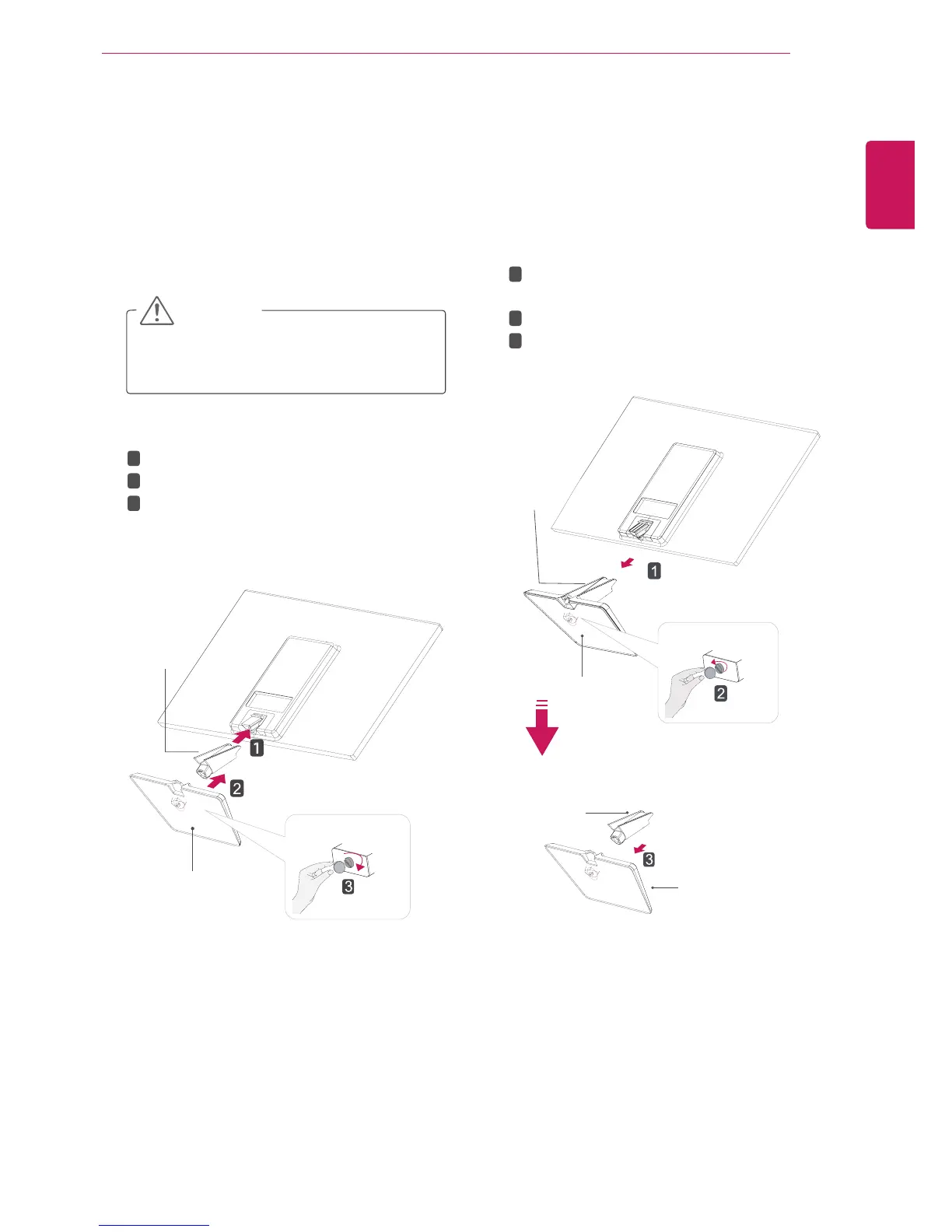
Attachthetothemonitorset.
Attachthe.
Tightenthescrewtotherightwithacoin.


1
PlacetheMonitorsetwiththescreenside
downonaflatandcushionedsurface.
Layafoammatorsoftprotectivecloth
onthesurfacetoprotectthescreenfrom
damage.

2



1
PlacetheMonitorsetwiththescreenside
downonaflatandcushionedsurface.




Pullouttheand
fromthemonitorset.
Turnthescrewtotheleftwithacoin.
Pulloutthe.
2

Related product manuals