OK?
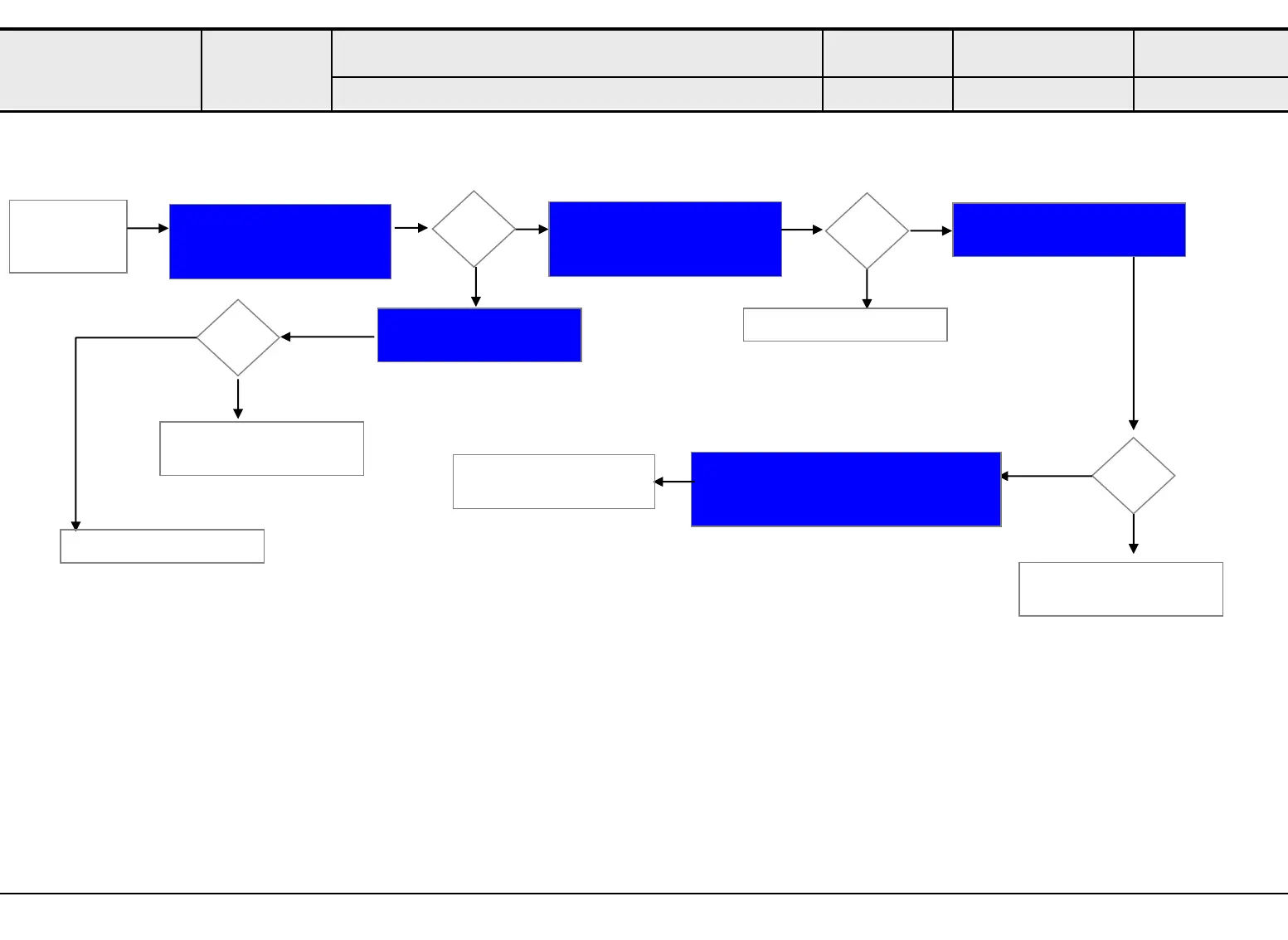
Entire screen
turns into
black
Y
Check the power supply
status of the Main board.
(12V)
N
Standard Repair Process
A. Video error
No video (Entire screen turns into black)
Established
date
Revised date
Error
symptom
Check Power Controller
Board
Check the power supply
status of the Main board.
(5V_ST)
AIO136
LED SIGNAGE
OK?
Y
N
1
Replace 12V PSU
OK?
Y
N
① Replace 8pin CABLE
② Replace Main Board
☞B1_③
Check the LED indicator on FPGA board
① Check connection with Main Board
② Verifying normal operation of FPGA
① Replace Vby1 CABLE
② Replace FPGA Board
☞A1
Check the power of FPGA
board(12V)
☞B1_①
☞B1_②
Replace Power
Controller Board
OK?
N
☞B4
Replace AC power Cord
Y



 To Next Page