- 33 -- 33 -
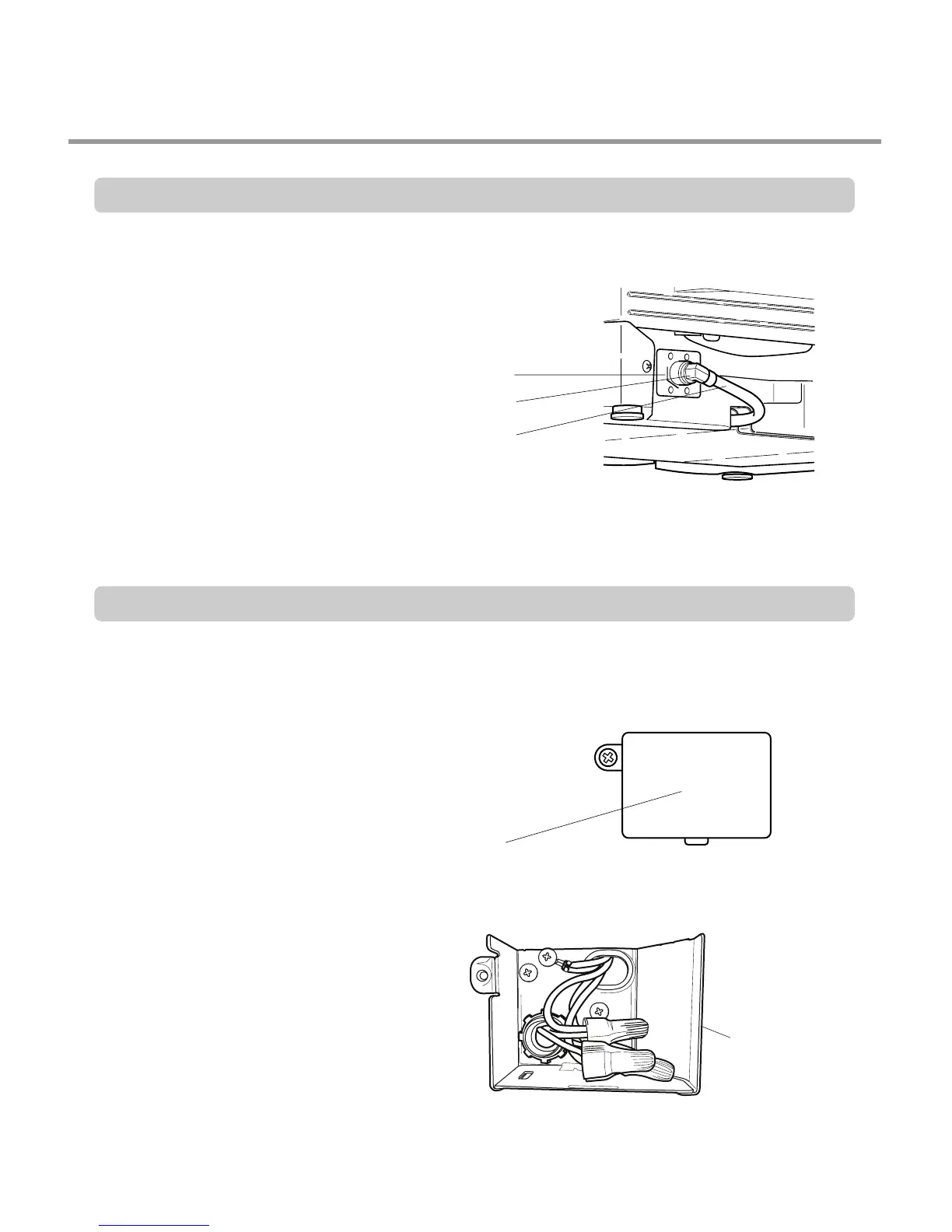
Step 7: WATER SUPPLY CONNECTION
1. When connecting, sealing tape or
sealing compound should be
used to avoid water leaks.
2. Before connecting, turn off the water
supply.
3. After fitting the Elbow into the
Inlet Valve, slide the Flexible
Stainless Tube or Copper Tube
into the Elbow.
4. Tighten the nut and make sure
that the line is not kinked or
sharply bent.
Inlet Valve
ater Supply Tube
Elbow
1. Before beginning, turn off electrical
power to the unit at the circuit breaker.
2. Remove the Junction Cover and then
Install the Strain Relief.
3. Twist Wire Connectors tightly on the
wires. Wrap each connection with
Electrical tape.
4. Check again and make sure that all
wires are connected correctly, black to
black, white to white, green to green
(ground to ground).
5. Replace the Junction Cover.
Junction Box
Step 8: ELECTRICAL POWER CONNECTION





 To Next Page