Need help?
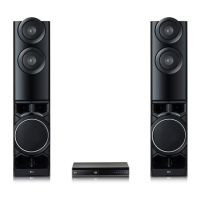
Do you have a question about the LG LHD655BT and is the answer not in the manual?
Details about not opening the unit and referring to qualified personnel for servicing, plus laser system use and radiation precautions.
Warnings about moisture, confined spaces, and surrounding products.
Explains symbols for AC/DC, class II, stand-by, power, and dangerous voltage.
Highlights Portable In, USB Recording, Full HD Up-scaling, and Bluetooth audio.
Explains the Home Theater Speaker ez Setup feature.
Lists compatible disc types like DVD-VIDEO, DVD±R/RW, and Audio CDs.
Defines symbols and explains the "O" symbol for unavailable functions.
Details compatibility for MP3, WMA, JPG, AVI, MPG, MPEG files.
Explains the purpose of each button on the remote control.
Instructions for replacing the remote control's battery.
Identifies and describes the disc tray, display, microphone jacks, and ports.
Identifies and describes power, speaker, HDMI, AUX, VIDEO OUT, FM, and OPTICAL ports.
Guides attaching the pole to the base and securing speakers to stands.
Details connecting speaker wires, ensuring correct polarity and avoiding cord pinching.
Instructions for connecting speaker wires to the unit and speakers, with cautions.
Illustrates optimal placement for surround sound setup.
Instructions for connecting the unit to a TV or monitor via HDMI cable.
Explains TV remote control integration and operational notes.
How to connect the unit to a TV using a video cable.
Guides setting HDMI output resolution via the setup menu.
Details available resolutions for HDMI and Video OUT.
Connects auxiliary audio devices using the AUX (L/R) INPUT.
Connects portable devices via PORT. IN or USB for music playback.
Steps to play music from connected portable players or USB devices.
Connects optical audio devices and FM antenna.
Guides setting up surround sound from TV, DVD, or Digital devices.
Overview of making picture, sound, and language adjustments.
Guide for selecting the initial language for the unit's interface.
Information on navigating and exiting the setup menu.
Selects menu, audio, and subtitle languages.
Sets TV aspect ratio and display mode (Letterbox/Pan&Scan).
Configures surround sound speakers, volume, and distance.
Explains DRC, Vocal, HD AV Sync, and Semi Karaoke functions.
Sets area code for DVD playback and rating limits for content.
Manages parental control password, including reset procedures.
Accesses Music, Movie, Photo, and Setup menus.
Covers disc insertion, USB connection, and playback controls.
Displays disc info, navigates DVD menus and titles.
Covers 1.5x speed, screen saver, timed playback, and resume functions.
Adjusts subtitle display for proper viewing.
Manages favorite files and deletes playback markers.
Selects folders, views photos, and uses slide show features.
Explains options like speed, rotation, and going back to the list.
Sets automatic turn-off time and dims the display.
Covers Last Scene Memory, Power Resume, and System Select.
Temporarily turns off the unit's sound.
Fine-tunes the sound level for each speaker.
Enables karaoke effect and automatic power saving.
Instructions for listening, tuning, and saving FM radio stations.
Steps for deleting saved radio stations.
Tips to improve FM reception by changing tuner mode.
Chooses sound modes like Standard, Bass, Football.
Allows custom adjustment of Bass and Treble levels.
Instructions for recording audio sources to a USB device.
Explains Bluetooth technology, available devices, and A2DP profile.
Steps for pairing Bluetooth devices and playing music wirelessly.
Unit automatically switches functions based on input signals.
Addresses problems like no power, picture, sound, disc playback, and remote control.
Guides on safe handling, cleaning, and shipping the unit.
Provides advice on storing discs properly and cleaning them.
Information on copyright protection, patents, and registered trademarks.
Details power, dimensions, ports, and FM tuning range.
Provides power output ratings for stereo and surround modes.
Lists type, impedance, power, and dimensions for all speakers and subwoofer.
 General
| Brand | LG |
|---|---|
| Model | LHD655BT |
| Category | Home Theater System |
| Language | English |


 To Next Page