#BTJD'VODUJPOT 34
Ţ Google search widget: Perform a Google search by inputting spoken
or written keywords.
Ţ Folder$SFBUFGPMEFSTUPHSPVQBQQTCZZPVSQSFGFSFODFT
Ţ Page icon7JFXUIFUPUBMOVNCFSPG)PNFTDSFFODBOWBTFTBOEUIF
currently displayed canvas which is highlighted.
Ţ Quick access area: Fix main apps at the bottom of the screen so that
UIFZDBOCFBDDFTTFEGSPNBOZ)PNFTDSFFODBOWBT
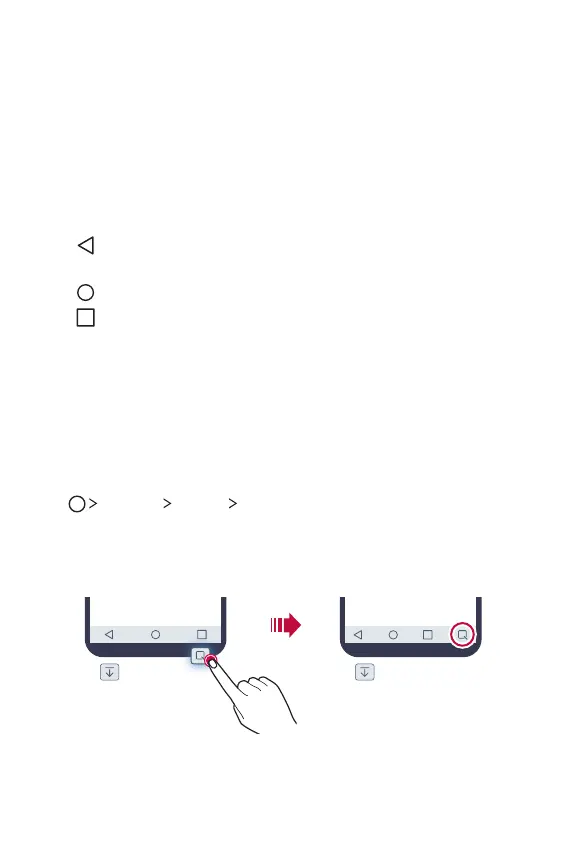
Ţ Home touch buttons
3FUVSOUPUIFQSFWJPVTTDSFFO$MPTFUIFLFZQBEPSQPQVQ
windows.
5BQUPHPUPUIF)PNFTDSFFO5PMBVODIGoogle, tap and hold.
: View a list of recently used apps or run an app from the list. Use
the Clear all option to delete all recently used apps. In some
apps, tapping and holding the button will access additional
options.
Editing Home touch buttons
:PVDBOSFBSSBOHF)PNFUPVDICVUUPOTPSBEEGSFRVFOUMZVTFEGVODUJPOT
UP)PNFUPVDICVUUPOT
Tap
Settings Display Home touch button combination and
customise settings.
Ţ 4FWFSBMGVODUJPOTJODMVEJOHNotification panel or Capture+, are
provided. A maximum of five items can be added.



 To Next Page