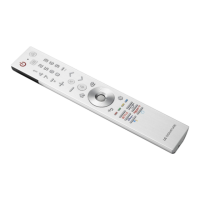
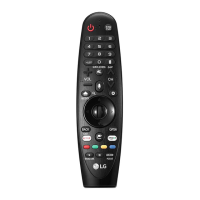
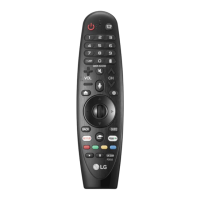
21
InputChangestheinputsource.
InputAccessesthe[HomeDashboard].
Wheel (OK)Pressthecenterof buttontoselectamenu.Youcanchangeprogrammes
byusing button.
Wheel (OK)Accessesthe[MagicExplorer].Youcanrunthe[MagicExplorer]featurewhen
thepointercolourischangedtopurple.Ifwatchingaprogramme,pressandholddownthe
pointerontothevideo.Whenusing[TVGuide],[Settings],[SportsAlert],or[ArtGallery],
pressandholddownonthetext.
Up/Down/Left/RightPresstheup,down,leftorrightbuttontoscrollthemenu.Ifyoupress
buttonswhilethepointerisinuse,thepointerwilldisappearfromthescreenandMagic
Remotewilloperatelikeageneralremotecontrol.Todisplaythepointeronthescreenagain,
shakeMagicRemotetotheleftandright.
Back Returnstothepreviouslevel.
BackClearson-screendisplaysandreturnstolastinputviewing.
Q. SettingsAccessestheQuickSettings.
Q. SettingsDisplaysthe[AllSettings]menu.
, ,
,
Theseaccessspecialfunctionsinsomemenus.
Red buttonRunstherecordfunction.
Streaming Service buttonsConnectstotheVideoStreamingService.
Note
• Tousethebutton,pressandholdformorethan1second.
• Theremotecontrolimageshownmaydifferfromtheactualproduct.
• Theorderofdescriptionmaydifferfromtheactualproduct.
• Somebuttonsandservicesmaynotbeprovideddependingonmodelsorregions.
Remote Description
PowerTurnstheTVonoro.
Number buttons Entersnumbers.
Accessesthe[QuickHelp].
Accessesthe[Guide]
Accessesthesavedprogrammeslist.
Accessesthe[EditQuickAccess].
-
[EditQuickAccess]isafeaturethatallowsyoutoentera
specifiedapporLiveTVdirectlybypressingandholdingthe
numberbuttons.
More actions Displaysmoreremotecontrolfunctions.
Audiodescriptionsfunctionwillbeenabled.
Volume buttonsAdjuststhevolumelevel.
MuteMutesallsounds.
MuteAccessesthe[Accessibility]menu.
Programme buttonsScrollsthroughthesavedprogrammes.
HomeAccessestheHomemenu.
HomeLaunchesthelastusedapps.
Voice recognition Networkconnectionisrequiredtousethe
voicerecognitionfunction.
Checkforrecommendedcontent.(Somerecommendedservices
maynotbeavailableinsomecountries.)
Voice recognition Speakwhilepressingandholdingthebutton
tousethevoicerecognitionfeature.


 To Next Page
 Loading...