Connecting 7
Connecting
2
Connection
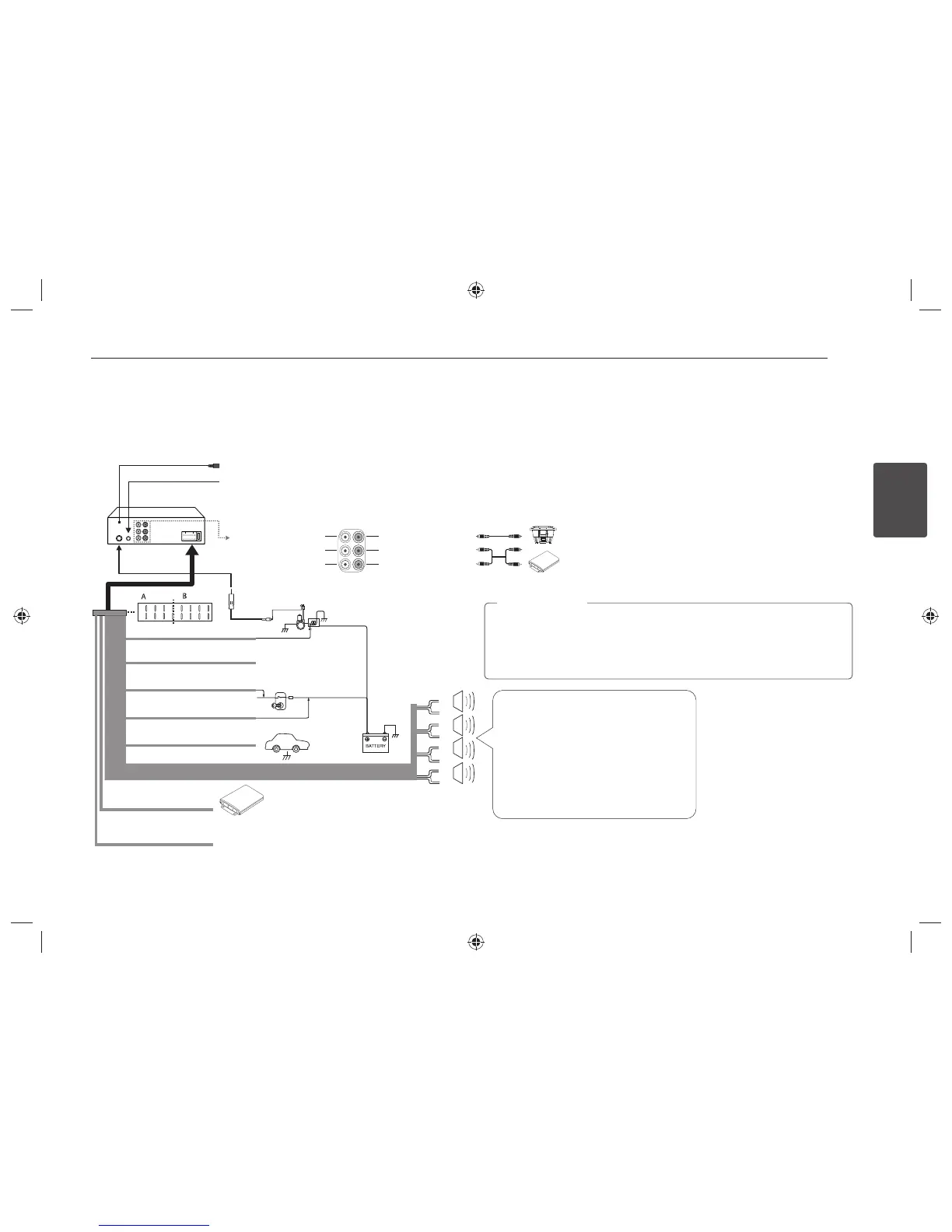
Connecting to a car
Before installing, make sure that the ignition-switch is set to OFF and remove the terminal of the car battery to avoid short-circuiting.
B
a
Not connected
abcd
efgh
abcd
efgh
a
b
c
d
e
f
g
h
A
A
A
A
A
A
A
A
A
a
Gray : Front Right +
A
b
Gray / Black Stripe: Front Right -
A
c
Violet : Rear Right +
A
d
Violet / Black Stripe: Rear Right -
A
e
White : Front Left +
A
f
White / Black Stripe: Front Left -
A
g
Green : Rear Left +
A
h
Green / Black Stripe: Rear Left -
Power
Antenna
Control Relay
To Audio out To Audio in
Ampli er
Sub-woofer Left Sub-woofer Right
Front Left Front Right
Rear Left Rear Right
Ampli er
B
f
Power Antenna (Blue)
B
g
Not connected
B
c
To Ignition (Red)
B
h
Ground (-) (Black)
B
d
To Battery (+) (Yellow)
B
e
Remote On
(Blue / White)
B
b
Not connected
Ignition Switch
Wired mic
Wired remote input (Black): Hard-wired control adapter can be connected. (Optional)
Sub-woofer
When being connected in a wrong way, the unit displays as follows.
- Antenna / Remote port short: "ANTENNA/ REMOTE ON PORT SHORT CIRCUIT
CHECK"
After connecting it again, restart the unit.
>
Caution


 To Next Page