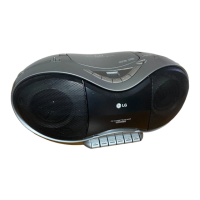
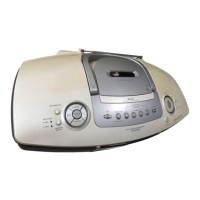
The LG MCD104 (MCD104 -A0U/ MCS104F) and MCD204 (MCD204 -A0U/ MCS204F) are compact audio systems designed to play various media formats, including CDs, USB devices, cassette tapes, and radio. The system features a sleek design with a central disc tray and a clear display window.
Function Description:
The core function of this device is to provide versatile audio playback. It supports:
- CD Playback: The unit can play both audio CDs and MP3/WMA CDs. Users can open and close the disc tray, select desired tracks, and control playback (play, pause, stop, skip, search). It also offers a resume play feature, allowing playback to continue from where it was stopped. The system supports creating custom playlists of up to 20 tracks from a CD.
- USB Device Playback: The system includes a USB connector, enabling playback of media files (MP3, WMA) from compatible USB flash drives and MP3 players. Users can select the USB function, browse files and folders, and control playback.
- Cassette Tape Playback: A cassette door allows for playing cassette tapes. Standard playback controls such as play, stop, fast forward, rewind, and pause are available.
- Radio Tuner: The device features an FM/AM tuner (AM is optional) for listening to radio stations. It supports both manual and automatic scanning for stations and allows users to save up to 50 preset stations. The FM tuner also includes Radio Data System (RDS) functionality, which displays information like program type (PTY), radio text (RT), time control (CT), and program service name (PS).
- External Device Connectivity: An AUX IN connector allows users to connect and play music from various external audio devices, such as TVs or other media players.
- Sound Enhancement: The system offers several sound adjustment features, including a sound quality adjustment (EQ), LG EQ with fixed sound impressions (e.g., DANGDUT, ARABIC, SALSA), XDSS (Extreme Dynamic Sound System) to reinforce treble, bass, and surround effects, and MP3 OPT to optimize compressible MP3 files for improved bass sound.
- Recording Functionality: The device can record audio to a USB device from various sources. Users can record individual tracks from a CD or an entire programmed playlist (Audio CD only). It also supports recording from radio, AUX, or tape sources. Recording bit rate (96/128/192/256 Kbps) and speed (X1 or X2) can be adjusted for USB recording. Additionally, the unit can record to cassette tapes from various sound sources.
- Clock and Timer Functions: A built-in clock can be set for either AM/PM or 24-hour display. The TIMER function allows users to schedule the unit to turn on or off at a desired time for CD, USB playback, or tuner reception, effectively functioning as an alarm clock.
- Sleep Function: The SLEEP function allows users to set a delay time (10 to 180 minutes) after which the unit will automatically turn off, useful for falling asleep to music.
- Dimmer Function: The display window and front panel LED can be dimmed using the SLEEP button.
Usage Features:
The device is designed for ease of use, with controls available on both the main unit and a remote control.
- Intuitive Controls: The main unit features clearly labeled buttons for disc tray operation, power, display, clock/timer settings, disc skip, open/close, preset/tuning, USB selection, stop, tuner, CD, AUX, tape functions, cassette door, recording, playback, fast forward/rewind, stop/eject, pause, XDSS/MP3 OPT, EQ, and volume.
- Remote Control: A comprehensive remote control provides access to all major functions, including power, EQ, disc skip, preset/folder navigation, mute, sleep, program/memo, info, record, repeat/random, tuning, and playback controls.
- Speaker Connection: Front speakers connect to dedicated terminals, ensuring proper audio output. Attention is drawn to matching speaker cord polarity (+ to + and - to -) to avoid distorted sound.
- Aerial Connection: The FM aerial should be stretched straight and horizontally for optimal reception. An optional AM loop aerial is also provided.
- USB Recording Options: When recording to USB, users can choose between one-track recording (from CD playback) or program list recording (from a programmed CD playlist). The recording process can be paused and resumed.
- Radio Information (RDS): For FM radio, the RDS feature provides additional information about the station being listened to, such as program type (PTY), radio text (RT), and program service name (PS). Users can search for stations by program type.
- Alarm Clock Functionality: The timer can be set to wake the user with a chosen function (tuner, CD, USB) at a specific time and volume.
- Power Cord Protection: The manual emphasizes protecting the power cord from physical damage and ensuring it is easily accessible for disconnection.
Maintenance Features:
The manual provides essential safety and maintenance guidelines to ensure the longevity and proper functioning of the device.
- Safety Precautions:
- Electrical Safety: Warnings against electric shock, fire hazards, and exposure to rain or moisture are prominent. Users are advised not to open the unit and to refer servicing to qualified personnel. The importance of using a dedicated power circuit and avoiding overloaded wall outlets, damaged cords, or improper cord placement is highlighted.
- Ventilation: Instructions to avoid blocking ventilation openings are given to prevent overheating. The unit should not be placed in confined spaces without proper ventilation.
- Water Exposure: The apparatus should not be exposed to dripping or splashing water, and no liquid-filled objects should be placed on it.
- Laser Safety: The product employs a laser system. Users are warned not to stare into the laser beam or attempt to open the enclosure to prevent hazardous radiation exposure.
- Speaker Duct: Caution is advised to prevent children from inserting objects into the speaker duct.
- Battery Handling: Instructions for safely removing and disposing of portable batteries are provided, emphasizing environmental protection and proper collection points. Batteries should not be exposed to excessive heat.
- USB Device Handling:
- Users are warned not to extract the USB device during operation to prevent data loss.
- For large-capacity USB devices, longer search times are expected.
- Backing up all data on the USB device is recommended.
- Using USB extension cables or hubs may lead to non-recognition.
- Only FAT(16/32) file systems are supported; NTFS is not.
- The unit does not support more than 1000 files, external HDDs, locked devices, or hard-type USB devices.
- The USB port is for device connection only and cannot be connected to a PC or used as a storage device for the computer.
- CD Maintenance: If a disc does not play, users are advised to ensure it is a playable disc and to clean dirty discs.
- Radio Reception: Tips for improving poor FM reception by switching to mono mode are included.
- Tape Recording: When recording to tape, users are reminded to ensure record protect tabs are not removed.
- Remote Control Maintenance: If the remote control is not working, users should check the distance from the unit, remove any obstacles, and replace exhausted batteries with new ones.
- Speaker Placement: To prevent TV screen discoloration, speakers should not be placed within 30cm of the TV.
- General Troubleshooting: A troubleshooting section helps users diagnose common issues such as no power, no sound, CD playback problems, radio tuning difficulties, and recording issues, providing simple solutions like checking power cords, selecting the correct function, cleaning discs, or securing antennas.



 To Next Page
 General