EasyManua.ls Logo

LG MS-7042MK - User Manual

LG MS-7042MK
35 pages
Print Icon
To Next Page IconTo Next Page
Loading...
MICROWAVE OVEN
SERVICE MANUAL
MODEL: MS-7042MK
CAUTION
BEFORE SERVICING THE UNIT, READ THE
SAFETY PRECAUTIONS IN THIS MANUAL.
website: http://www.lgservice.com
P/NO : 3828W5S2395
July, 2002
Printed in Korea

Questions and Answers

  • D
    Dr. Erik MataJul 31, 2025
    What to do if my LG MS-7042MK does not work?
    • E
      estevensonJul 31, 2025
      If your LG Microwave Oven isn't working, first ensure the plug is securely inserted. If that's not the issue, check that the AC input voltage is adequate. Also, consider that if the food temperature is too low, it may simply need a longer cooking time.
  • C
    Cindy YuAug 6, 2025
    Why is my LG MS-7042MK not heating properly?
    • J
      Justin RodriguezAug 6, 2025
      If your LG Microwave Oven seems to be operating but produces little heat, the output rating voltage may be lower than 90%. It is suggested that the customer contact their local electric power utility company or a qualified electrician. Also, a defective PCB assembly or magnetron may be the cause. In these cases, replace the PCB assembly or the magnetron.
  • W
    wweaverAug 12, 2025
    What to do if LG MS-7042MK Microwave Oven won't turn on?
    • J
      jessereeseAug 12, 2025
      If your LG Microwave Oven does not operate at all, the display window shows no figures, and no input is accepted, it could be due to a malfunction of the monitor switch, a defective thermostat, or a defective power supply cord. Replace the fuse and check the continuity of the monitor switch. Replace the thermostat or the power supply cord.
  • M
    Michael FowlerAug 18, 2025
    How to fix LG MS-7042MK display not counting down?
    • B
      bmooreAug 18, 2025
      If your LG Microwave Oven display doesn't count down when you touch the START pad, this could be due to a defective secondary switch, a defective PCB assembly, or a loose connection. Try replacing the secondary switch or PCB assembly. Ensure all connections are tight.
  • R
    Robert RobinsonAug 25, 2025
    Why does my LG MS-7042MK trip the breaker?
    • S
      Shannon JonesAug 25, 2025
      Avoid using other electrical appliances when you use the LG microwave oven.

Summary

Safety Precautions

Precautions for Servicing to Avoid Microwave Exposure

Detailed safety measures to prevent excessive microwave energy exposure during servicing.

Specifications

Cautions

Microwave Radiation Safety

Warnings and precautions regarding microwave radiation exposure during servicing.

Installations

Grounding Instructions

Instructions and warnings related to proper grounding for safe operation.

Operating Instructions

Features Overview

Description of the various parts and features of the microwave oven.

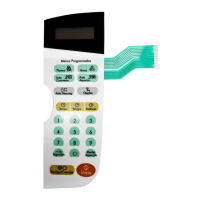
Control Panel Layout

Explanation of the buttons and indicators on the control panel.

Operating Sequence Guide

One Touch Cooking

Instructions for using pre-programmed one-touch cooking options.

Auto Defrost Cooking

How to use the automatic defrost function based on weight.

Time Cooking Procedure

How to cook food for a specific duration.

Setting the Clock

Step-by-step guide to setting the time of day on the microwave.

Schematic Diagram

Circuit Description

Service Information

Tools and Measuring Instruments

Lists necessary tools and measuring instruments for servicing the microwave.

Microwave Leakage Test Procedures

Procedures and precautions for performing microwave leakage tests.

Measuring Microwave Energy Leakage

Detailed steps for measuring microwave energy leakage using a survey meter.

Measurement with Outer Case Removed

Notes for Accurate Measurement

Important notes and precautions for accurate microwave leakage measurement.

Record Keeping and Notification

Guidelines for recording test results and notifying relevant parties.

Measurement with Fully Assembled Oven

Procedure for checking microwave leakage on a fully assembled oven.

Measurement of Microwave Power Output

Disassembly and Adjustment

Outer Case Removal

Instructions for removing the outer casing of the microwave oven.

Power Supply Cord Removal

Steps for disconnecting and removing the power supply cord.

Control Panel Assembly Removal

Procedure for removing and accessing the control panel assembly.

Door Gross Assembly Removal

Steps for removing the door assembly from the microwave oven.

High Voltage Transformer Removal

Steps to safely remove the high voltage transformer.

Fan Motor Assembly Removal

Instructions for removing the fan motor assembly.

High Voltage Capacitor and Diode Removal

Procedure for removing the high voltage capacitor and diode.

PCB Assembly Removal

Procedure for removing the Printed Circuit Board assembly.

Interlock System

Interlock System Overview

Overview of door lock mechanism, switch mounting, and adjustment procedures.

Interlock Continuity Test

Primary Interlock Switch Test

Procedure to test the continuity of the primary interlock switch.

Secondary Interlock Switch Test

Procedure to test the continuity of the secondary interlock switch.

Monitor Switch Test

Procedure to test the continuity of the monitor switch.

Component Test Procedure: Transformer & Magnetron

High Voltage Transformer Test

Test procedure and expected results for the high voltage transformer.

Magnetron Test

Test procedure and expected results for the magnetron.

Component Test Procedure: Capacitor & Diode

High Voltage Capacitor Test

Test procedure and expected results for the high voltage capacitor.

High Voltage Diode Test

Test procedure and expected results for the high voltage diode.

Component Test Procedure: Motors & Relay

Relay 2 Test

Test procedure and expected results for relay 2.

Fan Motor Test

Test procedure and expected results for the fan motor.

Turntable Motor Test

Test procedure and expected results for the turntable motor.

Troubleshooting: General Issues

Troubleshooting Cautions

Important cautions to observe before and during troubleshooting.

Common Operational Problems

Troubleshooting steps for common issues like no power, low power, sparks, and uneven cooking.

Troubleshooting: Control Circuit

No Input Can Be Programmed

Troubleshooting steps when no input can be programmed into the control circuit.

Some Inputs Cannot Be Programmed

Troubleshooting steps when some inputs cannot be programmed.

Display Shows Incorrect Number;Figure

Troubleshooting steps when the display shows incorrect numbers or figures.

Random Programming or Fixed Display

Troubleshooting steps for random programming or a fixed, unresponsive display.

Troubleshooting: Oven Inoperative

Fuse Blows

Troubleshooting steps when the fuse blows, preventing oven operation.

Fuse Intact but Oven Inoperative

Troubleshooting steps when the fuse is intact but the oven does not operate.

Troubleshooting: Cooking Start Delay

Setting Time Does Not Count Down

Troubleshooting steps when the timer does not count down after pressing start.

Fan Motor or Oven Lamp Failure

Troubleshooting steps when the fan motor or oven lamp fails to operate.

Troubleshooting: Low Heat Output

Output is Low

Troubleshooting steps for low heat output during oven operation.

Troubleshooting: No Microwave Oscillation

No Microwave Oscillation

Troubleshooting steps when there is no microwave oscillation despite other functions working.

Full Power at Lower Power Level

Troubleshooting steps for full power output at lower power level settings.

Exploded View

Introduction to Exploded Views

Introduction to the exploded view diagrams of the microwave oven parts.

Door Parts

Controller Parts

Oven Cavity Parts

Latch Board Parts

Interior Parts

Base Plate Parts

Schematic Diagram of P.C.B.

Printed Circuit Board Layout

LG MS-7042MK Specifications

General IconGeneral
Capacity20 liters
Microwave Power700 W
Control TypeMechanical
Cooking Levels5
Turntable Diameter245 mm
Weight10.5 kg
ColorWhite
TypeMicrowave

Related product manuals