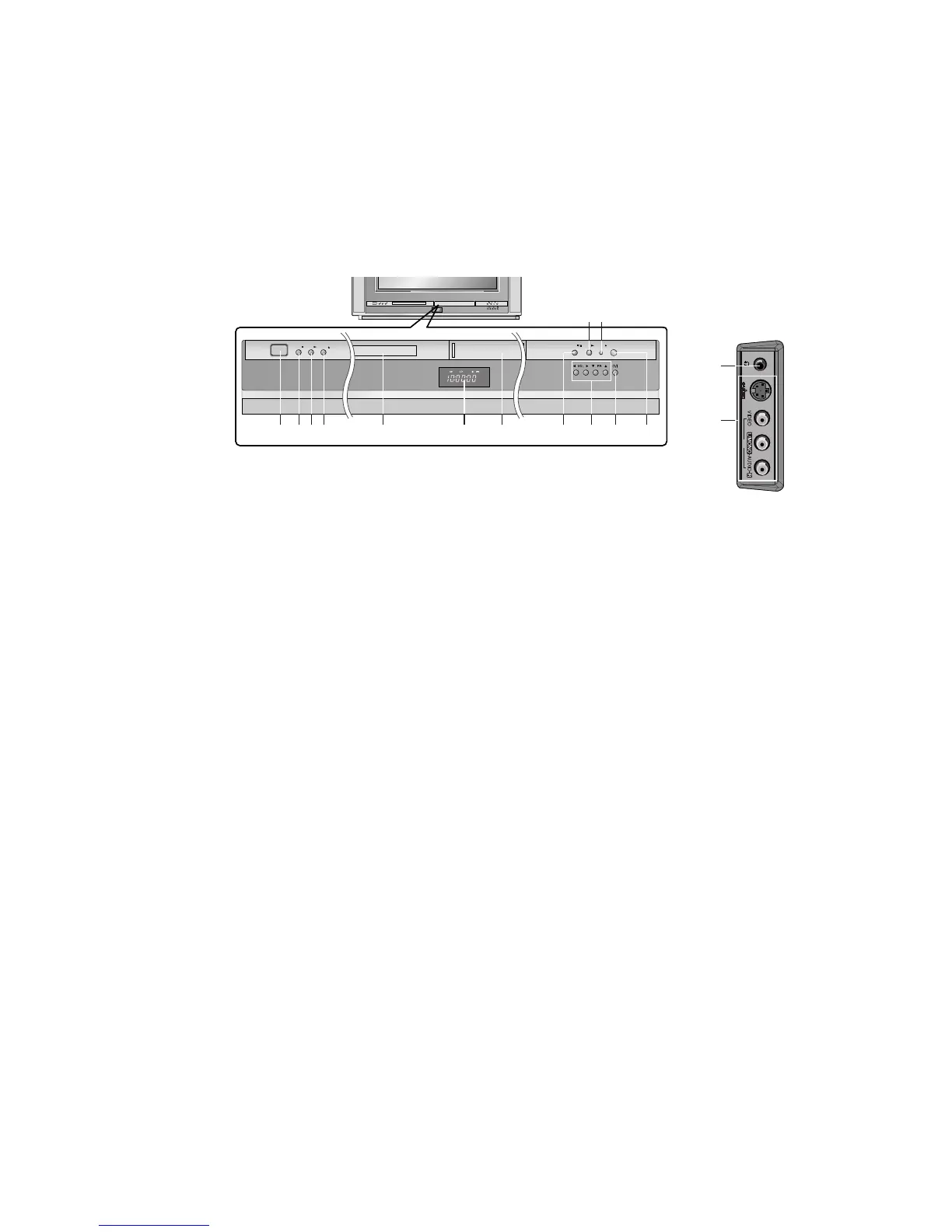
1. MAIN POWER (ON/OFF)
switches the set on or off.
2. STOP
Stops playback for DVD player.
3. PLAY
Starts playback for DVD player.
4. OPEN/CLOSE
Opens or closes the disc tray.
5. DISC TRAY
Places a disc on the disc tray.
6. LED (Light Emitting Diode) DISPLAY
7. CASSETTE COMPARTMENT
Inserts a video cassette tape here.
8. STOP/EJECT
stops the tape during playback or recording or
ejects the tape.
9.
DD
/
EE
(Programme Up/Down)
selects a programme or a menu item.
switches the set on from standby.
FF
/
GG
(Volume Down/Up)
adjusts the volume.
adjusts menu settings.
10. REC/ITR
starts a manual recording or instant timer
recording.
11. POWER (
rr
/ I)
switches the set on from standby or off to
standby.
12. COMMUNICATOR SENSOR
Note : Only use the supplied Communicator.
(When you use others, they’ll be not able to
function.)
13. HEADPHONE SOCKET (option)
Connect the headphone plug to this socket.
14. AUDIO/VIDEO IN SOCKETS (AV2)
Connect the audio/video out sockets of exter-
nal equipment to these sockets.
S-VIDEO/AUDIO IN SOCKETS (S-Video)
(option)
Connect the video out socket of an VCR to the
S-VIDEO socket.
Connect the audio out sockets of the VCR to
the audio sockets as in AV2.
15. STANDBY / REC/ITR / TIMER REC
INDICATOR


 To Next Page